• Hello MLAers! We've re-enabled auto-approval for accounts. If you are still waiting on account approval, please check this thread for more information.

Installing a Fan in a iBook G3 Clamshell

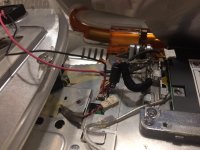
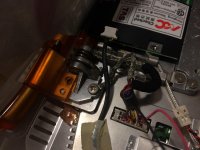
My iBook G4 Clamshell seemed to be running very hot and during OS installs it would freeze up. I looked online but couldn't find anyone who had actually installed a fan in a clamshell. The built-in heatsink seems to cool the G3 fine, but with a G4 its not cutting it. So I went online and bought a 25mm x 25mm x 5mm fan to stuff in place of the speaker. I then grabbed power off the motherboard and she seems to be working fine!
IMG_2192.JPG

IMG_2191.JPG

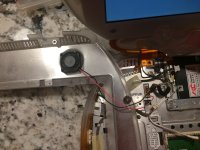
IMG_2193.JPG

 
Another thought: could you remove the modem card and install a slimline fan in it's place?  A thicker replacement heatsink might also do.

 
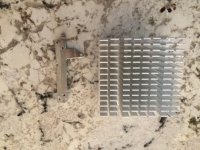
The heatsink on the right is for a 533MHZ G4 Digital Audio (same chip that's in my clamshell) and the one on the left is the factory heatsink. The factory heatsink doesn't even use thermal paste, its just one of those pads. I used one of those laser temperature measures and it shows the factory heatsink can get up to 120F. 
 
Even though you loose the onboard speaker while installing a fan, the clamshell has a 3.5mm headphone jack, so audio isn't completely lost. Even if you don't have a CPU upgrade in your clamshell, I think this is worthwhile to extend the longevity of your clamshell.
IMG_2209.JPG

 
Turns out you can't mount a fan in the speaker location. The fan will hit and intervene with the display connector. I mounted it right beside the CPU (where the modem goes) and that seems to help. Still a fan that is at max 4mm tall. 

 
Back
Top