• Hello MLAers! We've re-enabled auto-approval for accounts. If you are still waiting on account approval, please check this thread for more information.

Inexpensive multiple LCD setup, wall mount TV . . .

Trash80toHP_Mini

NIGHT STALKER
68040
.  .  .  or a Rack Mount 42"HDTV!
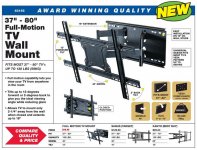
RackMountHDTV.JPG

Just finished setting it up on the TelCo Rack and I love it. It'll be coming down for fitting it to uprights on the back of my desk to hold the two LCDs and the new HP 14" 1080p Laptop.That'll free up almost my entire desktop! It'll be depth and angle adjustable. Side to side adjustment's dependent on how far it's pulled from the back of my desk. It faces a window, otherwise this'd be mounted on the wall right quick. [:)] ]'>

With the coupon code it's only $39.99 until 8/11.

 
Let us know how putting more than one desktop-sized LCD on a single wall mounting kit designed for a single large televisions goes.

Or: is only the TV going to be mounted? Is there a provision to use those mounts somewhere on this kit? It seems like this kit is designed for televisions with mounting hardware that's further away.

There are wall and desk and post-based mounting kits designed explicitly for LCD displays, especially any that have 100mm by 100mm mounting areas on them, which are exceedingly common. All or almost all Dell UltraSharps have this, for example.

 
That's a great buy for two identical displays for the average setup, but it's way too light duty for what I want to do. There's also no provision for height differential for aligning different size displays. The smaller of mine will be in portrait orientation on the left. On the right I'm building a "stand" that puts the 1080p display of my new laptop in line with the main 20" 1600x1200 working display. The "KBD" will be angled down to the max so I can more readily navigate windows on the laptop without KVM switching away from the Mac screens.

That's where the 130 lb. max, rated construction comes into play. The killer feature is the full articulation. I'll be able to easily extend and angle the unit to view the two KVM'd LCDs from a second workstation. My desk is shallow, but I built a huge plexi drawer for Split KBD/Mouse/Numeric Pad, which makes the total depth a bit more than average and ergonomically correct.

Luckily my TV only required the vertical brackets, so I can build the assembly on the horizontal members before I buy another one. The verticals are too tall, but might make a nice extension on the right if bolted up horizontally and angled out for the laptop stand. A wooden mockup will follow testing articulation in the target space with cardboard or foam parts. Prototyping the basic mounting hardware in wood on the horizontals follows that. I've got a couple of LCD bases in the parts bin as angling/rotating mount donors for the final version.

Getting two LCD bases and the 14" Notebook up off the desk surfaces will be a real treat. Way more real estate to pile  all kinds of stuff up!

BTW, the base's outside slots bolted up to the TelCo rack like it was designed to be centered in a 6U space. I picked up another load of $1 DVDs on the way back from HF. Watched Pale Rider with the 42" screen 18" closer to the foot of the bed. It made for a perceptible increase in effective screen size. [:D] ]'>

 
Last edited by a moderator:
I was really confused there for a minute; for a moment it sounded like you were trying to hang X many monitors on that thing *along with* a 45" TV.

My 65" TV at home is mounted on a very similar stand and, honestly, I just can't see it as the ideal basis for something to hang computer monitors on. Once you've bolted it down it's not height adjustable and the range of tilt is *very* limited (And, worse, almost all the available motion is in the tilted-forward direction. This makes sense for a TV mounted high on the wall like in a sports bar, etc, but most people prefer having their monitors at roughly eye level or slightly *below*, which makes the ability to tilt backwards more important.) Obviously you've decided that you're not mounting your monitors straight to it (which you can't anyway, since it was only designed to accommodate one and there's about a 50-50 chance that even the larger of the monitors you've mentioned uses a VESA pattern smaller than 100x100), so maybe you'll compensate for some these issues, but, well, by the time you've spent all the time crafting on that you probably will have "invested" more than you would have on just buying proper desk mounts. Obviously you didn't like that $30 one because it was insufficiently adjustable; here's one for $70 that gives you two completely independent tilt-and-swivel arms:

https://www.amazon.com/dp/B00ST052XS?psc=1

And, not to be left out, there are laptop arms too:

https://www.amazon.com/Mount-Adjustable-Articulating-Computers-MI-3352LT/dp/B00FUOILAC/

I mean, sure, I guess if you really need a whole set arrangement of "stuff" to pull out from the wall and swivel around (within the limited range of motion that stand offers) in order to, I dunno, follow you between two slightly different seating positions there might be some case to be made for crafting something custom like that, but... I dunno, lacking that I think you can probably do better.

 
Even if my desk wasn't totally hostile to those clamp on mounts, I'd still have to buy a much more expensive combination of "stuff" to get the three devices mounted. I was just in the process of linking to this one!

https://www.amazon.com/Mount-MI-4352LTMN-Adjustable-Notebooks-Compatible/dp/B01HSJSAQ6/ref=pd_sim_147_6/139-1761693-7055010?_encoding=UTF8&pd_rd_i=B01HSJSAQ6&pd_rd_r=MBAJ4A2DK4RBD31EFV4J&pd_rd_w=ibH1k&pd_rd_wg=JevDN&psc=1&refRID=MBAJ4A2DK4RBD31EFV4J

The space I have available between a tall bookshelf and some display/media shelves I won't do without precludes twin stands anyway.

It'll be an interesting hack. [;)] ]'>

edit: I've been looking at options for different custom "home built" systems for quite some time. Four bolt holes on the backside of my nice teak desk seems the least destructive and most sturdy option by far. Slotted angle doesn't move the desk much farther from the window and offers many options in terms of cable management that's a real PITA  the way things sit now.

 
Last edited by a moderator:
It took me literally one hour to fab the mockup from a scrap of 3/4" rigid foam insulation and long drywall screws to prove the validity of my guesstimations. It's perfect!

All that's left to do is set up the framework for mounting the two displays and laptop stand with cardboard standins for the next round of feasibility testing.

G, your mention of the limited backward angle adjustment will be easily addressed. Canting the VESA (horizontal angle adjustable) mounting plate hardware I'm scavenging back by a few degrees will take care of that. Having the left side LCD on a Pivot mount frame that's left to right adjustable (nominally vertical) is icing on the cake.

Realized I can use a horizontal member on the slotted angle to stabilize the gravity mounted media/display shelves to the desk too. [:)] ]'>

 
Last edited by a moderator:
KISS compliance achieved! [:D] ]'>

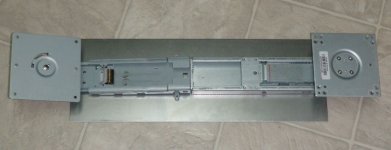
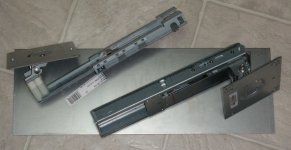
I tore the two LCD base units down last night and took a good look at the hardware while working on my coffee. It turns out I can just lose both vertical and horizontal frames for TV mounting. All I really heed to fab is a simple mounting plate to bolt up to the  central plate interface. It's easily removable and is the leveling adjustment mechanism for big screens.

After the arm unit's wall mounted and the TV/bracket assembly is complete, the TV is hefted onto the notched base plate, hanging on the top of the three mounting bolts. Then the other two nuts are put in place, the screen is leveled and all three are torqued down in the final step.

Now to locate one of my 1/8" mild steel workbench wheel mounting plates. :ph34r:

 
Keeping it a little more simple. Decided to use the 22" 1080p HP panel as my aux/menu screen for AI on the QS. It's the same 14" height as the 20" 1600x1200 Dell. Should be interesting if I need to pivot it into portrait mode! The 19" Dell multisync will be a lot more useful for playing with the toys on the AppleDisplayUnit in the living room. Don't need a bluRay display out there, I moved the player into the bedroom when I got the 42" panel.

Lappy will have its own stand now as switching to the 22" wide screen panel would make a three unit assembly a bit unwieldly for the space.

Bought a $10 piece of 18ga.steel to put the hack on a more level playing field. Not everyone has sheet steel plate laying around and 1/8" black iron is a bit overkill, even for me. ::)   The few bucks worth of metric bolts and spacers will come in handy in the future.

FlexMount-0.JPG

I'll probably mount the right side arm (non-pivot) so it's off the end of the plate and bolt the angle/pivot head directly to the plate on the right. I don't need the width (height) adjustment on both sides for whenever I might buy a larger main display. The scavenged posts aren't designed for torsion/support, but the post on the right is a BEAST!

Spacing is spot on at 1/4" between panels with the posts abutted, but using a set screw to hold the main screen somewhere in its travel seems a good idea. Losing the post on the left seems a better idea yet.

FlexMount-1.JPG

I'll just unbolt the pivot head to mount directly to brackets or a block mounted to the plate. Dunno, the long bolts and spacers were great for eyeballing panel to panel angle adjustment possibilities, but I'm not crazy about the notion of them as a solution.

This is fun, needed a break from plexi work for a bit.

 
I LOVE this setup! [:D] ]'>

Progress report:

I returned the plate above and went back basics. Removed the VESA plate from the lower unit above and bolted it up directly to the horizontal members that came with the TV Mount. Slotted angle is bolted up to the desk and I just finished my first round of readjustments.

I've been mulling over options for mounting the second LCD (snagged a refurb twin of my 20" 1600 x 1200 UltraSharp) and have begun thinking about adapting a more conventional unit for mounting the second monitor to the wall mount.
51xn74PbqOL._SL1100_.jpg.c47bb1684c793369d8eadc92ed76c1c7.jpg


https://www.amazon.com/FLEXIMOUNTS-Motion-Computer-Monitor-D1DL/dp/B01648IYEK/ref=pd_sbs_229_2?_encoding=UTF8&psc=1&refRID=NFYJDW02Y7XAGZKHJS9Y

A pair of them nay work out well enough that I won't bother getting a second wall mount to reinstall my TV on the A/V rack. This is the first unit I've seen that's a possibility for mounting to the back of my desk. If that doesn't work for the main screen due to interference with the display shelves,It may also mount easily enough in an inverted configuration to the TV mount. The pipe or tubing cutter will make short work of the trimming procedure.

The only problem is that it's not a pivoting mount. :-/ But an adapter plate for  mounting the pivot mount above to it  will be very easy to fabricate. Especially now that I FINALLY have a drill press again! [:D] ]'>

Dunno, we'll see!

 
Back
Top