• Hello MLAers! We've re-enabled auto-approval for accounts. If you are still waiting on account approval, please check this thread for more information.

iMac G3 (Rev A -> C) G4 CPU Upgrade

@CC_333 thats very kind of you to offer them but i only have 3 G4s chips left ATM and id like to try those first on other machines. i mean if you wanna cover postage feel free to send them but I dont know when id get round to doing a CPU swap on em so maybe keep them for now i know user bunnspecial may be interested in one tho.

@Max1zzz thats very awesome! now install OS X/leopard :) (interesting that L2 cache is not detected the iBook is a uninorth machine after all maybe its just too old to detect the G4 properly like gossamer machines. btw is the firmware fully updated?) btw when installing sonnets cache enabler some times it likes to display G4s as having 2MB of L2 when they dont but the L2 cache does get enabled

also i noticed on the G4 Pismo the POST message does say Cache failure so thats that i guess :p

and heres a picture of it running leopard 

IMG_0251.jpg.6473a01979cfa2ee666a4bfe7fd3277f.jpg


IMG_0252.jpg.c716733e6d978342b325f28d38f96f7d.jpg


any more word on the iBook G3 clamshell? any OS X shots? :) im quite interested in how that turns out :) (if cache does not show up natively run GeekBench get a score then install sonnets cache enabler then re run GeekBench if the score is higher then the last by an appreciable amount then cache is most likely now working) btw i have since gotten the pismo updated to 10.5.8 

IMG_0254.jpg.586fbced6f5b4f58bf7b1c0191a4aab5.jpg


Last edited by a moderator:
Pretty much :) I installed the Rage 128 Kexts from Tiger they help some but not all of its bundles are compatible with leo so i dont get any OpenGL acceleration for example. apart from doing Fancy GUI animations it runs well (especially as i have it booting from a Good 16GB CF card where the HDD normally goes) of course tiger is better suited but where is the fun in that :) (also Leopard looks nice on a Pismo heh) id love to see leopard on an iBook G3 or iMac G3 heh (or any other G3 with a G4 upgrade I have run leopard on my G3 Blue and White as well as my G3 beige)

 
Not had any more time to play around with it unfortunately, Will defiantly have a go at running leopard on it though :)

 
sounds like a plan! if its still in bits/you made the hard drive easily accessible id recommend pulling the drive and installing Leopard on it using another Mac and putting the drive back. (the First gen clamshells basically have No fast user IO apart from maybe the 10/100 ethernet) the clamshell being a Uninorth mac should boot Leopard natively with a G4. But dont install any Rage Pro kexts (as at least with the G3 Beige they do not play nice). Leopard does not have them by default but its a common thing for people with Rage 128 cards to install them like my pismo) otherwise yeah leopard SHOULD boot up with the G4 (famous last words... if it does please post plenty of about this mac and system profiler shots :)

btw here is a geekbench score of my Pismo G4 in leopard :)  https://browser.geekbench.com/geekbench2/2618740

 
btw just a quick comment. a friend had a iBook clamshell arrive from the same source you got yours max and i noticed the firmware was not fully updated. (his came running firmware 2.4 something, the latest is 4.1.7) so i recommend installing that firmware update and see if it enables the L2 cache with the G4 in place. you can find it here http://www.pure-mac.com/appud.html#ibookfwud

 
It could also be worth trying the drivers for commercial G4 CPU upgrades from back in the day - it's my impression that they tend to work across different models & brands of upgrades, and their main function is to activate the cache on startup (other functions like software control of multipliers etc probably won't work), so they may well work for this DIY upgrade as well.

But yes, getting firmware up to date would be the first step.

 
Last edited by a moderator:
I already mentioned trying sonnets cache enabler on the iBook G3 but yeah defo get the firmware updated (sonnets cache enabler works best from my testing) dont use the one in xpostfacto it hangs the system in anything past like 10.2 LOL

 
Last edited by a moderator:
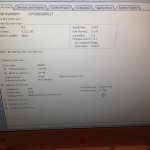
Huh, this is odd. Se the jumpers on the iBook to 500mhz. It boots, But only sees the CPU speed as 67mhz.....

Whats the best thing to benchmark this to find out what it's actually running at? The iBook booted too darn quick for it to be running at 67mhz....

IMG_0184.JPG

 
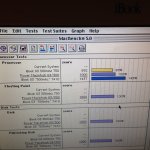
Well, I "think" it is running at 500mhz... The G4 board gets a benchmark of 1437 with MacBench 5.0, a stock 300mhz G3 board gets 892. Either way a 1.61x performance boost is not bad :)

IMG_0185.JPG

 
well its defo not running at 66.8Mhz thats for sure :) I suspect OpenFirmware does not know how to compute the 7.5x multiplier you set it too (some G4 upgrade cards for the G4 towers warn of this and some had OF patches so OF detected/displayed the right frequency to the OS). Btw did you update the firmware to the latest version? I know for example a FW400 G4 MDD wont detect a a 1.42Ghz  CPU card properly until its firmware is fully updated (it gets detected as a dual 417Mhz G4 LOL). and finally is this running with the stock L2 cache chips or did you swap em out?

 
I have been trying to do the firmware update but it keeps failing. I had the same problem with a iMac G3 once, took me about 20 attempts to get it to do the upgrade....

I haven't tackled the L2 Cache yet either, I need to order some faster L2 cache chips for the iMac G3 at some point, I could try installing them on the iBook as well if we get nowhere with the cache

 
so it is currently running without any physical cache chips then or?

also interesting on the firmware update, i have not had many issues with updating firmware/boot roms (I have had to update a lot of my own machines and I did not have many/if any issues at all although i dont own a clam shell i did help someone update their clamshell firmware, they couldn't get it to update turned out they where holding down the wrong key at reboot but after they got the right key it updated right away. also the Firmware update is a fairly simple OF program you could execute it right from the OF prompt thats how it was done when downgrading the firmware on FW800 MDDs was the only way to run OS 9 :)

also wondering if you Fire up sonnet metronome or some other CPU Profiling app like newertech's gauge pro app http://macintoshgarden.org/apps/gauge-pro what they report the CPU running at heh.

 
Last edited by a moderator:
The cache chips are still there, just they aren't working for whatever reason.

I have found firmware updates to be somewhat finikey in the past, I have had no problems on my G4 towers, but my iMac G3 did something quite similar to what the ibook is doing

 
interesting heh. if the cache is still there on the board what if you install OS X on the machine and install sonnets cache enabler does it enable the cache or does the machine lock up because the cache gets enabled but is running too fast? also still waiting to see it running leopard :p . also what is the Firmware update doing exactly? (ie how is it failing)

 
A 500MHz clamshell will run like trash on leopard. Great proof of concept but not practical. That being said- Im stilling gonna run 10.5 on my clamshell lol.

I am eager to try and get a 1GHZ clamshell and make the 'worlds fastest clamshell'. Ill upload one quick GeekBench test (for bragging rights :) ) and then probably tone it back down to 600MHZ. Most G4's can handle +100-150MHZ fairly steadily.

 
theres No way you can get a clamshell clocked to 1Ghz theres no compatible CPU with them that clocks that high. the best you could do is rob a 533Mhz 7410 off a Apple CPU and clock that to like maybe 650Mhz or something plus remember clamshells are fanless computers so you will be limited by thermals as well. shame they dont have removable CPU cards like pismos :p

 
The CPU mx1zzz is using is natively clocked at 500MHZ. Pushing it to 600 shouldn't cause many issues. Albeit 1,000MHz is quite ambitious , something like 733-800 isn't quite out of the picture, a 5.5~ multiplier with some thermal grease on the (non existent :) ) heatsink should run sorta reliable.

 
Shoot! Its a 66MHZ bus. I totally forgot about that(thought it was a 133MHZ bus). A 733MHZ would be a 11x multiplier. at max it could run at 594. so yeah your right realistically it could do 533. 

 
Last edited by a moderator:
Back
Top