
You are using an out of date browser. It may not display this or other websites correctly.
You should upgrade or use an alternative browser.
You should upgrade or use an alternative browser.
iMac G3 333 Battery 920-0980-A
- Thread starter Alex
- Start date

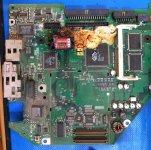

Maxell should have stuck to making tapes and disks. Why they blow up more then any other brand I am not sure, but they seem to.
Last edited by a moderator:


Amen to that. Every time I've seen the little red battery in a Mac the first thing that comes to mind is "tick tick tick".
Back to the board though, is the G3 daughter card okay? If it is, you can pick this guy up for ~$30:
http://www.ebay.com/itm/202016078470
EDIT: There's an auction that's even cheaper. Can't beat $12.95 with free shipping.
http://www.ebay.com/itm/201634539692
Back to the board though, is the G3 daughter card okay? If it is, you can pick this guy up for ~$30:
http://www.ebay.com/itm/202016078470
EDIT: There's an auction that's even cheaper. Can't beat $12.95 with free shipping.
http://www.ebay.com/itm/201634539692
Last edited by a moderator:

Wow, thanks for the reply!
The daughter card is untouched, luckily.
They advertise a 233 MHz board but that doesn't matter it's the model number on the MLB that counts right?
I will go for one of those right now if the answer to the above it 'correct' but hopefully they ship to Poland, EU.
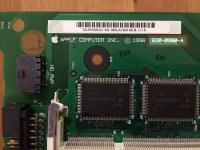
The daughter card is untouched, luckily.
They advertise a 233 MHz board but that doesn't matter it's the model number on the MLB that counts right?
I will go for one of those right now if the answer to the above it 'correct' but hopefully they ship to Poland, EU.
Correct, as long as the part number on the motherboard matches you'd be all set.
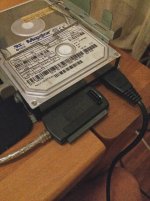
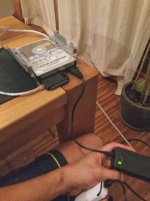
Guys, I have another question related to this machine. I pulled out the HD as my friend asked me to recover her photos. I plugged it in but there is no activity from the drive. No spin occurs it's like it's dead.
Maybe it is dead but just in case, I am here to ask if there is something I might have forgotten. So drive is connected to power and to USB and to the computer.
I tested the cables and the USB ports on the computer and they both test well. No hub is involved.
Could it be a jumper setting on the drive?
Kind regards
—Alex
Maybe it is dead but just in case, I am here to ask if there is something I might have forgotten. So drive is connected to power and to USB and to the computer.
I tested the cables and the USB ports on the computer and they both test well. No hub is involved.
Could it be a jumper setting on the drive?
Kind regards
—Alex
If you unplug the IDE adapter and only have the power cord plugged in the drive should spin up. That being said, I had an adapter that looked exactly like the one you're using and the power brick stopped working. Even though the green light was on it wasn't actually dumping out any power (turned out to be a break in the cable coming out of the brick going to the Molex connector).


EvilCapitalist's suggestion is a good one. If the drive powers up without anthing on its IDE connector, it's probably a jumper setting. If it doesn't, your power brick may be failing. I've had some of those fail before. One would spin up some drives, but not others due to differences in current required for spinup.
I explicitly remember having a problem with iMac Maxtor drives and IDE/USB interfaces. I think the drive needs to be configured as Master in the iMac, but I had to change it to Slave (or maybe Cable Select) for it to cooperate with the adapter. Here's the jumper settings for your drive:
http://www.seagate.com/staticfiles/maxtor/en_us/documentation/quick_specs/diamondmax_30_vl_ultra_ata_100_quick_specs.pdf
I explicitly remember having a problem with iMac Maxtor drives and IDE/USB interfaces. I think the drive needs to be configured as Master in the iMac, but I had to change it to Slave (or maybe Cable Select) for it to cooperate with the adapter. Here's the jumper settings for your drive:
http://www.seagate.com/staticfiles/maxtor/en_us/documentation/quick_specs/diamondmax_30_vl_ultra_ata_100_quick_specs.pdf
Guys, thanks for the tips on the power brick. This might explain why my LG Bluray appears to be dead. I will purchase a new brick. Actually looking at the brick now, the little LED is flashing.
IMPORTANT
Guys I found a 400MHZ G3 logic board for about 12USD. Can I insert this logic board in the iMac G3 that I own? here is the link for the sale. http://allegro.pl/plyta-glowna-apple-imac-g3-400mhz-100-sprawna-i6975915447.html
I truly appreciate your help!!
This is the translation to English (using Google translate)
parameters
Invoice: I do not issue invoices Manufacturer: Remainder components: Processorstandard discs: Othertypes of supported memory: SDRAMmaximum amount of RAM (GB): 1maps of RAM: 2 Supports multiple graphics cards: no support for attaching disks: does not support connectors: fireWire
rear panel connectors: RJ-45, uSB 2.0 type A, audio output, audio input
Description
Motherboard with Apple iMac G3 Indigo, 400MHz processor. A slim plate, pulled out of the iMac G3 which was turned at the time (I'm selling it now). If anyone is interested I can put on another auction drive to the iMac G3 and the original drive.
IMPORTANT
Guys I found a 400MHZ G3 logic board for about 12USD. Can I insert this logic board in the iMac G3 that I own? here is the link for the sale. http://allegro.pl/plyta-glowna-apple-imac-g3-400mhz-100-sprawna-i6975915447.html
I truly appreciate your help!!
This is the translation to English (using Google translate)
parameters
Invoice: I do not issue invoices Manufacturer: Remainder components: Processorstandard discs: Othertypes of supported memory: SDRAMmaximum amount of RAM (GB): 1maps of RAM: 2 Supports multiple graphics cards: no support for attaching disks: does not support connectors: fireWire
rear panel connectors: RJ-45, uSB 2.0 type A, audio output, audio input
Description
Motherboard with Apple iMac G3 Indigo, 400MHz processor. A slim plate, pulled out of the iMac G3 which was turned at the time (I'm selling it now). If anyone is interested I can put on another auction drive to the iMac G3 and the original drive.
Never mind
It looks like the logic board can' be upgraded. https://groups.google.com/forum/#!searchin/imaclist/imac$20g3$20333$20logic$20board$20upgrade%7Csort:relevance/imaclist/BGz2021L2mE/u6WOWjJFB5wJ
Scratch everything below.
With respect to swapping out the original mobo to a G3 400MHz
I found this, https://everymac.com/systems/apple/imac/faq/imac-g3-processor-daughtercard-how-to-upgrade-processor.html
Towards the end this is mentioned. I marked in red specific text, does this mean I might be able to put in a new logic board?
…
Given the other limitations of the tray-loading iMac G3 models, it does not make financial sense to invest much in a upgrade card. However, if you locate an extremely cheap iMac G3 upgrade card and you like to tinker with old Macs, you probably would enjoy the experience.
Alternately, a motherboard swap for the slot-loading models makes even less financial sense, but if you don't mind the risk of killing a slot-loading iMac G3 entirely, and you have a lot of hardware experience, overclocking it is an option.
It looks like the logic board can' be upgraded. https://groups.google.com/forum/#!searchin/imaclist/imac$20g3$20333$20logic$20board$20upgrade%7Csort:relevance/imaclist/BGz2021L2mE/u6WOWjJFB5wJ
Scratch everything below.
With respect to swapping out the original mobo to a G3 400MHz
I found this, https://everymac.com/systems/apple/imac/faq/imac-g3-processor-daughtercard-how-to-upgrade-processor.html
Towards the end this is mentioned. I marked in red specific text, does this mean I might be able to put in a new logic board?
…
Given the other limitations of the tray-loading iMac G3 models, it does not make financial sense to invest much in a upgrade card. However, if you locate an extremely cheap iMac G3 upgrade card and you like to tinker with old Macs, you probably would enjoy the experience.
Alternately, a motherboard swap for the slot-loading models makes even less financial sense, but if you don't mind the risk of killing a slot-loading iMac G3 entirely, and you have a lot of hardware experience, overclocking it is an option.
Last edited by a moderator:
The tray loading (233-333MHz) and slot loading (350-700MHz) iMac G3 logic boards are a completely different shape and size, with different electrical and cooling requirements, different monitor connections, so swapping from one family to the other isn't very practical. Some slot loading logic boards can be swapped into other slot loading iMac G3s, but there are some differences on later boards that may complicate things. I'm not as familiar with tray loading iMac G3s, but I believe the logic boards have interchangeability between revisions.
Excellent thank you rsolberg!
By the way, I should let you and EvilCapitalist know that the little powerbrick I was using to power the IDE drive, well, the light started flickering and is now completely dead. Nonetheless I tried it on other IDE devices and no go. On a related note, you guys REALLY helped me out because like I said, I have an 8 month old LG Blu-ray burner and I had thought it was dying but now it looks like the adapter may have been intermittent. So I will buy a new adapter.
Thank you both VERY much. I sincerely appreciate the time you both took to provide very useful responses.
Kind regards
—Alex
By the way, I should let you and EvilCapitalist know that the little powerbrick I was using to power the IDE drive, well, the light started flickering and is now completely dead. Nonetheless I tried it on other IDE devices and no go. On a related note, you guys REALLY helped me out because like I said, I have an 8 month old LG Blu-ray burner and I had thought it was dying but now it looks like the adapter may have been intermittent. So I will buy a new adapter.
Thank you both VERY much. I sincerely appreciate the time you both took to provide very useful responses.
Kind regards
—Alex
Years back, we did a fair bit of motherboard swapping between tray loading iMacs. Usually we'd swap the whole tray containing motherboard, HD and optical drive between machines. Never saw one where we could't make the swap.
It was easier to swap the whole tray instead of moving just the hard drive. Did a lot of processor card upgrading. The 333mhz processor card will work in any tray loading iMac.
I kept one tray loading iMac. When I can find time I'm going to try soldering on a G4.
It was easier to swap the whole tray instead of moving just the hard drive. Did a lot of processor card upgrading. The 333mhz processor card will work in any tray loading iMac.
I kept one tray loading iMac. When I can find time I'm going to try soldering on a G4.
Hey guys, so I bought a logic board. Feels like I spent a $100 of my lowly Polish currency.
I am going through a restore of the machine and wanted to share some info with you.
So there were some small scratches and paint on the blue shell. I first tried a regular white erase and got some of it off. The remaining paint that somehow got on the surface was really stubborn but there were small paint drops that dried. What I did was put a drop or two of isopropyl alcohol followed by using the eraser on the alcohol and it most cases it almost dissolved before my very eyes.
The rubbing action left some sort of sticky substance so I washed the case in warm water and dish detergent but the areas I rubbed remained and left a sort of smoky look to the areas.
What I did to replenish those areas was use a small amount of "PLASTX" by Meguiar's and gently rubbed over those areas, in fact I did the entire outercase but only lightly to bring out some shine.
The results are spectacular.
The front bezel was cleaned up of all those minor scratches using PLASTX and the hand tool with the added wool attachment (not sure what you call it). NOTE: I did the blue housing by hand with a lint free cloth because I didn't want to potentially over do it, I just wanted to get rid of the cloudy look to my eraser and isopropyl alcohol (dried paint removal from housing)
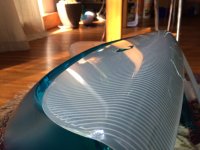
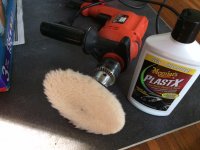
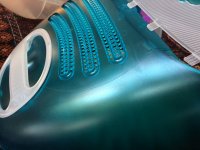
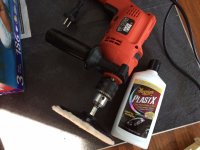
I am going through a restore of the machine and wanted to share some info with you.
So there were some small scratches and paint on the blue shell. I first tried a regular white erase and got some of it off. The remaining paint that somehow got on the surface was really stubborn but there were small paint drops that dried. What I did was put a drop or two of isopropyl alcohol followed by using the eraser on the alcohol and it most cases it almost dissolved before my very eyes.
The rubbing action left some sort of sticky substance so I washed the case in warm water and dish detergent but the areas I rubbed remained and left a sort of smoky look to the areas.
What I did to replenish those areas was use a small amount of "PLASTX" by Meguiar's and gently rubbed over those areas, in fact I did the entire outercase but only lightly to bring out some shine.
The results are spectacular.
The front bezel was cleaned up of all those minor scratches using PLASTX and the hand tool with the added wool attachment (not sure what you call it). NOTE: I did the blue housing by hand with a lint free cloth because I didn't want to potentially over do it, I just wanted to get rid of the cloudy look to my eraser and isopropyl alcohol (dried paint removal from housing)
Last edited by a moderator:
A few more pics.
As you can see this iMac is going through a restoration process. The CRT Bezel Frame is going to be sanded followed by a fresh application of spray paint to makeup for the corrosion caused by the battery blowing-up.
This thing was as dusty as can be, in fact the red cables from the anode were not red but black with dust. The most complex part of the job will be routing cables back in. I have to carefully document this chapter of the job.
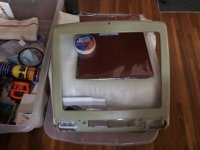
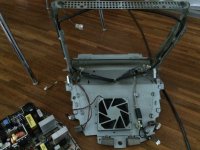
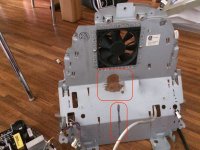
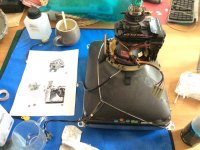
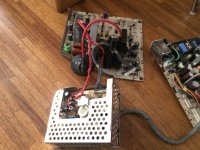
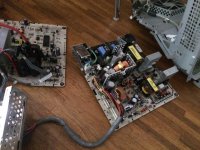
As you can see this iMac is going through a restoration process. The CRT Bezel Frame is going to be sanded followed by a fresh application of spray paint to makeup for the corrosion caused by the battery blowing-up.
This thing was as dusty as can be, in fact the red cables from the anode were not red but black with dust. The most complex part of the job will be routing cables back in. I have to carefully document this chapter of the job.
Last edited by a moderator:
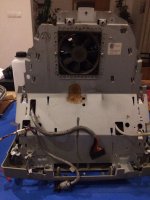
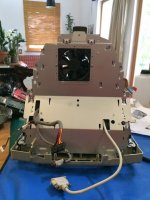
Similar threads
- Replies
- 2
- Views
- 234
- Replies
- 4
- Views
- 419
- Replies
- 0
- Views
- 253

- Replies
- 15
- Views
- 946

