I recently purchased an iMac 98, when trying to turn it on, it turns on the orange light on the button, the monitor degausses, and I hear the boot chimes that are interrupted earlier than it should. The light remains orange and nothing happens.
I found that if I press the reset button (that little hole on the side, that we use a paper clip) it will start up. But with a peculiarity: I need to keep it pressed for more than 30 seconds. If I hold it down for, say, 10 seconds, I will only be able to hear the chimes for a few thousandths of a second longer than before. The time I hold the reset button is proportional to the "necessary for the machine to start up as it should"
This is so crazy that I myself cannot find much logic on how to solve this problem.
I have a hunch, some capacitor is damaged, and needing more time than usual to charge, maybe?
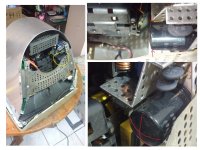
I disassembled a part of the imac, checked the motherboard, and the reset button is apparently ok. I also changed the battery and the CUDA button procedure, tried to connect the machine without HD and cdrom drive, all in vain.
Strangely, the machine will not turn on (not even turn on the orange light) if it has no battery, and I remember having other imacs that turned on normally even with a dead battery, they just got the wrong date.
Can someone give me a tip where to start?
I found that if I press the reset button (that little hole on the side, that we use a paper clip) it will start up. But with a peculiarity: I need to keep it pressed for more than 30 seconds. If I hold it down for, say, 10 seconds, I will only be able to hear the chimes for a few thousandths of a second longer than before. The time I hold the reset button is proportional to the "necessary for the machine to start up as it should"
This is so crazy that I myself cannot find much logic on how to solve this problem.
I have a hunch, some capacitor is damaged, and needing more time than usual to charge, maybe?
I disassembled a part of the imac, checked the motherboard, and the reset button is apparently ok. I also changed the battery and the CUDA button procedure, tried to connect the machine without HD and cdrom drive, all in vain.
Strangely, the machine will not turn on (not even turn on the orange light) if it has no battery, and I remember having other imacs that turned on normally even with a dead battery, they just got the wrong date.
Can someone give me a tip where to start?