• Hello MLAers! We've re-enabled auto-approval for accounts. If you are still waiting on account approval, please check this thread for more information.

IIgs

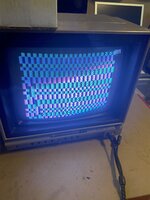
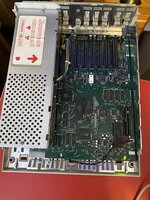
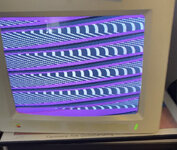
I have a IIgs that was bought in unknown condition. The psu was dead. I bought a new known working PSU. While I waited for it to show up I recapped the logic board. Once new PSU showed up, I plugged it in. First thing I got on display was fatal system error. Next power on, I got system check or looking for system startup something. Now it only gives me colourful rectangles and squares. Any ideas what happening?
 
Don’t remember if the IIGS has a self test mode, the IIe has the same kind of behavior when the keyboard is removed, but the IIgs had an external ADB keyboard.
 
Are you positive you have the polarized capacitors installed in the correct orientation? Does it display an error code?
 
Checked all caps, all good. It did turn on and gave fatal error. Then proceeded to look for start up disk upon next power on. Now, just this..
 

Attachments

  • A98BDF80-2E12-487B-96FE-C32C10E30DB6.jpeg
    A98BDF80-2E12-487B-96FE-C32C10E30DB6.jpeg
    1.8 MB · Views: 20
Verify that the power supply voltages are within tolerance. Also look if the clock battery that has leaked over the PCB. Which revision IIgs do you have?
 
Verify that the power supply voltages are within tolerance. Also look if the clock battery that has leaked over the PCB. Which revision IIgs do you have?
It is a rom 0 or rom 1. Battery was fine, logic board was clean, like brand new. Will check psu voltages.
 
Also consider reseating the chips that are in DIP sockets. You might also press on the VSC leadless chip at UH2 to make sure it is seated (that style chip really needs the purpose built chip extractor to safely remove it). Also if you haven't already done so, reseat any interface cards and memory expansion card. If you have a memory expansion card, remove it and see if the behavior is any different.
 
The first way is to disconnect the power supply and use a meter to check the unloaded voltages by probing the pins of the connector from the side that connects to the pins on the motherboard. The second is to probe the rear of the connector while it is under load while attached to the motherboard (You might need to use a narrow probe or use a component wire lead attached to your probe). There are 7 positions on the connector and pin 3 isn't used. Pins 1&2 are ground, 4 is +5 V, 5 is +12 V, 6 is -12 V and 7 is -5 V.
 
The supply voltages look to be within normal tolerances, note that until there was some load the secondary supply voltages (i.e. everything that isn't +5 V) weren't quite as close, but under load they end up being more close to the targets.

Your problem lies elsewhere, possibly with some bad RAM. I've not experienced any bad RAM in my only IIgs, so I'm not sure if this is a VRAM issue or the fact that the CPU isn't executing code from the ROM and is failing to initialize the display memory. It could also possibly be a problem with some of the auxiliary logic chips or even one of the larger custom chips.

Have you reseated the socketed chips yet? If there are any expansion cards, have you removed them to get to the basic hardware configuration?
 
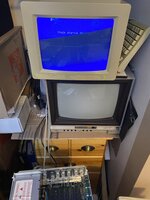
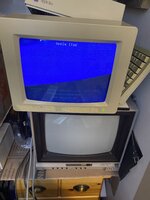
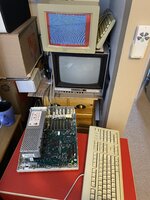
Well, after playing with some filters that looked bent on iigs logic board (maybe got bent from recapping?) and finding my iigs rgb cable i decided to power her on one more time for good old sake. She turned on and went to looking for startup disk! Even ran diagnostics.. now what to run on it? I have both size floppy drives but no software.
 
its alive!
 

Attachments

  • E33DFE9E-50DC-4482-B96A-49939A3D79B3.jpeg
    E33DFE9E-50DC-4482-B96A-49939A3D79B3.jpeg
    1.5 MB · Views: 9
  • CEA7AEA5-72B2-4478-A039-F7CCDFEA8774.jpeg
    CEA7AEA5-72B2-4478-A039-F7CCDFEA8774.jpeg
    1.6 MB · Views: 10
  • FCF6A891-CDD3-443C-9916-D0C6F76F0B26.jpeg
    FCF6A891-CDD3-443C-9916-D0C6F76F0B26.jpeg
    2 MB · Views: 11
  • B3B41D68-1A05-4AB6-B71A-B9639A772756.jpeg
    B3B41D68-1A05-4AB6-B71A-B9639A772756.jpeg
    2.2 MB · Views: 12
When i unhook everything, leave for a bit, plug all back in she starts fine. Then subsequent start up’s she goes back to that garbly screen. Any help would be great! She works fine on initial boot. Is the rom bad?
 
Well, I figured it out. The monitor was the issue. Corrected the sync on back, boots perfectly every time now. Got into control panel, and checked things out. Dont know what software you can put on this?
 
Your best place to find software, that you will have to transfer to the GS vis this program: https://adtpro.com/ is https://www.whatisthe2gs.apple2.org.za/
The ADTPro page will tell you everything you need to know to be able to transfer Apple disks images to your GS from either a PC or a Mac. Another good place to get GS software is here: https://www.apple.asimov.net/ when you go there click on the 'images' link, then 'gs' link and then any of the folders you want to download disk images from. The beauty of the GS is that since you have a 5.25 drive you can also download regular Apple II software and transfer that to the GS and run ghat besides the GS specific software. You an also get the regular Apple II disk images from Asimov.

magnus
 
Your best place to find software, that you will have to transfer to the GS vis this program: https://adtpro.com/ is https://www.whatisthe2gs.apple2.org.za/
The ADTPro page will tell you everything you need to know to be able to transfer Apple disks images to your GS from either a PC or a Mac. Another good place to get GS software is here: https://www.apple.asimov.net/ when you go there click on the 'images' link, then 'gs' link and then any of the folders you want to download disk images from. The beauty of the GS is that since you have a 5.25 drive you can also download regular Apple II software and transfer that to the GS and run ghat besides the GS specific software. You an also get the regular Apple II disk images from Asimov.

magnus
ok, I dont have scsi hard drive or anything for iigs, so no storage. Plus, being a rom 1, I think it is memory limited too. So, learning curve on how to get this up and running lol...Macs are much easier for me for sure. Thanks for all that info, that's awesome, appreciate it!
 
Actually if you look at the ADTPro page it's not talking about using SCSI or anything like that on your GS. It is a way to take an 800k disk image of a program for the GS and turn it into a real 800k disk. The same goes for the 140k disk images. You can use your Mac to download lots of disk images for your GS and then use ADGTPro to turn them into real disks for the GS. That's what I did for a long time, until I bought a CFFA3K for my GS.

magnus
 
Back
Top