• Hello MLAers! We've re-enabled auto-approval for accounts. If you are still waiting on account approval, please check this thread for more information.

How Toasted is This Logic Board?

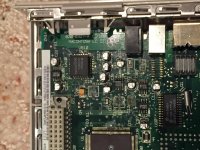
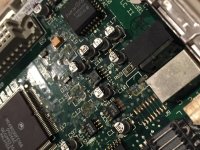
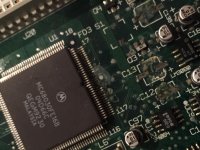
I recently picked up an LC II in a lot of Macs and it wouldn't power on. I opened the case and found this horrific mess inside. It appears as if the caps leaked and someone removed them? I'm not sure if there were caps there in the first place but I'm assuming there were. Anyway, this board is most likely beyond saving but I'd like to know the extent of the damage.

IMG_0525.JPG

IMG_0526.JPG

IMG_0527.JPG

 
Ehhhhhhh.,...

From the photos it looks like surface spots. Have you tried wiping off those spots? Some of them are really bad looking though... 

I cant really say anything else, not good with stuff like this.

 
Would a toothbrush and alcohol work for the surface stains? Even the one near the processor? I'm new to working on logic boards like this.

 
I would remove the capacitors and wash this board, perhaps soak it in warm soapy water for a few hours. Just make sure that you get this white residue off. Consider using dishwasher if you feel so, perhaps this would be the best idea.

Then I would resolder new capacitors and with a bit of luck, you'd have a nice working logic board.

 
Yup. Agree.

Still not sure what those spots are though. Hopefully they are just surface marks.

You are perfectly safe soaking the board in water! Just remember to remove the ram or rom or whatever can come out of the board. Makes it better when drying. If you have an old toothbrush, clean all of that gunk off when its soaking!

If you dont want to solder, there are many people here who can recap for you too, but see if the board comes out good first. Why waste money on a bad board?

 
Use vinegar on the bad areas with a tooth brush. Apply, soak for 15 minutes, scrub. Repeat. To keep wet with vinegar, you can soak paper towel and apply. I dont recommend dishwashers. Sure, it can work, but if you do - never, ever use the dry cycle. Its pretty much death to a board. Heat and humidity do NOT mix well on circuit board. This has been proven time and time again. I always use the sink/hot water/dish soap method with a paint brush to scrub. A paint brush does larger areas than a tooth brush and is gentler. Then a hair dryer can do a good job of getting water out of tight spots. Nothing beat compressed air though. You can oven back at 110 degree F for a bit for final dry. NEVER LET IT SIT FOR DAYS TO DRY! Get that water out as best you can, as quick as you can.

 
Wait... Why not? Of all the 'washing corrosion off boards' videos that I have seen, they all let the board sit.

Corrosion. And hour or two, fine to let dry with a space heater, oven, etc. But to let sit for a long time with water trapped in places, very bad idea.

 
Water evaporates fairly fast. You will get corrosion if you let the boards sit in a water tub for a week or two.

I let boards sit for a day or so in the basement (dry not humid area) and never had an issue. Using crappy water that leaves residue on dried boards is another issue.

Hot water and soap will remove most chemicals and dust from a board (use a new painters type brush to work any crap loose from the board), just make sure you wash the soap off as well.

If your are is humid maybe take a hair dryer to any Nubus or PDS slots (or anything that can trap water) to dry them out before use. But standing the board up for a few days is all I ever do.

 
You can rinse the board in denatured alcohol after the water bath if you want, that would remove most or all remaining water and the alcohol will evaporate very quickly.  Blow dry with compressed air.  

Better yet use distilled water.  The more pure your cleaning supplies are, the better.  Never had a failure using these methods.

 
I use 90% rubbing alcohol in the bathtub... pour some on.. toothbrush to get in under the IC's and all around.. then rinse with the alcohol. Denatured is even better.. then I do the other side as well.. sometimes the electrolytic fluid leaks through the through holes.. also wear a pair of gloves to limit your skin exposure to the alcohol..

Also don't just pull those other capacitors off... you will pull the pads.. I hope the pads are still on those spots where the capacitors are gone.. Sometimes it appears they are pulled off but in fact just really dirty... globs of melted solder put on them will usually clean them up.. along with a solder wick.. I find extra solder really is good at removing old solder.. and soak up with the wick..

 
Last edited by a moderator:
I used to remove the capacitors by desoldering them, but I managed only to pull a pad every other time, which gave me headaches. 

Now I use the method of twist and pull with pliers, with that method, I never pulled a pad. You grab the capacitor with pliers and then you twist it left and right few times. Do not pull upwards! Usually they are so corroded underneath that they will break loose after one or two twists.

You can also use SMD hot air station to remove them, but you will usually melt some plastic connector or something that is near the cap...

About cleaning the board, rubbing alcohol is good, but when the board has a lot of corrosion or residue left, it would often not help much. Use vinegar or a limescale remover instead.


 
Back
Top