Follow along with the video below to see how to install our site as a web app on your home screen.
Note: This feature may not be available in some browsers.
Hello MLAers! We've re-enabled auto-approval for accounts. If you are still waiting on account approval, please check this thread for more information.
I am wondering if there is a way to install A/UX on my SE30 without a CD drive. I am thinking about install A/UX on a simulator and then copy it to the SD2SICI drive. I don't know if it would work.
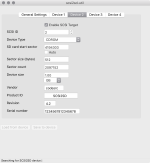
I did this, yes. I made a second SCSI target on the SCSI2SD card (you can configure this with the 'scsi2sd-util' configuration utility via USB) and copied the A/UX installation CD image onto that virtual SCSI drive. You can even flag the device as being a CDROM, but I don't think I bothered with that.
Copying the image onto the logical unit is the trickiest part. When you configure the second SCSI target on the SCSI2SD, it should say what sector number the logical device starts at. Each block is 512 bytes in size I recall. You can then use 'dd' on your Mac to copy an A/UX installer ISO into that offset in the SD card.
Note the SCSI device offsets are stored in the flash memory on the SCSI2SD device itself, they aren't saved onto the SD card (a design flaw, IMO), so you need to remember that if you swap in any other SD cards in future, you 'll need to change the config agian.
Afterwards, put the SCSI2SD back in and hopefully the Mac will recognise your A/UX install CD and you can then run installation like normal onto a separate SCSI target on the same SCSI2SD card.
I'm writing this from memory, maybe later on this week I'll try doing this again and see if I had to do anything else to get the A/UX image to mount on the SE/30.
This site uses cookies to help personalise content, tailor your experience and to keep you logged in if you register.
By continuing to use this site, you are consenting to our use of cookies.