• Hello MLAers! We've re-enabled auto-approval for accounts. If you are still waiting on account approval, please check this thread for more information.

How does System Picker works?

Can someone explain to me how System Picker does the magic? It's not just about blessing a different folder, which is still an obscure technique to me.
System Picker can also affects the boot order, booting from a non SCSI ID 0 device.

thanks
 
Great question. I’ve wondered this forever but never bothered to look into it. If you watch carefully, when using System Picker, you might see a sequence of multiple “happy Macs” appear, as if each album is being booted in turn, then noticing it’s not the “picked” system, and yielding to the next one. I’ve often been curious what exactly is happening there.
 
Great question. I’ve wondered this forever but never bothered to look into it. If you watch carefully, when using System Picker, you might see a sequence of multiple “happy Macs” appear, as if each album is being booted in turn, then noticing it’s not the “picked” system, and yielding to the next one. I’ve often been curious what exactly is happening there.
it doesn't do that with two system folders in the same SCSI drive/ID
 
I promise I'll try to find a source later, but off the top of my head, I understood that it wrote the boot device to PRAM, and the folder id of the System folder to use to a special location on the disk formatting. This later thing is the "blessing".

On older machines you couldn't generally boot from partitions other than the first, even with System Picker... I think. I find I need a newer version of Startup Disk (I use the one from Mac OS 8, but I'm not sure when it was introduced).

The above might be half remembered nonsense. I'll do some digging later, or alternatively @cheesestraws might know :)
 
I will look into a disassembly of System Picker soon if nobody can answer this, I suddenly really need to konw.
 
The following is in PRAM (location/length/description)
784Set/GetDefaultStartup. 1byte drive ID, 1 byte partition, 2 bytes driver reference number.


If in doubt, bbraun defeats (my) brain.
 
Yeah it’s probably just this. On entry, A0 points to a long containing the described data (which is then picked up by _WriteXPram):


Code:
SetDefaultStartup    PROC    EXPORT

; Write info to parameter RAM.  Format is:
; $78 [ (byte) DriveId{for slots} | (byte) PartitionId | (word) RefNum ]

            MOVE.L    #$00040078,D0                ; Write 4 bytes starting at loc $78
            _WriteXPRam                            ; Write it to PRAM.
            RTS                                    ; Return.

Then it presumably blesses the appropriate folder on the chosen volume/partition.
 
Yeah it’s probably just this. On entry, A0 points to a long containing the described data (which is then picked up by _WriteXPram):


Code:
SetDefaultStartup    PROC    EXPORT

; Write info to parameter RAM.  Format is:
; $78 [ (byte) DriveId{for slots} | (byte) PartitionId | (word) RefNum ]

            MOVE.L    #$00040078,D0                ; Write 4 bytes starting at loc $78
            _WriteXPRam                            ; Write it to PRAM.
            RTS                                    ; Return.

Then it presumably blesses the appropriate folder on the chosen volume/partition.
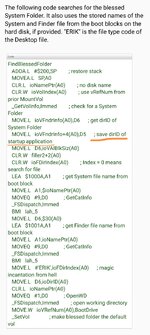
I haven't found a written description of where the folder id of the blessed system is stored. I assume in the drive formatting somewhere. I found this though :


Follows through the boot pricess.
 
Interesting part of that page follows. Remember in System 6 you can pick the startup application to be something other than the finder, so it stores the location of the System file, and of the application to run. If you directly manipulate things (like norton utilities... 3? does to create recovery disks), you can still do this in System 7 and later. Previous experiment here :

Screenshot_20220927_203544.jpg
 
You want the FinderInfo structure from the Volume Header. Apple's TN1150 describes it, but I'll reprint the useful bits here:

finderInfo
This array of 32-bit items contains information used by the Mac OS Finder, and the system software boot process.

finderInfo[0] contains the directory ID of the directory containing the bootable system (for example, the System Folder in Mac OS 8 or 9, or /System/Library/CoreServices in Mac OS X). It is zero if there is no bootable system on the volume. This value is typically equal to either finderInfo[3] or finderInfo[5].

finderInfo[1] contains the parent directory ID of the startup application (for example, Finder), or zero if the volume is not bootable.

finderInfo[2] contains the directory ID of a directory whose window should be displayed in the Finder when the volume is mounted, or zero if no directory window should be opened. In traditional Mac OS, this is the first in a linked list of windows to open; the frOpenChain field of the directory's Finder Info contains the next directory ID in the list. The open window list is deprecated. The Mac OS X Finder will open this directory's window, but ignores the rest of the open window list. The Mac OS X Finder does not modify this field.

finderInfo[3] contains the directory ID of a bootable Mac OS 8 or 9 System Folder, or zero if there isn't one.

Twiddling these is how I was able to get my 1400cs to start an incompatible 7.5.3 image (enough to whine about it).
 
interesting, so System Picker writes in the PRAM the drive/partition to boot from and it writes in the boot block the id of the folder or application to start, which to my surprise can be "any" application.

Now, if I set a custom System System folder in Drive 0 and I remove/reset the PRAM battery is should start from the custom one.
But if I set my custom folder in Drive 1 and I remove/reset the PRAM battery it will boot from the drive 0 whatever was set in the boot block.
Is it? I need to jump in the basement and run a test :)
 
interesting, so System Picker writes in the PRAM the drive/partition to boot from and it writes in the boot block the id of the folder or application to start, which to my surprise is can be "any" application.

Now, if I set a custom System System folder in Drive 0 and I remove/reset the PRAM battery is should start from the custom one.
But if I set my custom folder in Drive 1 and I remove/reset the PRAM battery it will boot from the drive 0 whatever was set in the boot block.
Is it?
I suspect it doesn't write partition and that came later?
 
Back
Top