• Hello MLAers! We've re-enabled auto-approval for accounts. If you are still waiting on account approval, please check this thread for more information.

Help diagnose an LC problem

Hi,

I am having a problem with my fave, my original LC. When I start it up, it gives a sound like a radio tuning in, with the frequency going up and down a couple of times. Then it calms down, then it will start up again, but this is different: it starts with a really quiet, high pitched sound that progressively gets lower in frequency, almost like a bomb dropping. It is almost comical, I should record it...

Does anybody have any idea? I would like to save my baby...I love being able to run System 6! And my Apple IIe card!

Thanks!

 
Sounds like capacitors crapping out. My LC 575 AIO did something similar. I pulled the board out and noticed the oily crap around nearly every capacitor. That was 2 years ago and I regret giving it away.

 
Absolutely it's capacitors. I have an LC myself. Mine used to do that, then I recapped it and it's now working perfectly. It's a fairly simple board to recap, except for the capacitor near the audio jacks. I had to desolder and remove the jack, then remove and replace the capacitor, then put the jack back on. If you have a soldering iron with a long, thin tip, then you probably won't need to.

 
Ok, yep, took the ethernet card out, and by the capacitors, there is a gunky, filmy stuff all around that area of the board, and not anywhere else.

So, I took the Apple IIe card out of the LCII, and same thing. Took the ethernet card out of the LCIII, and yep, again, same thing.

Grumble, grumble, grumble...ok, I guess I have to re-cap the things. How hard is that? I have limited experience with a soldering iron...definitely *not* searching for another task to do right now, but oh well..

 
I plugged in a set of computer speakers and I could barely hear the whirling. Sound in games and other things were just fine. It might differ with yours though

 
Ok, yep, took the ethernet card out, and by the capacitors, there is a gunky, filmy stuff all around that area of the board, and not anywhere else.
So, I took the Apple IIe card out of the LCII, and same thing. Took the ethernet card out of the LCIII, and yep, again, same thing.

Grumble, grumble, grumble...ok, I guess I have to re-cap the things. How hard is that? I have limited experience with a soldering iron...definitely *not* searching for another task to do right now, but oh well..
I'm new to soldering, too, plus I have shaky hands which makes it doubly difficult. However, I still managed to do it. Perhaps the most important tip is for you to get TWO soldering irons. Simple pencil irons will work, and they're really cheap. Like $10 or $15. If you don't use two soldering irons at the same time, then I can pretty much guarantee you'll tear off one of the little pads under the capacitor. I lost three motherboards to that problem before it donned on me to use two soldering irons (duh!)

My second suggestion is to get solder paste. It's a little pricey compared to normal solder, but man, I found it to be the best stuff. You just put some of that goop on each of the pads, lay the capacitor right on the goop, then just hold the iron in the goop. All the flux just evaporates, and the solder melts right onto the pads. Super easy, even with shaky hands. :)

I recommend tantalum capacitors so you can avoid future leakage.

Also, don't push too hard on the caps when you're removing them. When you have both the irons down there melting both sides, the cap will eventually just slide off.

 
Perhaps the most important tip is for you to get TWO soldering irons. Simple pencil

irons will work, and they're really cheap. Like $10 or $15. If you don't use two soldering irons at the same time, then I can pretty much guarantee you'll tear off one of the little pads under the capacitor.

I lost three motherboards to that problem before it donned on me to use two soldering irons (duh!)
Two are better than one? He he.. Yes, it could be done, but, better yet:

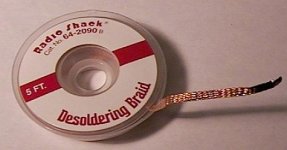
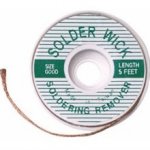
1. Use desoldering wick.

2. Practice a lot on scrap boards.

3. Read this article.

http://www.daycounter.com/Articles/Solder-Surface-Mount-Parts.phtml

wick_1.jpg

wick_2.jpg

 
I've read that, and I use soldering wick all the time, but I could not get it to suck up all the solder beneath the capacitor without accidentally lifting the capacitor up and breaking off the other pad. I just found that 2 soldering irons was the easiest.

 
Back
Top