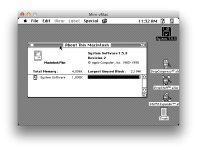
Just finished installing 7.5.5 on my Quadra 700 (Thanks to that pinned guide!!). When I installed 7.0.1, under about this Mac it said Quadra 700 and had a picture of one. I didn't like 7.0.1 and initialized the drive blah blah blah, but now in 7.5.5 it just says macintosh with that drawing of one with the blue and yellow and red... this happened when I reinstalled in on the original hard drive a while ago too. I'm using a legacy disc.
Is there a way to edit the system files to make it show Quadra 700 and the photo?
Is there a way to edit the system files to make it show Quadra 700 and the photo?