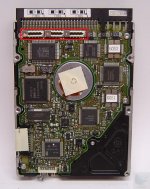
Lately a lot of my fun mac stuff has been biting the dust (everyday). As a last resort before putting it all away, I come here for some advice..Today I had my Classic II 10MB RAM running with a used hard drive I had just acquired from ebay. The hard drive is an IBM 200MB 50 PIN SCSI. I used an external Syquest EZ 230 drive that had a system on it (7.5) and I copied the system to the hard disk after formatting it with Lido. The hard drive successfully booted to it's cloned system and I had fun playing some old games, drawing pictures, doing everything with full speed. I then used an apple cd 300 external drive to put on even more additional programs. Keep it mind, the entire time having the hard disk installed, I have had a scsi device hooked up to the back. When I was finished copying some more files from my cd, I dragged it to the trash and a few seconds later the drive itself began to make horrible banging noises followed by a smell of burning electronics. So my apple cd 300 is dead. I got back to my computer, turn it on without any scsi device attached to find that the system does not boot. I attached my Syquest drive, then the hard drive booted to the desktop.... then I get a watch arrow icon for 2 minutes. It goes away, make a new folder and the watch comes back for a few more minutes. Anything I do, watch comes back. :lol: :lol: :lol: So if anyone could be so kind as to a solution to it booting with it's own drive/ or without the hanging problem it would make my day! Hopefully something isn't internally damaged in the computer
This hard disk needs the M switched on for it to spin up I believe.