


So I have a dual 1.42ghz MDD. When I got it, it kernel panicked. Then stopped booting at all. I did the whole take-apart-and-rebuid dance, cleaned the motherboard and CPU card and it was fine.
I put a flashed ATI 9200 into it. Still fine, great even.
I swapped the 9200 flash chip to a full-size one, and it didn't boot. I spent a long time thinking it was the video card, until I realized it could boot headless and I could use capslock LED to determine if it crashed. It did indeed crash.
It basically exhibits random MDD symptoms, including J20 issue (didn't before) and powering off randomly. Thinking it was the PSU, I took it apart, and it looks clean (though not completely eliminated, the seller had said it was either new or recapped, and it looks that way).
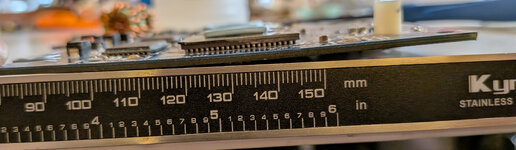
The CPU card is warped. I am thinking this is the source of this MDD being haunted. I also imagine, but cannot prove, that the J20 RAM pins on the CPU card are the first ones to pull up with a warped CPU card.
Here's my plan of attack, but other ideas are welcome:
1) Clean CPU with full isopropanol immersion, some ShinEtsu microsi got messy. I don't think it's conductive, but I want to remove any chance conductive junk like corrosion bits is amongst the balls under the cache chips and CPU.
2) Try 1-3mm spacers to raise the CPU card edge clip so the bend is not pulling the connector out
3) If this fails, I might be worried the balls of the CPU have lifted off the board (nooo) or are intermittent. How reasonable is it to reheat these (e.g. a 858 style heatgun) without potentially causing the chip to come off or shorts? I know Motorola used weird non-full-melt solder balls here.
4) Buy a new CPU/MDD?
I put a flashed ATI 9200 into it. Still fine, great even.
I swapped the 9200 flash chip to a full-size one, and it didn't boot. I spent a long time thinking it was the video card, until I realized it could boot headless and I could use capslock LED to determine if it crashed. It did indeed crash.
It basically exhibits random MDD symptoms, including J20 issue (didn't before) and powering off randomly. Thinking it was the PSU, I took it apart, and it looks clean (though not completely eliminated, the seller had said it was either new or recapped, and it looks that way).
The CPU card is warped. I am thinking this is the source of this MDD being haunted. I also imagine, but cannot prove, that the J20 RAM pins on the CPU card are the first ones to pull up with a warped CPU card.
Here's my plan of attack, but other ideas are welcome:
1) Clean CPU with full isopropanol immersion, some ShinEtsu microsi got messy. I don't think it's conductive, but I want to remove any chance conductive junk like corrosion bits is amongst the balls under the cache chips and CPU.
2) Try 1-3mm spacers to raise the CPU card edge clip so the bend is not pulling the connector out
3) If this fails, I might be worried the balls of the CPU have lifted off the board (nooo) or are intermittent. How reasonable is it to reheat these (e.g. a 858 style heatgun) without potentially causing the chip to come off or shorts? I know Motorola used weird non-full-melt solder balls here.
4) Buy a new CPU/MDD?







