• Hello MLAers! We've re-enabled auto-approval for accounts. If you are still waiting on account approval, please check this thread for more information.

Free Macintosh Plus!

PotatoFi

6502
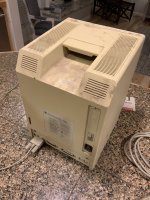
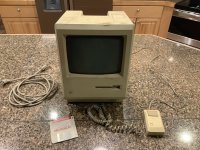
Several months ago, when I was first getting into this compact Macintosh thing, I posted on Facebook asking if any of my friends had one. I ended up buying an SE FDHD and restoring it, but in the meantime, one of my old coworkers told me he had an "old Mac". We were finally able to co-ordinate tonight so I could pick it up, and here it is!
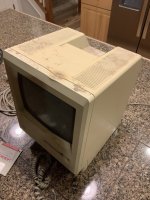
IMG_0129.JPG

IMG_0130.JPG

IMG_0131.JPG

Apparently, this came out of an aircraft hangar. There is a mouse, 2 power cords, and keyboard cord, but sadly no keyboard. Condition is rough... there's some melted plastic on the top, and it is really really really dirty. It's covered in a very sandy dust... possibly paint overspray. In fact, there's overspray on the mouse. The battery leaked a tiny bit, but there's no significant damage to the battery compartment.

I have decided to NOT attempt to power it on tonight, due to the pervasive sandy dust. I'm mostly worried about the floppy drive (which looks to have a disk in it). Before I attempt to power it on, I think I'll completely take it apart and clean it out, with special attention to the floppy drive. I'll also double-check J1 to make sure it isn't burned or cracked. Maybe reflow some joints on the analog board. I'll also clean the Flight Simulator disk to see if it works, my buddy said he grew up playing that on it.

I'm also wondering if I could do a series of YouTube videos about it. Shooting video is easy... it's editing that I find to be a lot of work. I have lots of video from my Macintosh SE but haven't found time to make it into a video. If you have thoughts on that, let me know.

 
128k or 512k upgraded to a Plus...we will need to see what's inside!
Whoa, very good catch. That had escaped my notice. What is more desirable, replace the case with a nicer Macintosh Plus case (note melted plastic on the top), or restore the original 128k/512k case? I'm thinking retrobrite, clean up the burn mark a bit by carefully heating and bending it back, maybe spot-sanding it a bit to smooth it out. It'll never look perfect again but it could probably look nicer with some careful work.

 
I have an extra 512k/512ke front bezel too, if that helps :)

The serials wouldn't match, but unless you're a purist, I don't think it matters that much.

c

 
Ok, I finally had some time today to work on the Macintosh Plus! Sadly, it's not up and running (yet). But here's the journey for how I got to where I am now (bong, no display, floppy flup-flup-flup, half-hearted floppy eject).

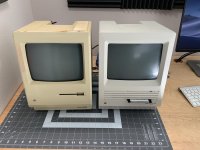
I started by wiping it down. Check it out next to my fully restored (and retrobrighted) Macintosh SE FDHD.

IMG_0169.JPG

The case took a bit of effort to pop off, especially since the melted plastic on the top fused together a bit but it did come off cleanly.

IMG_0172.JPG

Oh, sweet! $1.50 off at Dominoes! Expired in 1995 though... dang.

IMG_0173.JPG

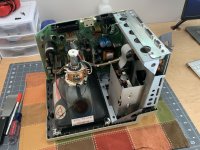
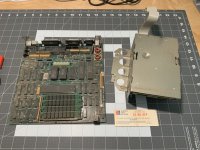
Logic board and floppy out. Blasted the logic board with compressed air, along with the rest of the Macintosh.

IMG_0175.JPG

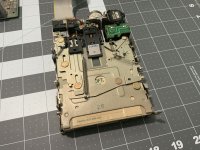
Time to clean out the floppy drive.

IMG_0176.JPG

This disk as been in here for a long time. The platter(?) has one very dusty stripe where dust continuously got on it. TBH, the drive wasn't as nasty as I thought it would be.

IMG_0177.JPG

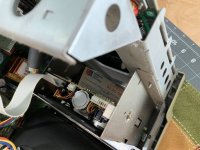
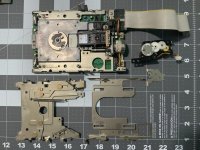
I took apart the drive and cleaned it. Scrubbed metal parts with soap and water, lubricated everything with lithium grease, and put it back together. Made sure disks ejected smoothly. I also pulled the cover off the eject motor mechanism and it looks great. I put a couple drops of Silicon lubricant in there (I primarily use it on the linear rails on my 3d printer).

IMG_0179.JPG

Reassembled, attempted to power on aaaaaaaaaand:

  • Bong
  • Flup-flup
  • Half-hearted floppy eject (can't remove the disk, it's stuck in there)
  • No video, no raster
Slapping the side of it while it's running doesn't produce video. I did not check J1 for cracks, as it has the shield double-side-taped down. I wish I would have now!

I'm pretty comfortable working around my SE FDHD because I think it has a CRT bleed-off resistor... but the CRT and analog board on the Plus, I am less comfortable with. I am not a big fan of the "massive loud blue spark" on CRT discharge thing (my SE has never done that). How long should I let this thing sit for before going through the discharge procedure before doing that? I'm happy to wait, I'd really rather not mess with high voltages if I can.

 
Last edited by a moderator:
I’m fairly certain this has to do with voltage adjustments. Could be as simple as adjusting a potentiometer, could have to do with capacitors. You’ll need to test the voltages at the main logic board connector and see what you have.

As for the discharge, you need to make yourself a tool with a screwdriver, wire, alligator clips, and a resistor to ground the thing off. It will bleed off the charge without a pop. If I recall, I think it is 1/4 watt rated, 10 megaohm resistor.

 
Last edited by a moderator:
I don't think you would get the bong if the voltage was so low that you would have no video. On my Classic, I wouldn't get the bong below ~4.5V, but I still got (admittedly wavey) video. The floppy was also functional at that voltage.

 
Ok, here's what I've done this evening:

  • Freshened up the solder at J1
  • Measured voltage at floppy connector: 4.9v and 12.08v
  • I adjusted the voltage using the voltage potentiometer, it is now 5.0v and 12.3v at the floppy connector
The screen is still dark. Before adjusting the voltage, the floppy drive did successfully spit out the random floppy disk that I had in it! It now ejects it reliably after attempting to read the disk. I'm not sure why it failed the first time but the floppy drive seems happy now.

Funny, this is identical to the issue my Macintosh SE FDHD had. Everything seems to work, but the display is dark. On the SE it turned out to be a broken leg on a filter.

 
I've been out of town for work a lot, so the Macintosh Plus has not received a lot of attention. Soon I'll take it apart, discharge the CRT, make a list of capacitors from the analog board to order, and retrobrite the case (probably full submersion method).

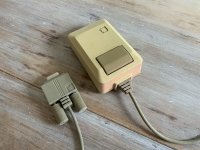
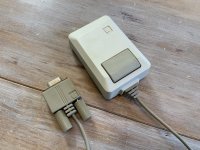
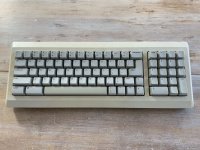
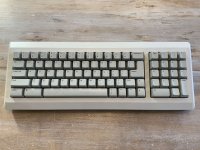
I did spend some time on the mouse and the keyboard (not the original keyboard, I purchased this separately). The keyboard was in pretty good shape, but the mouse was severely discolored and had pink paint overspray on it.

IMG_0201.JPG

IMG_0209.JPG

Overall, the mouse turned out pretty good. There's a bit of marbling from the retrobrite but it's very hard to detect. On to the keyboard (less dramatic):

IMG_0195.JPG

IMG_0207.JPG

This keyboard is probably the worst retrobrite job I've done... the spacebar shows marbling. That said, it looks pretty dang good. I'm glad I did it. You have to look very closely to see the marble. I DO think this is the wrong keyboard for this Mac. I would like to find the original keyboard so the color matches the 128k case. We'll see.

 
Technically, that is the correct keyboard for any original Plus, but did not come with your original Mac (128l or 512k, whichever it was). The mouse is the original 128/512k style.

 
Original Plus' mice were beige until the Plus line was switched to platinum. The large connector and thumbscrews were (to my knowledge) only 128k/512k.

 
Last edited by a moderator:
Back
Top