


• Hello MLAers! We've re-enabled auto-approval for accounts. If you are still waiting on account approval, please check this thread for more information.

Floppy disk drive cleaned - still don't want disks

vik

6502
Hi !

I found a mac SE/30 some 5-10 years ago, and I switched it on.

I still remember the horrible sound the hard drive made.

Yesterday, decided to fix it, so I opened it:
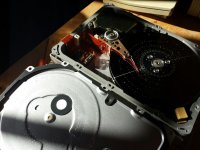
photo309929328776423398.jpg

I have a bunch of mac stuff of the same period sitting here, so I found an external scsi disk of the ~same capacity; Can this be swapped in directly ?

I removed the lithium battery.

I tried to boot the mac from a floppy disk; after cleaning it and trying making multiple images of multiple systems on multiple floppies (with dd on osx, and with winimage on windows, and testing if I can read the content in my macbook - yes I can), I can't get it to accept any floppy.

It does this everytime: https://www.youtube.com/watch?v=1d9PzmTKCCg

The only thing I did not do is clearing the head with isopropyl alcool since I don't have any (difficult to get in france), I cleaned it with a dry Q-tip, can I clean it with something else ? 90deg alcool ?

Does the drive needs fixing ? Can I try something else ? thanks...

 
Last edited by a moderator:
Woops, the video should be ok now.

Yes, the hard drive started spinning and the heads detached only after full speed, so... that was noisy.

 
Wow that drive looks bad. Looks like you could almost take the platter out and use it as a vinyl for a DJ. :p

With scratches that bad, I'd be surprised if the head hadn't been ripped clean off by now. I think my drive may have had a head-crash too since my mac won't read it. (Diagnosing the LED flash codes have indicated that it probably is a head crash).

But aside from the usual noise an old drive like this makes, I haven't heard any unusual noises from it. I probably won't find the same kinda of disaster yours went through when I eventually open mine up. :p (which I only plan to do once I determine there is no way to format and use this drive)

As for the floppy drive, if cleaning it didn't work, perhaps the heads are magnetized. I heard that could become a problem with drives this old and cleaning them won't solve that problem. If it still doesn't read discs after de-magnitizing the heads, I would assume the heads are toast and the drive is a write-off. Part it out and find a replacement. It's probably not worth fixing it at that point.

 
Last edited by a moderator:
That floppy drive seems like its doing what its supposed to. Its rejecting the disk because it cannot find a valid boot sector. 

Now, theres 2 things for this. 1, your not preparing the disk properly, which has to be tested in an emulator, or another machine to verify that. 

2: the track alignment is off on the drive itself. if the drives heads have ever been jammed before, or dropped, etc.. it can throw off the track alignment and it will cause this. You can try making an 800K boot disk, which is a little bit more impervious to track mis-alignment, but that requires another mac to do. 

For making a boot floppy, you cant really use DD or anything like that, unless you have a RAW valid blessed image. Or it wont work. Winimage will definitely not work unless it was an image file from a valid bootable HFS/MFS diskette. However you wouldnt be able to browse the file structure in winimage I dont think. 

In a windows box, you need to use HFVexplorer and then format the disk that way, and drag a blessed system folder onto it, Or, setup an emulation environment and map your diskette drive to the emulator. Format the disk within an emulated mac OS environment, and then use disk copy. 

The other option is for someone to post a DD RAW image from a diskette that was setup and bootable. That might work. Maybe... 

But, from what I see in the video, I dont really "see" any major faults with the drive itself, chances are, your not prepping your disks properly. 

 
Last edited by a moderator:
Ahh so that's what's going on. I had assumed he had already booted into MacOS. I think he was at the Flashing Floppy icon. Now the instant eject makes sense.

Yeah try what technight has suggested. If the Mac was at the floppy icon asking for a boot disk, it decides pretty quick your floppy isn't bootable if it's able to read it. I think it would struggle for a bit if it was having trouble reading the disk due to an issue to the drive. Trust me, I had a disk with a bad track 0 and my Mac struggled for a few extra seconds before giving up on it.

The quickness it has at rejecting it means you most likely aren't prepping the disk properly for it to boot from. I had only one disk get rejected and that was due to bad sectors on Track 0.

Although interestingly, I was able to get rid of the bad sectors with a program called "Flobo Floppy BAd Sector Repair". Just something I found on Google recently when I had thought I was out of usable disks. (MacOS really hates disks with bad sectors. MS-DOS/PCs were a little more friendly to it since they could map them out as bad clusters. I don't think MacOS had a convenient way around them)

The program claims it recovers the lost space from bad sectors by doing what I believe is some kind of "unformatting" process where it resets the organization of the data tracks. I guess it re-magnetizes the entire disk? I don't know if it actually does that, but that's what the program maker claims it does. It did seem to work for me though. I used it on two disks I knew had bad sectors (and were reported as such with chkdsk. One of them I couldn't even format anymore due to bad track 0).

Afterwords I reformatted to FAT format using PC and rescanned with chkdsk. They both now work 100% it seems. (and the one my Mac would refuse to boot from was now bootable now!) Obvously the program says it won't fix disks that have physical damage like scratches on the oxide layer and age related deterioration of that layer. Usually you can see such damage by carefully opening the disk slider and rotating the disk surface to inspect it. I have a few that legit have physical damage to them. But two floppys that had bad sectors and had no apparent visible damage. So tried it on those two.

Although I've noticed that Basilisk II may not be formatting floppies correctly (The old version that can still access physical disks). It may be over provisioning them or something. I got a disk error when I attempt to fill up the last 60 or so KB on a disk. This happened consistently across two different floppies and was driving me crazy as it always happened when I tried to pop in one extra control panel or app. :p

Seemed too much of a coincidence. So I created a floppy image with HFVExplorer and opened that in Basilisk. It had less free space then my physical floppies. So I wrote that image to the disk with TransMac and now it looks like I have no problems with them now.

That program might be helpful in recovering vintage Mac disks that appear to have bitten the dust. Don't toss them just yet! They might just need to be remagnetised/unformatted. Obviously the above program will destroy existing data when fixing the disk, so this isn't something useful for trying to recover data on the disk. Mainly useful to make the disk usable as a storage medium again. :p

 
Last edited by a moderator:
Thanks everyone for all your help !

Unfortunately I don't have any classic mac that runs, so making a floppy from another one is not possible.

I looked for more "full images" of system floppies, come to http://www.macgeek.org/downloads/index.html (particularly the all in one 608sysst.exe program that apparently creates a bootable 6.0.8 floppy under windows in one click).

Can anyone try this one and tell me if the floppy made with this program boots in a mac ?

I tried again 3 hours tonight (making a floppy from an emulator, making one from different full floppy images, even with a brand new floppy disk I found in a box). Still the same result.  :(

Is there a method for checking if heads are not aligned ?

 
If you are using a PC make sure it's a 1.44mb sized image you write to the disk. 800/400k images won't work from a PC because of the special format those size disks use. As long as you stick to the 1.44mb images, you can write an image to a disk if you use something like HFVExplorer or Transmac to write the image.

 
I think I had some kind of extreme luck (and some bad luck after).

By disappointment I tried to swap a scsi drive in to see if it works: The thing made noises like hell for 1 minute.

But suddently: "welcome to mac os" and then error #3;

Tried to boot with Shift key pressed, and tadam, a desktop.

BUT WHY DOES THIS WORK ??? THIS IS A RANDOM DRIVE I FOUND IN A BOX.

Anyway, tried to bench the floppy drive, and guess what, formatted a floppy with it, says "793kb free"...

so I think this mac got swapped with a 800kb floppy drive...

Does this sounds possible ?

Edit: checked the ref: it's a MP-F51W...... going to look for a 1.44 drive, if someone has one to sell ...

 
Last edited by a moderator:
MP-F51W is an 800K drive for sure. Itll never work on any level with that drive, unless you have another mac that runs 800K disks. 

You need the 2MB drive, or the high density drive to boot from disks made on a PC. 

I would format a DS-DD disk (without the hole), and then make a minimal system disk by using the Finder/System thats on your currently working HDD...

I used to do that alot back in the day, as thats my emergency "get back into the system" disk. 

Oh... and if I were you, I would invest into a Floppy Emu from Steve @ bigmessowires before buying an FDD. Honest opinion. You still have an 800K drive, AND you have the Floppy Emu to mount 1.44MB Disk images. And you can run in HD20 mode and run hard disk images from your SD card. Cant go wrong here... 

 
Last edited by a moderator:
I really don't understand why would someone replace a 1.44 drive with a 800k one (except 1.44 drive broken and no spare).

Is there any interest on the 800k drive ? As I think the 1.44 can write all formats ?

I will try to make a 800k boot disk as you said techknight. Thanks

Also going to order some Floppy Emu as you said. This thing will be really handy.

Going to recap and polish it now  :)

 
Last edited by a moderator:
There's a chance whoever replaced that drive wasn't aware it was a 800k drive. Outwardly, it's hard to tell the difference as they may look similar physically. :p

 
Thinking back ten to twenty-five years...

1. The 800K drives use a stronger magnetic flux (if that is the correct term) than the 1440KB drives used to write information (I think...., this may seem counter-intuitive, but I think the explanation is something like to store more information on a 1440KB disk, compared to an 800KB disk, the information : flux changes between magnetic domains : needs to be stored closer together - as in "packed tighter" - which in turn requires a weaker signal per domain on the 1440KB diskettes so that the neighbouring domains do not interfere with each other).

2. When the nylon gears in the eject mechanism get old the teeth can become brittle, and once one tooth breaks off a gear the drive cannot reliably load or eject diskettes. I have an 800KB drive (External Unidisk 3.5, for Apple II systems) with this ailment, regrettably.

3. In some cases, you can recover information / files off a dying 800KB diskette with a native 800KB drive, even though you cannot recover the information on the same 800KB disk using a 1440KB drive.

There was a 2880KB 3.5" format of IBM / PC Compatible drive, but I do not know what happened to them (nor am I sure what happened to the IBM PS 2 OS/2 ?)

 
Back
Top
