• Hello MLAers! We've re-enabled auto-approval for accounts. If you are still waiting on account approval, please check this thread for more information.

Fixing original 1984 disks

Hey there

I have re-lubed both of my 400k floppy drives. They all work brilliantly now. I was able to make some copies of my original 1984 disks. These are special because they're in French and I couldn't find them anywhere on the net... So I need them to work!

MacWrite, MacPaint, and System Startup work fine. No problem with those. The Tours are buggy as hell though.

I have uploaded the disks on the MacGarden.

When you boot off MiniVMac with the Mac Tour disk, it prompts you to the "early" finder, that's the 6 white boxes with the grey background but you cannot click on either of them. Even "let me use my macintosh!" crashes MiniVmac (I should point out at this moment that I am using an original Mac 128k, 64k ROM)

I cannot try them on the actual 128k because it needed new RAM chips. It's currently in transit to Uni's house. Maybe it works on the actual computer? Mine has Rev A ROMs. Who knows...

Whatever I do, I always end up with an error, ID<7 (tried on an actual Mac Plus, it did the same). I don't know if that means "error 7" which is :

  • Privilege Violation
    The Motorola 68000 runs in Supervisor or User mode. The Macintosh should always be in Supervisor mode, but sometimes is placed in User mode. Some of the instructions can only be executed in Supervisor mode. If the computer attempts one of these instructions while in User mode, a Privilege Violation error results.
I don't think there's a way to bypass this privilege violation thing. Do you?

The problem is probably with the finder or system file. But since this is a "tour" disk it used a special version of the finder and had to use something called "realfinder" which works btw since I tested that tour with the system startup version of finder and system and it doesn't crash when using these ones. But the script was not designed to work with those files, and when you click on "Show me the desktop" for example it starts and does not crash but it doesn't click on the right things. Sometimes, it starts and immediately prompts you to the following dialog box: "The disk needs some repairs" but in that "mode" you can't interact with the system. Mouse movements are dictated by the script, which does not "see" the dialog box and continues clicking on the wrong stuff that's greyed out.

I tried another Mac Tour, the english version. I swapped the system & finder from that image and it crashes but it doesn't display any error codes: the dialog box flickers and you have to reboot. I should point out that this US 128k Tour has a few problems ( I cannot use the Keycaps DA and when I boot this disk in MiniVmac it tells me that the computer is behaving abnormally... Maybe that disk is also bad?

What is the next thing to try? If anyone has an image of the 128k tour that's MiniVMac friendly, I'd like to test its finder & system files with my tour.

Also, if someone knows how to edit and fix system files, that would really help me! I do have a copy of CP FileFix on my SE/30. I should try that out. What do you think?


 
Really? I didn't know that.

But it didn't complain when I copied the disk onto another 400k formatted 800k. And later when I created an image of the latter disk using DiskDup...

IIRC, the Plus did the same with the original floppy.

All floppies were write protected as well. The image is. Tried creating another image using a blank 400k in Mini vMac with same results.

 
I don't know of Apple themselves employing copy protection schemes on any Mac software?

It was apparently rather common in the Apple II world, and *some* Mac software had copy protection, but not Apple software, as far as I know.

c

 
None of Apple's software during system was copy protected. They were literally giving it away.

Chances are you/he is formatting the disks to HFS Formatting scheme when it needs MFS Formatting. Any system before System 4.2 requires MFS Formatting on 400K or 800K.

 
Ah. I used 6.0.4 to copy the disks. My bad. I guess it created an HFS 400k partition. I didn't think of that.

So I need 4.2 or lower to copy the disks, right?

The easiest thing to image the disks for me is to DiskDup them directly on my SE/30 (SSW 7.5.1) but I'm afraid I might damage the contents of the original disks even if they're write protected. Do you think it's possible? You see I don't have anything lower than 6.0.4 to work with right now.

 
System 6 can read and write MFS Disks but not format them. So if you can get something like System 3.2/Finder 4.2 to boot on a 128K - Plus or SE you can format MFS disks. High Density Drives as I remember can not format MFS Disks.

So if you can get System 4.2 or lower on MFS going, format a bunch of Disks as 400K and 800K. This way you can have 400K versions of the software in case one day you get a 128K or 512K with a 400K drive, you can boot it.

When you are done formatting (enough for at least a minimum of 2 sets of each), then you can use the System 6.04 on what machine you have and copy the files to the disks from one to the formatted ones. System 7 does not support MFS format.

 
System 7 does not support MFS format.
Yeah that was predictable but it can read them, right? I spent an entire afternoon trying to make Diskdup work on system 6 on that Plus, it just wouldn't want to. So I'm using the SE/30 (SSW 7.5) to "image" the disks.

I do have a 128k, it's just missing its LB right now. Or I would have used this one.

Hang on, I have an idea: The Plus will probably boot off the System Disk "image" I made using a 400k-formatted 800k (probably HFS). It is a carbon copy of the 128k disk. And it works.

I could use this disk (finder 1.1h) to copy the right stuff on another 400k formatted 800k but this time in MFS using the external drive (400k).

High Density Drives as I remember can not format MFS Disks.
If I format an 800k in a 400k external drive under System 1.1 on a Plus, is it still MFS??

How do I know if it's MFS or HFS?

Another question: The system Startup disk works with the 128K Mini vMac. So why the others don't ? I used the same method... 

From Wikipedia:

While 400K disks can be formatted using a Hierarchical File System (HFS) system, they then cannot be used as startup disks, or read on an original 128K Macintosh.
Mini vMac with a 64k ROM can boot off that disk. So it's probably MFS. 

I'm going to try it out anyway, with an earlier system. The finder & system files on the tour disks are weird.

 
Last edited by a moderator:
You can boot older MFS-only SSW's can boot on the Plus, but due to the slightly different architecture (upgradeable RAM, SCSI), some odd things may happen.

It should work well enough to format your disks as needed.

c

 
Okay. 

I tried to boot from the original MFS, 400k formatted 400k disks and it still gives me the SAME error: ID<7

I was still using my Mac Plus, with 128k ROM.

So the backups I did are okay. The "good ones" boot fine with a 64k ROM version of Mini vMac. It must mean they are MFS.

So the backups are out of the equation. There are now two possible leads:

1/ Mini vMac (128k emu, 64k ROMS) and the Mac Plus are having problems with the disks. But this could be a ROM-related problem. I have a Macintosh Tour that's in English that won't work correctly with Mini vMac (64k ROM) and not at all with the 128k ROM version... Maybe the ROM's to blame here. And as I said before, good 64k ROMS "images" are hard to find on the web. Tried a few and the one I have right now worked best. Although now, it gives me a Sad Mac when I try booting from System 1.1g. But that disks works fine when used with the Mac Plus version of Mini vMac.

I really need to find other 64k ROMs.

2/ The disks themselves are bad. Very unlikely though because all the other disks in that "picasso box" worked perfectly fine, including the System Software disk. So I can't see why these two wouldn't work...

I have three solutions to this problem: 

1/ Wait until I can test them in my 128k (that's under repair)

2/ Gently ask a 68KMLAer to test them. Could someone with a 128k or 512k with 64k ROMs try my disks on their real machine? Five dollars paypal? PM me if you're interested. The disks are available on the Mac Garden, link to them in 1st post.

3/ Find another Tour disk. I found some guy on the internet who currently sells a Mac 512k with its original bundled software. He has the disks and I'm wondering if I could ask him to copy his disks and send me the backups... Maybe he'll do it?

 
Wow, look what I found on an ebay ad by accident: 

Screen Shot 2016-03-26 at 10.52.32 pm.png

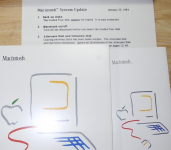
Exhibit A: the Macintosh addendum from 1984: "The Guided Tour disk cannot be copied. It is copy protected"

That explains it. Seems that ole was right. Well done man! Some disks were indeed write protected. 

My disks are younger than those advertised here, and are in French but I guess they were copy protected too.

Now the fact that it did not work on my Plus might be indeed a ROM-related problem. But it's the copy protection fault if it doesn't work with mini vMac, because I copied this disk onto a new one before creating an image.

NOW: What is the best tool to create a disk images of a floppy that's protected?

I think DiskDup is the best one as it can handle 400K MFS disks and create an image of it; unfortunately, it's less often able to overcome copy protection... 

I wanted to try putting the original disk inside my SE/30 running 7.5.1 but then I read this

I would rather not destroy that floppy and I can't boot System 6 on the /30 for various reasons.

From what I read on the internet:  Copy ][ Mac is able to copy disks that are copy protected.

So if I copy that original floppy to a 'new' one using Copy ][ Mac, and then create an image of that floppy using DiskDup on the /30, it "should" be okay, yes?

I'm going to give it a go tomorrow morning. I'll let you know.

 
MAJOR BREAKTHROUGH ------

The disks now work fine.

Last night, I found this article on Applefritter. Very useful. It seems that DiskDup+, or at least one version of it, can create an image of a copy protected disk. Mac128 was using Diskdup+ 2.7 on his Mac Plus running 6.0.5.

So I tried doing the same. AND IT WORKED.

The tour works on Mini vMac (64k ROM).

In a nutshell, if you have some precious copy protected 400k or 800k disks, use DiskDup+ 2.7 with System 6.

All early Tour disks (for 128k, 512k, 512ke) are copy protected. If the copy you've just made of a disk doesn't work, then it's probably because it's copy protected.

 
Actually, Diskdup gives you the choice.

Dc4.2 or DiskDup+

I used the Disk Copy 4.2 format.

And the images are perfect! MFS architecture preserved. Diskdup 2.7 is the deal man!

DiskDup 2.9 is kinda decieving tho.

 
But I just figured out it's not very good for 1.44mb floppies. My Mac Portable is sick but it's still capable to boot from a floppy. I wanted to backup the Macintosh Portable Tour (I uploaded it to the garden 6 months ago but it doesn't work correctly) using DiskDup 2.7 and it gives me an error after 3 seconds. I guess that's what DiskDup 2.9 is for. I think it works better with HD floppies.

But for 400k/800k copy protected or just normal stuff, DD 2.7 is the way to go!

 
In short, this would be my utility list:

DiskCopy 4.2 for all non-copy protected disks.

DiskCopy 6.3 for CDs.

DiskDup 2.7 for copy protected 400K/800K disks.

DiskDup 2.9 for copy protected 1.4MB disks.

 
Back
Top