


• Hello MLAers! We've re-enabled auto-approval for accounts. If you are still waiting on account approval, please check this thread for more information.

First Vintage Mac

Hello!

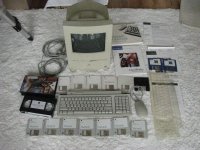
Today I purchased my first Vintage mac. I first used one of these in 1993 in Grade One and have not used one since, the rest of my primary schooling being completed on Classics and early powermacs. 

Behold, The colour classic

Paid $212 AUD for it or roughly $150 USD. It is a lot but I was desperate to get started and it came with an interesting array of software / books and an original VHS about getting started.

Its HDD is not functioning, so I will be chasing one of these. any ideas as to where to look? eBay I guess.

Regards,

Jarrod
$_57.JPG

 
Last edited by a moderator:
Well played sir! :) I have just restored one of these myself and have a second one to do later, which needs some more in depth work. :)

For secondhand drives, eBay is likely your best bet, however if you are confident with the lid off the drive, you may find the problem to be a simple matter of the heads being stuck against the degraded rubber bumpstops which if the heads havent smeared rubbery goo all over the platters, you may fix. This may not be a guaranteed fix but worth a try all the same... for what it's worth, no harm can come from opening a drive thatd otherwise be considered rubbish. :) If you do a quick search you should find a thread covering this, specific to the Quantum Prodrive ELS used in most Mac's of that era.

Also do a search of the bigmessowires SCSI2SD hack as a possibly more permanant solution to the issue of failing mechanical HDD's. :)

 
Nice, yes i agree with Schmoburger, try to fix the hardrive, you have nothing to lose.

Another option will be a 68 pin hard drive instead.

Have a look at caps also in the LB side.

 
Looks good.  I want to get mine working again too.

Seems if you don't use them for a while they stop working :(

 
Caps failures probably, i recapped a CC board a couple of months ago, didn't boot anymore and booted first time afterwards.

If you are talking of hard drives, yes, i agree also.

 
Yes, definitely do the caps as a precautionary measure as soon as practical to do so... you will find a lot of CC's tend to not want to power up when the caps start to go bad. This is often initially due to leaked goo shorting componentr, and they will come good with a toothbrushing. But this is only a temp fix... eventually as more goop leaks and the caps fall further out of spec, the problems become more frequent and varied, until the machine becomes unusable.

 
Yep everyone's right.

1. recap (remove the caps, clean the hell out of the board with a toothbrush and hot water with a bit of washing up liquid, leave to dry like the dishes but for a day or two, put the new caps in)

2. open up the hard drive and just give the head a little nudge to work it loose (make sure you don't get any dust in, if you do, blow it out, don't touch the platters!)

3. work up to using SCSI2SD instead of a hard disk

Then you'll be sorted!

PS if you're not sure the best way to recap, search the forums, then if you're still not sure, just ask :) main thing to remember is to be really careful when removing them not to rip them/their pads/traces off the board

 
Nice score, especially considering all the extra stuff that came with it.  +1 on the hard drive, open the lid and manually rotate the platter and wiggle the head you may find that it comes to life.  I recently revived and SE/30 drive simply by doing that.  I recently got a Colour Classic myself and did a Mystic upgrade, I also installed an ethernet card, great machine.

 
Thanks Guys, I am really looking forward to it. There is a boxed cc on eBay au atm but it was going to be right out of my price range. this almost was but i figured the little extras made it an appealing package

 
Oh and make sure you take a photo of location and/or write down the values of every capacitor before you remove them!

There are probbably charts out there, but best to make sure you cover your arse ;)

 
Back
Top


