• Hello MLAers! We've re-enabled auto-approval for accounts. If you are still waiting on account approval, please check this thread for more information.

Extensions Issue

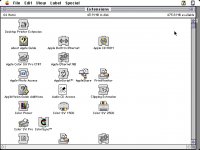
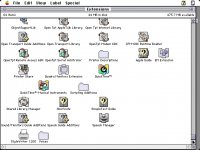
This will be my last question for awhile, I promise. Ok so I decided to revert my quadra to 7.6.1. The installation was a success, but the computer fails to boot unless I hold shift to disable extensions at boot up. Otherwise, it spends a long time on the start up screen, and then proceeds to freeze on a "rebuilding Macintosh HD" screen until I am forced to reboot it. I am pretty sure this means I am having an extension causing troubles for me. When I installed the system, I ticked a few extra things that I probably shouldn't of and that may have installed some extensions that aren't good for my quadra 610. i just want to know which extensions(s) you think may be causing this problem. I included a screenshot of the many extensions that are in my folder. Thank you.

Picture 1.jpg

Picture 2.jpg

Picture 3.jpg

 
1.) Is the correct System Enabler file installed? This is pretty much required for any Mac starting with System 7.x.x (I'm not sure which version it was, but beginning in 1992, Apple started issuing these files.) Without the enabler, the Mac can't even run certain versions of System 7. I'm not even sure which enabler number is the correct one; the System Software installer should be able to pick the right one out automatically.

2.) You could be having an extension issue. To speed things up, I'd recommend using a program called Conflict Catcher.

Quoted from Macworld's Mac Secrets, 5th Edition by David Pogue & Joseph Schorr:

Conflict Catcher is a startup-file manager. If you press the space bar as your

Mac starts up, you’re shown a list of every extension and control panel in

your Mac. At this pause in the Mac’s start-up sequence, you can switch

extensions on or off (by clicking); rearrange the loading order (by dragging);

view them sorted by type, name, or loading order; group them into mutually

required, or mutually incompatible, clusters; or group them into named

subsets. Conflict Catcher can actually show the names of your extension

icons as they load.

Best of all: if you’re having some mysterious glitch or crash, you click on CC’s

Conflict Test button. After a few restarts, CC triumphantly names the problem

extension and offers to turn it off for you. Conflict Catcher also offers the

Clean Install System Merge feature — after clean installing a new System

Folder, Conflict Catcher can reduce to only a few minutes the task of

bringing your customized fonts, sounds, control panels, preferences,

extensions, and Apple menu items into the new System Folder.

===========================================================

I have access to a demo of version 8. This demo version expires a week after you first use it — long enough to get out of whatever extension conflict you’re currently suffering. (The clean install feature doesn't work in the demo version, however.) If you'd like a copy, send me a PM and we'll go from there.

3.) I would also recommend running Disk First Aid to help with any drive or partition issues. I have a copy that I can give to you, if you'd like. Same as above, send me a PM if interested.

73s de Phreakout. :rambo:

 
This will be my last question for awhile, I promise.
Ask as many questions as you'd like or as you need to make your 68k Mac work well. Just ask them in the right place.

I have a copy that I can give to you, if you'd like.
Just make sure that you're either licensed to distribute that software, or that it's software that truly was released for free redistribution.

 
Just make sure that you're either licensed to distribute that software, or that it's software that truly was released for free redistribution.
The app is off of a CD included with each copy of Macworld's Mac Secrets 5th Edition by David Pogue and Joseph Schorr. It is free to use for up to 1 week, then you have to register (Shareware). But I did some research and the original authors of the software, Jeff Robbin & Bill Kincaid wrote it and Casady & Greene were the publisher/distributers. C&G are no longer in business as of 2003; Jeff & Bill are both Apple developers. Just an fyi. SoundJam MP is also made by Jeff & Bill (distributed by Casady & Greene), funny enough, until Apple came around and bought the rights to SoundJam. That app evolved into what we now know as iTunes.

73s de Phreakout. :rambo:

 
Firstly, at some point you're going to have to take some responsibility for sorting these problems out yourself - it's all part of the learning process and something you will have to do - you may as well start now!

A quick google search on your problem throws up this link pretty close to the top - http://support.apple.com/kb/HT2976, that pretty much explains how to troubleshoot your current problem. Using extensions manager will help you to create extension sets you can turn on and off whilst you're trying to figure out which extension/s are causing the problem.

Secondly, you need to use some common sense in sorting your extensions. There's an awful lot of extensions in your system folder you simply don't need. Find out what they all do and remove the ones you won't be needing - all those printer extensions for example for the moment won't be needed - round them all up and put them all into a separate folder outside the System Folder. Maclink for easy open? find out what it does, if you don't need it - take it out, likewise Speech Manager and Voices etc. By clicking an extension and going to 'get info' can tell you a lot about what the extension is, what it does and what part of the System Software it comes from.

 
spiceyokooko's words sound harsh but the OP should follow that advice.

There is no need, most of the time, for a third party extensions manager. It comes free with System 7.5 onwards, and that version can be retrofitted to System 7.0 onwards or you can dig out the version that Apple offered on the developers site. If you have System 7.5, Extension Manager is usually good enough. The third party products may "fix things" but you may not understand what has been fixed.

For System 6, try John Rotenstein's freeware "init cdev".

When installing Mac system software, expect that a universal installation will work on a standard model. Apple tried it and tested it. If your Mac has a third party accelerator, use the option "Install System Software for this Mac" and then run the installer/drop in the CDEV/INIT.

Add lightness and simplicate.

 
There's an awful lot of extensions in your system folder you simply don't need. Find out what they all do and remove the ones you won't be needing
There is an app (a self-contained document really) called InformINIT which lists and describes all the extensions, control panels and other system folder items up to MacOS 8.1 (InformINIT 8 ), including optional third-party ones. It is searchable. This is an invaluable aid in working out what you can remove, and what you ought not.

There is no need, most of the time, for a third party extensions manager.
That's true, up to a point. Extensions Manager is adequate for most purposes. However, EM will not show every extension or CP, declaring some off-limits and invisible to the user. The third-party manager Symbionts (and, IIRC, Conflict Catcher) will show every item in those two folders, as well as other system folder items which can be "managed" (moved to non-active folders). If one wants to create the smallest possible system folder, for example for a RAM-challenged system, it does a more thorough job.

Back in my System7/MacOS 8 days, I used to keep different, named, sets of INITs in Symbionts for different purposes, and re-start between them: for example, one set for internet, one for diagnostics and troubleshooting, and one for MIDI and music. Having only the minimal required INITs for each purpose seemed to help with stability.

 
Guys, please, take it easy. We all were n00bs or n00bish at one time in our lives. Give 'em a chance to learn and be patient. For some of us, it takes a while to grasp the concepts. I didn't get where I'm at today by being the ultimate expert 20 years ago.

73s de Phreakout. :rambo:

 
Bunsen wrote:

That's true, up to a point. Extensions Manager is adequate for most purposes. However, EM will not show every extension or CP, declaring some off-limits and invisible to the user. The third-party manager Symbionts (and, IIRC, Conflict Catcher) will show every item in those two folders, as well as other system folder items which can be "managed" (moved to non-active folders). If one wants to create the smallest possible system folder, for example for a RAM-challenged system, it does a more thorough job.
True enough. The catch all description Extension can be very confusing because it includes INITs (which patch the OS at boot), OS plug-ins (eg Chooser extensions) and Libraries (like DLLs). However to resolve a startup clash, you only need to worry about Extensions and Control Panels that have INIT code. Libraries, for example, are not called during boot so they are not going to create startup problems.

However a third party extension manager is going to help manage non-INIT extensions. If you have two applications that require different versions of a Library, different startup sets are the way to work.

 
Back
Top