• Hello MLAers! We've re-enabled auto-approval for accounts. If you are still waiting on account approval, please check this thread for more information.

Ethernet for my Performa 6360

mloret

6502
Hey guys,

I recently picked up an Apple 10/100 Base T ethernet card and I popped it in my Performa 6360 in the hopes of connecting the machine to the internet. No dice. I tried in OS 7.6 and 8.1. I did FULL install of the system software for both 7.6 and 8.1 in the hopes that it would install the correct Ethernet driver, but the computer isn't registering that there's anything there. When I go to TCP/IP control panel, Ethernet is not an option.

This is the first ancient computer I've tried to take online, and honestly, I am not 100% sure what I'm doing. I'm probably missing something obvious. Please let me know if you have any suggestions or ideas on what I'm doing wrong.
 
Hey guys,

I recently picked up an Apple 10/100 Base T ethernet card and I popped it in my Performa 6360 in the hopes of connecting the machine to the internet. No dice. I tried in OS 7.6 and 8.1. I did FULL install of the system software for both 7.6 and 8.1 in the hopes that it would install the correct Ethernet driver, but the computer isn't registering that there's anything there. When I go to TCP/IP control panel, Ethernet is not an option.

This is the first ancient computer I've tried to take online, and honestly, I am not 100% sure what I'm doing. I'm probably missing something obvious. Please let me know if you have any suggestions or ideas on what I'm doing wrong.

If the card is compatible it should just show up, I thought the ethernet stuff was just bundled in by default. I just tested a CS II card and when I added it to the machine it just showed up in system profiler without me doing anything.
 
If the card is compatible it should just show up, I thought the ethernet stuff was just bundled in by default. I just tested a CS II card and when I added it to the machine it just showed up in system profiler without me doing anything.
Nope, it's not showing up. Maybe there's something amiss with the card or the PCI slot on the logic board. However, the LEDs light up.
 
Nope, it's not showing up. Maybe there's something amiss with the card or the PCI slot on the logic board. However, the LEDs light up.
Do you have an OSX machine you can try it in? Is it possible the card you purchased only works under OSX? Might be worthwhile to find a CSII card although they are quite a bit more expensive.
 
Yeah it's defintely PCI. I have a Hackintosh that I'm running OS X on as well as an iMac G4. Not sure if either of those would run that card. Maybe it's not compatible?
 
Yeah it's defintely PCI. I have a Hackintosh that I'm running OS X on as well as an iMac G4. Not sure if either of those would run that card. Maybe it's not compatible?
Truth be told, a large number of PCI cards I've bought have been damaged by poor storage and postage. I often need to solder pins back down on any big quad flat package chips.

So, first things first, clean the edge connector. If that doesn't work, use a scalpel to ping each pin on any big QFP chips to see if they're not attached to the board.
 
Is it this (upside-down) card?

681dbd819ca6ea1376cc7bcef8ac2469.jpg
 
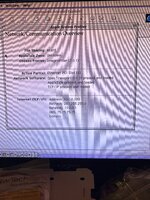
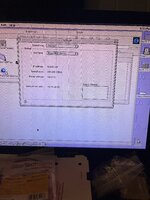
Okay I got a little closer. I did some internet research and read that this card needs the Enet driver. I don’t think I saw that in my OS 8.1 installer so I grabbed it out of an 8.5 disk. When I added the Enet extension, Ethernet shows up in TCP/IP settings. But not much else. Not sure what settings I need. I looked at system profiler, and it looks better! Still not right though. Help?
 

Attachments

  • 8F855952-F0B6-4B2F-88F1-E2E3E3CE7A47.jpeg
    8F855952-F0B6-4B2F-88F1-E2E3E3CE7A47.jpeg
    3.5 MB · Views: 13
  • BD301EED-7553-4120-A690-A3A9F43649CD.jpeg
    BD301EED-7553-4120-A690-A3A9F43649CD.jpeg
    3.2 MB · Views: 14
What is it that doesn’t look right or isn’t working?

From the images it looks like the driver is loading, the card is detected, TCP/IP is set to Ethernet, and you’re getting DHCP settings from your router (obviously I have no way of knowing if they are the correct settings or not). It seems like things should be working.
 
When I launched Internet Explorer, it was trying; to get to a live.apple page and I was getting a security error. When I tried Macintoshgarden.org, it worked. Can't get it to work in Os 7.6 though.
 
No page with modern security (including apple.com) will load on ancient browsers.

theoldnet.com and frogfind.com will be your friends with ancient browsers
 
Back
Top