The trick for dual boot is to install OS 9 first and make sure the boot driver partition is created. After that, you create a second partition using Drive Setup, and then install OS X onto that. You could even create three partitions, so you can install 10.4 on one and 10.5 on another.
The trick after installation is that to select your OS, you hold down the Option key after the boot chime sounds. A screen will come up showing you three hard disk icons with the name of your three partitions. I usually name my partitions after the OS that's on them. Then you just select the OS you want to boot into, and let it boot!
The best OSes to choose are 9.2.2 (with a bunch of extras to make the multimedia keys work, etc.), 10.4.11 with OS 9.2.2 in Classic mode (you can copy your System Folder from your 9.2.2 partition over to your 10.4 partition for this), and Sorbet Leopard (which is a pre-streamlined 10.5.8). You'll want to install Classilla on 9.2.2 as well, and TenFourFox on 10.4.
For the most part, you can probably get away with spending your time in 10.4. This lets you boot the Classic environment to run (most) older software, plus run (most) OS X PPC software. Sorbet doesn't support Classic mode, but does support some newer OS X software that 10.4 doesn't -- and it plays video better.
If you REALLY get the multiboot bug, you can do what I've done with one of my G4 Minis, and use Sorbet to create 10 or so partitions of 2GB size, and use the CHRP ROM and Enablers mentioned in another thread on this forum to boot OSes from System 7.0 and later. I have to say, System 7.1 on a G4 Mac is a real treat (although audio still hasn't been solved) -- the speed with which everything runs is astounding.
As far as software to install goes -- MG also has restore DVDs for the eMacs so you can restore all the educational software they were originally bundled with, and the Market Software Series and Internal Edition CDs both have other must-have software bundles on them that everyone used back in the day.
Good places to pick up the packages: MacOS91_Internal.ZIP for OS 9 software (just copy the software/installers off, don't do the OS install),
https://macintoshgarden.org/apps/sorbet-leopard for Sorbet,
https://macintoshgarden.org/apps/apple-restoration-cds-market-software-series-1994 for older "classic" Macintosh software bundles that shipped with older Macs and Performas (most of that stuff will still run under OS 9),
https://macintoshgarden.org/apps/universal-tbxi-patchset if you want to play with booting older Mac OS versions,
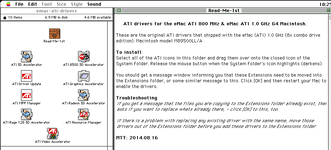
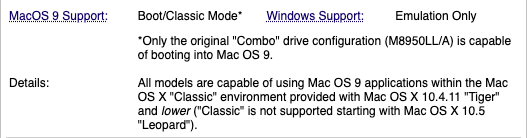
https://macintoshgarden.org/apps/emac-g410-ati-restore-discs - as you discovered, you can't actually boot OS 9 from these, but you CAN copy the bundled software off them and use it. To that end, you can do the same thing with
https://macintoshgarden.org/apps/emac-g4142-2005-software-restore-media-set-mac-os-x-104 - use the bundled software with your 10.4 install.
For Mac OS 9 and earlier, there is nothing special about where you install software, other than that the folder where your System is installed must be "blessed" which sets a record in the boot partition indicating the path to the boot info. Other than that, you can organize your partitions as you see fit.
For OS X 10.0 and later, there's a lot more structure about the location of files and naming conventions. As the OS X versions get higher, Apple enforced more and more of what started out as relatively loose rules. So most software got installed in /Applications (or else, in ~/Applications, which is short for /Users/<yourusername>/Applications), and there are a /Library and a ~/Library folder which provide support documents for these locations, including DLL equivalents, preferences files, cache files, etc. All the kernel extensions and other system files go in /Library/System. And to install OS X, you must first be booted into the OS X version you want to install (usually off a DVD/CD). One trick I like to use is that I create an 8GB "Install" partition on my drives, and use Disk Utility to restore an OS X install DVD to that partition. Then I can boot from it just like from the DVD (but faster) and use it to install to a different partition. This also doubles as a recovery partition, allowing me to boot and run Disk Utility to do repairs or use a terminal to modify system files from the main boot partition.
For OS 9 and lower, as long as you have all the correct files with the correct resources loaded into them, you can copy system folders between partitions, move them around, store applications and documents anywhere you want, etc. Just make sure that the System folder contents stay in the System folder in the correct folder structure.