• Hello MLAers! We've re-enabled auto-approval for accounts. If you are still waiting on account approval, please check this thread for more information.

Dove MacSnap issue

crazyben

6502
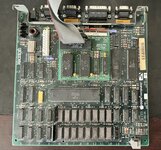
I got a Mac 512k with dove MacSnap card. 512k got damaged during shipping and when I opened the Mac I found the Macsnap was rattling inside. It had lot of bent pins. I straightened them using the mechanical pencil. I removed the board seated back the macsnap card and installed board on my working 512k. When I try to turn in the Mac I get long bong with distorted sound then followed by black and white vertical lines. If I turn off the Mac and turn back on I only get black and white vertical lines.

I checked on dead Mac scroll and it point the issue with ROM. It is installed correctly so I am out of ideas on what is wrong.
 

Attachments

  • IMG_5337.jpeg
    IMG_5337.jpeg
    441.2 KB · Views: 20
  • IMG_5338.jpeg
    IMG_5338.jpeg
    3.5 MB · Views: 21
That sounds like a frustrating situation! You're absolutely right, the long bong with distorted sound followed by vertical lines is a classic symptom of a ROM issue. However, since the MacSnap card took a beating during shipping, it's definitely worth checking there first.

Those bent pins or the connections to the sockets could be causing problems. Even though you straightened them, a visual inspection might not be enough. If you can, try cleaning the ROM sockets with DeoxIt. This contact cleaner can help remove any corrosion or grime that might be interfering with a good connection.

If you have access to a multimeter, a good next step would be to perform a continuity check on every pin of the MacSnap card. This will ensure they're making proper contact with the ROM sockets on the logic board.

Lastly, if you have access to another known-good ROM for your Mac 512k (or a ROM-INATOR board), try swapping it in to see if the issue persists.
 
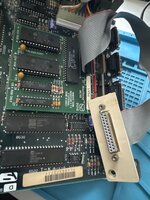
After I posted I had same idea as you about the connection. I took out the board and turns out one of the pins was broken and stuck in socket. With little solder and multimeter I was able to confirm that broken pin is now connected and Mac booted as normal. When I connected the scsi cable to the board and booted the Mac I get sad Mac with 030001. I can’t find anything about thar error code. When I removed the cable Mac booted as expected.
 

Attachments

  • image.jpg
    image.jpg
    1.5 MB · Views: 19
I have been testing all this only on the board that has macsnap installed. I had to use my working 512k as the macsnap 512k has no video.
 
If you haven't done it yet, I suggest performing a continuity check on every pin of the MacSnap card to the 512K logic board. Maybe you'll get lucky and there's another pin not making connection, one with an address bus bit perhaps.

Also, I would thoroughly clean the sockets with something like Dioxit spray cleaner and re-seat the ROM ICs. I've seen many cases where a good cleaning of these sockets solves many issues on these Macs.

Lastly, clean and check the connectors of the SCSI cable.
 
Last edited:
Turns out the issue was the same broken pin. I added trace wire to make sure the connection was secure and now the Mac boots with no issue everytime. Thank you for your help :)
 
I'm so glad you could figure it out! Thanks for sharing your solution, it might be helpful to someone else facing a similar issue.
 
Back
Top