Dove MacSnap 5.0 RAM Upgrade Upgrade

mitchW

6502
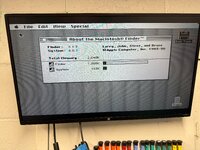
I am restoring a Mac 512K with a 512K Dove MacSnap 5.0 RAM Upgrade card + SCSI.
This upgrade card brings the Mac RAM to 1MB.

But I've seen some other Dove MacSnap RAM Upgrade cards that contain 1MB or 2MB of RAM.
Is it possible to upgrade my upgrade card to 1MB or even 2MB?

Also, one of the snap connectors is bit corroded, any possibility of getting a new one? Or were those made to order parts just for this upgrade cards?
 
I am restoring a Mac 512K with a 512K Dove MacSnap 5.0 RAM Upgrade card + SCSI.
This upgrade card brings the Mac RAM to 1MB.

But I've seen some other Dove MacSnap RAM Upgrade cards that contain 1MB or 2MB of RAM.
Is it possible to upgrade my upgrade card to 1MB or even 2MB?

Also, one of the snap connectors is bit corroded, any possibility of getting a new one? Or were those made to order parts just for this upgrade cards?
you can fix the corrosion by using white vinegar
 
Thanks, I did use a special "gentle" rust remover cleaning product that I usually use for corroded stuff and it turned all green corrosion into dull grey metal. I will try white vinegar if it will make it any better
 
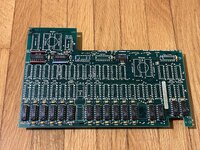
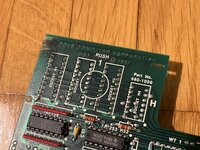
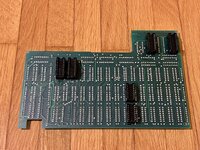
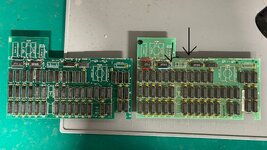
Can you post pics of the card? It might be an easy upgrade to 2MB. Great cards these, really make a 128/512K useful.
 
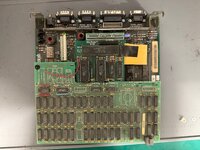
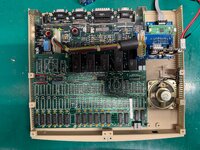
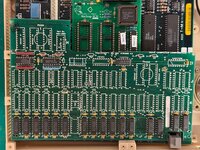
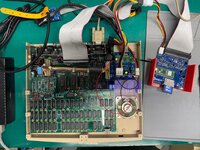
Here, I snapped few pics of the card :)
 

Attachments

  • IMG_9664.jpeg
    IMG_9664.jpeg
    3.3 MB · Views: 30
  • IMG_9668.jpeg
    IMG_9668.jpeg
    3.1 MB · Views: 25
  • IMG_9667.jpeg
    IMG_9667.jpeg
    2.6 MB · Views: 21
  • IMG_9666.jpeg
    IMG_9666.jpeg
    2.1 MB · Views: 22
  • IMG_9665.jpeg
    IMG_9665.jpeg
    2.9 MB · Views: 26
The card looks in great shape!

To upgrade it, you just need to populate the missing 32 ICs with 41256 DRAMs (256K x 1-bit) and add that second 74253 multiplexer chip on top. You should also check if the two 150-ohm resistors are present; if not, you'll need to install those as well—along with those 0.1 µF yellow capacitors.

Regarding the logic chip, it doesn’t strictly have to be a 74F253; a 74HCT253 or 74LS253 will work just as well in this application. Once upgraded, the card will provide 1.5MB, which, combined with the 512K on your motherboard, gives you a total of 2MB.

The hardest part will be sourcing 32 matching 41256 chips, as they are becoming harder to find in large batches. As for the corroded snap connector, those were, unfortunately, proprietary to Dove.
 
Thanks!

I checked my parts bin, and I actually have 18 of 41256 ICs (not tested though) and a 74F253! Other missing parts, I can order :)

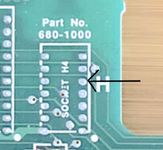
But now I found some photos of the fully populated Dove MacSnap 5.0 on ebay, but it seems it has and additional snap connector for one chip on top of the card (for connecting onto LS04 chip, I guess). And if they were proprietary, then even fully populating won't work.

I did find some photos on of that same board, but with 16+16 memory ICs (two thirds populated, so 1024K). Perhaps this configuration would work without connecting to LS04 chip? I am not sure though. Even having 1.5MB of RAM is better than 1MB though.
 

Attachments

  • Screenshot 2025-12-24 at 01.09.57.png
    Screenshot 2025-12-24 at 01.09.57.png
    1.1 MB · Views: 17
Actually, the model of your MacSnap board isn't '5.0', that's just the PCB revision.

Your board is a model '548.' Apparently, it seems the model names with an "E" at the end were specifically for the Macintosh 512Ke. Those 'E' versions have an extra snap-in socket connector for LS04 to tap address bit A20, which is used by an additional logic chip (74F259).

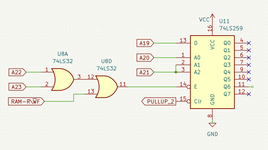
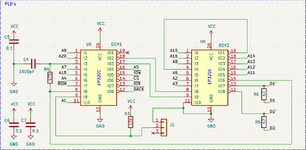
I've reverse-engineered the logic of this board; pin 11 of that 74259 connects to pin 15 of the additional 74F253 found on the fully populated 1.5 MB models.

It looks like what it does is disable writes to a specific memory address region: link
74259.png

From a functional standpoint, it doesn't affect the normal operation of the machine. We never quite figured out what it might be needed for.

So, you don’t actually need that additional snap-in socket connector and the 74259 to get 1.5MB (Just tie pin 15 to GND). But if you want to implement the 74259 anyway, you could just tap A20 from the logic board with a bodge wire.
 
Last edited:
Actually, the model of your MacSnap board isn't '5.0', that's just the PCB revision.

Your board is a model '548.' Apparently, it seems the model names with an "E" at the end were specifically for the Macintosh 512Ke. Those 'E' versions have an extra snap-in socket connector for LS04 to tap address bit A20, which is used by an additional logic chip (74F259).

I've reverse-engineered the logic of this board; pin 11 of that 74259 connects to pin 15 of the additional 74F253 found on the fully populated 1.5 MB models.

It looks like what it does is disable writes to a specific memory address region: link
View attachment 93575

From a functional standpoint, it doesn't affect the normal operation of the machine. We never quite figured out what it might be needed for.

So, you don’t actually need that additional snap-in socket connector and the 74259 to get 1.5MB (Just tie pin 15 to GND). But if you want to implement the 74259 anyway, you could just tap A20 from the logic board with a bodge wire.

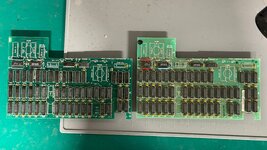
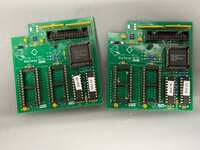
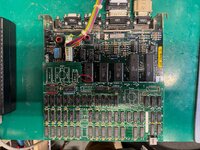
This is great information. I have a couple of MacSnap RAM expansion boards that were installed in two Mac 512k's. One had just the bottom portion of the board filled (512k RAM) and the other was fully populated with a MacSnap SCSI board.

I populated the board with similar RAM chips and I was curious as to why I did not get the full 1.5mb upgrade. This answers my question. So I can place a jumper on pin 15 where the 74259 chip is located and run it to a ground. Correct?

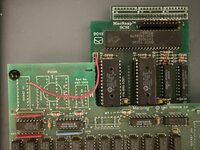
The fully populated board had a jumper from the SCSI board to the RAM expansion board. Would you know what the reason why it was placed?

Thank you in advance.
 

Attachments

  • macsnap ram and scsi.jpg
    macsnap ram and scsi.jpg
    3.2 MB · Views: 11
  • macsnap ram board jumper.jpg
    macsnap ram board jumper.jpg
    1.3 MB · Views: 11
  • macsnap ram expansion boards.jpg
    macsnap ram expansion boards.jpg
    1.4 MB · Views: 13
This is great information. I have a couple of MacSnap RAM expansion boards that were installed in two Mac 512k's. One had just the bottom portion of the board filled (512k RAM) and the other was fully populated with a MacSnap SCSI board.

I populated the board with similar RAM chips and I was curious as to why I did not get the full 1.5mb upgrade. This answers my question. So I can place a jumper on pin 15 where the 74259 chip is located and run it to a ground. Correct?

For the 1.5MB configuration, you need to have the second 74253 populated, as shown in your pictures of the 1.5MB boards. In both models (512KB and 1.5MB), pin 11 of the missing 74259 is already tied to ground (pin 8). That blue component is a 0-ohm resistor.

The fully populated board had a jumper from the SCSI board to the RAM expansion board. Would you know what the reason why it was placed?

Thank you in advance.
This is actually really interesting! It’s the first time I’ve seen a connection like this.

It looks like it’s injecting the LDS signal directly from the TSM PAL (Pin 9) into the SCSI board at J1, pin 2. I’m not 100% sure on the exact logic yet, but if I had to guess, it’s probably a failsafe to tighten up the data latching for the SCSI chip.

If LDS isn’t asserted perfectly during a SCSI access, the controller won’t "see" the data on the lower 8 bits of the bus, which usually leads to those annoying bus corruption issues.

In the original Mac design, these strobes are timed against the 7.83 MHz clock to make sure the data is stable before a peripheral tries to grab it. So, the equations in that DOV1 GAL are likely using this strobe to give the SCSI IC a much cleaner latching window.

Checking the equations stored in the DOV1 should corroborate that.


Screenshot 2026-03-12 at 10.40.20 PM.png
 
Okay, it seems I was right!

In the Macintosh Plus, the SCSI IC has its /IOW and /IOR connected to /LDS and /UDS, respectively.

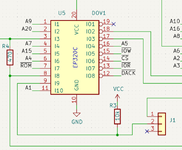
The SCSI MacSnap logic generates its /IOW signal (pin 15) at DOV1 like this:

/o15=i8 & /i9 & o19+i8 & i11 & o19
o15.oe=vcc

The first term never gets activated since i9 is simply being pulled up by R3 if nothing is connected to pin 2 of J1.

Consequently, /IOW is always directly generated by the second term, which is gated by the RC circuit formed by R4 and C4 (i8).

I haven't found an installation manual for the DOVE SCSI MacSnap, but looking at pictures online of people who have this board installed in their 512Ks, I have never seen this bodge connection before.

I suspect the DOVE engineers primary intention was for the SCSI board to work perfectly without this bodge. It is likely that J1 and the first term of o15 are there for factory verification, to ensure the RC time constant from R4 and C4 stays within the timing window for latching data from the SCSI.

Whoever made this connection clearly understood this; it is more than probable that the R4 and C4 values are not providing the correct RC time constant for the SCSI interface to work reliably on your specific board.

The other signal including i9 is for /IOR (pin 13), as expected:

/o13=i8 & i9 & /i11 & o19
o13.oe=vcc

Here, i9 directly gates /IOR. With the bodge in place, whenever /LDS is asserted, /UDS is unasserted , as expected.

Demik is the right person to test whether this bodge connection improves the reliability of the MacSnap SCSI replica!Screenshot 2026-03-13 at 9.47.25 AM.png
 
Last edited:
Back
Top