• Hello MLAers! We've re-enabled auto-approval for accounts. If you are still waiting on account approval, please check this thread for more information.

Does Apple Parallel Interface card use a non-standard (non-PC) pin out? (aka PLEASE help me get a printer working with my Apple IIe)

macinbot

6502
I have an Apple IIe with the Apple Parallel Interface card. I am attempting to get it working with an Okidata Microline 320 Turbo dot matrix printer. I am using the parallel port on the Oki in Epson FX compatibility mode.

Tried PR#1 to activate the printer, but it just hangs until I CONTROL + RESET.
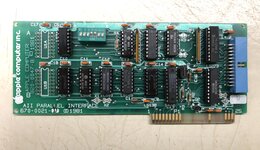
 

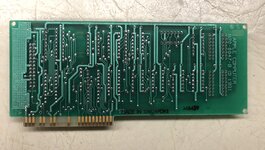
Attachments

  • 61EE4E64-1426-4E42-8234-A975B16F578D.jpeg
    61EE4E64-1426-4E42-8234-A975B16F578D.jpeg
    2.3 MB · Views: 5
  • C902D7DA-1B3E-4E1A-8BF6-32D6860CC5F7.jpeg
    C902D7DA-1B3E-4E1A-8BF6-32D6860CC5F7.jpeg
    2.3 MB · Views: 4
After entering PR#1 + RETURN key, I tried typing

PRINT “HELLO”

And the hitting RETURN key and nothing transpired.

Any other suggestions? I’ve tried several cables to rule out a faulty one. This site states there’s special pin out variance that Apple Parallel card uses from standard PC parallel pin out, but I’m not sure if it applies here.

 
Last edited:
The pinout appears non-standard, so you'll have to wire an adapter. Another option is finding a Grappler+ card. Those are still fairly common and usually include the Centronics ribbon cable or a DB-25 port.
 
After entering PR#1 + RETURN key, I tried typing

PRINT “HELLO”

And the hitting RETURN key and nothing transpired.
If it were working, you would expect the "P" to be printed as soon as you pressed the key, along with every other letter you type, not just the text "HELLO". I suspect your problem is somewhere in the configuration setup, or in the pinout as @NJRoadfan mentioned.
 
Back
Top