


• Hello MLAers! We've re-enabled auto-approval for accounts. If you are still waiting on account approval, please check this thread for more information.

Discharge a CRT?

OK so i will finally be upgrading the ram in my SE tomorrow. I am letting it sit all night unplugged just in case. Ive read several guides on how to perform the upgrade, but the first step is always to discharge the CRT. This might be a stupid question but how do i do this?

P.S. Apparently some models of SE had a jumper that tells the system how much memory is in the slots. What do i do with this if I am upgrading to the full 4mb? Do I take it off?

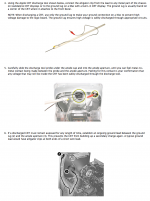
 
If you're not working on the CRT, don't discharge it. The **only** time I've ever been shocked by a compact Mac, out of scores of times working inside them, was when I tried to discharge the CRT. Just leave the CRT alone.

I don't know the RAM jumper answer, but it shouldn't be too hard to Google up, or someone else will be along in a bit with the answer.

 
Using a plastic handled long screwdriver and some thick copper wire works fine. I had a moment where my knuckle hit the analog board of my SE (no paper cover at that moment ) and now I'm not so afraid of the CRT that much :D

 
All Classics and most SEs self-discharge. I've heard earlier SEs (I'm guessing pre-1988 models) may not and I know all Pluses and earlier don't.

My approach:

SE/Classic: Work immediately. I've worked on scores of these, including messing with CRTs, and have never had an issue.

Earlier Macs: Keep it unplugged for a week, then work.

The reason you see the instruction to use a discharge tool in old manuals is for liability sake.

 
I tended to use an approach starting with "leave uplugged for a week" then "yank the power cord" when testing solder fix.

I didn't touch the CRT when it was open though, focusing on the analogue board.

(For liabilities sake follow Apples advice.)

 
So

All Classics and most SEs self-discharge. I've heard earlier SEs (I'm guessing pre-1988 models) may not and I know all Pluses and earlier don't.
My approach:

SE/Classic: Work immediately. I've worked on scores of these, including messing with CRTs, and have never had an issue.

Earlier Macs: Keep it unplugged for a week, then work.

The reason you see the instruction to use a discharge tool in old manuals is for liability sake.
So if mine is a 1989 model, you think I would be all right after letting it sit for 24 hours scott?

 
You don't need to discharge the CRT if your main goal is to upgrade Ram.

I have messed with a lot of compacts, never had to discharge the CRT for upgrades.

Just keep your hands off the red anode cap, and it will be fine.

 
Back
Top

