• Hello MLAers! We've re-enabled auto-approval for accounts. If you are still waiting on account approval, please check this thread for more information.

Digital Audio OS 9 Disc boot trouble...

derekcat

6502
Hey guys, been a while..

I'm literally stumped.

I CAN NOT get this DA G4 [dual 533] to boot OS 9 anymore.. It use to a year ago, but since then it's been running Tiger on an Apple software RAID.

I've taken out all of the PCI cards, swapped video cards, tried Discs for: 9.1 [a disc that has been tested on other machines], retail 9.0/9.0.4 [Even though they're not supposed to work], 9.2.2 for iMacs V1.0 and 2.0 [i use a 700Mhz G4 iMac disc for all my 9.2.2 installs at home and it works perfectly], I've zapped the PRAM, set the disc to start from the OS X startup pane, set the disc to start from the Option-Boot screen, reset-nvram and set-defaults in open firmware, restarted, hit the CUDA/PMU/etc button on the motherboard, tried taking a RAM stick out, tried booting from different CD drives [that can see the OS 9 CDs perfectly fine if I hook the RAID drives back up], disconnected all drives except the cd drive, tried the CD drive on both motherboard ATA connectors and on a Sonnettech ATA/133 card.

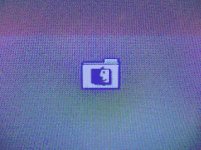
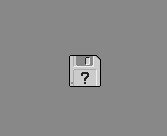
AND NOTHING! It does the gray blinking folder ?/Finder icon for a couple seconds and then switches to the light gray blinking floppy disk ? screen.

~_~

I'm totally out of ideas.. Anyone?

 
The PRAM battery shouldn't do anything for booting.. I did try removing it but I think it's still good anyway.

Haven't tried an OS X disc but I imagine it'll work.. The trouble seems to come in at or after open firmware has tried to pass it to OS 9 [the gray bkg folder to light gray bkg floppy changeover]

 
IIRC, Macs with New World ROMs shouldn't require a PRAM battery to boot. I know for a fact that an iMac G3 will boot without a battery even in the machine. Absent PRAM instructions, the firmware goes serching for a system folder. HD first. Then optical. At some point it should also scan the USB ports (I think). Ergo, the New World ROMs are considerably "smarter." You can override this order, and go staight to optical by holding C.

Do you have the original optical drive for that Mac, or is it a third party replacement? I have heard that some third-party drives are troublesome as boot devices. Does it look and/or sound like the firmware is even searching the CD?

 
you can hold the option key down during boot and itll search for any bootable medium and display them. then youcan click which one to boot.

 
Right. If the CD doesn't show up at all when holding Option, then that is likely that the drive is not considered a bootable device *or* none of your OS 9 discs are bootable on that machine. There were a couple of different flavors of OS 9 that were machine dependent, or only worked on a certain number of machines. I have an eMac 9.2.2 disc that will only work on machines built before mid-2002 or so.

If an OS X disc won't even boot, then I would definately lean towards it being the drive. Were any of the drives you tried the one that came with that machine?

 
oops must've gotten lost in my giant blog of text..

It's not this specific machine's original optical drive but it is an Apple-shipped CD/RW drive that I pulled from another DA I have [it even has that stupid aluminum tape holding it in from the factory ^_-]

The machine does see the OS 9 discs as an option in the option-boot screen, but like I said it just gets to the ? Floppy

I forgot one little sidenote: to boot OS X off the softRAID I have to option boot it, otherwise it just sits at the normal gray blinking Finder/? folder

Google has provided images!

If I don't have the CD in as if I tried to boot OS X without holding option to select it -OR- if I try to boot any OS 9 disc I get this for just a second or two:

Finder-folder.jpg

After trying to boot the OS 9 disc and that one goes away it switches to this:

floppy.jpg

I tried leaving the machine unplugged with no PRAM/power cord.. No effect

Also booting without the PRAM has no effect [does the same things]

Open Firmware can't boot USB drives, it does search for Firewire ones though. I tried the disc in a known good firewire drive, same stuff.

Btw, I've been a Mac repair tech for ~6yrs now.. So I've tried to be pretty through ^_-

The only possibilities I can think of right now are: the PCI reset that I found in the service manual [unplug, remove PRAM batt, press power, wait 10+min], and reseating the CPU daughter card [Just because I haven't tried that yet..], or the motherboard has given up on OS 9 >_< [i don't know how that could come about, but it's a looming possibility..]

 
Yea, pretty weird.. >_<

I'll try booting off an OS X CD tomorrow.

Hmm... Maybe it was just USB 1 machines.. Been a while since I've messed with that. USB is just a terrible hard drive interface anyway though.

 
Only the USB 1.1 iMac DV/PM G4 (Sawtooth on) and Pismo + G3 iBooks+ some G4 powerbooks were bootable. Once USB 2.0 came out, apple nixed the ability until the intel machines came out. Not even the PowerMac G5 could do it. Kind of frustrating, as all they left was the FireWire port, and I had a machine at one time that the firewire chipset went out on it. (iBook G4) with no way to boot from it when the HDD went bad. DVD/CD-RW also was not reading correctly.

So I had no option but to swap a new motherboard in it to get anything to work since it turned out that part of the chipset went south, and the IDE didn't work

 
Only the USB 1.1 iMac DV/PM G4 (Sawtooth on) and Pismo + G3 iBooks+ some G4 powerbooks were bootable. Once USB 2.0 came out, apple nixed the ability until the intel machines came out.
That makes sense, as I've done it on an iMac (2001) and a G4 Digital Audio (2001).

 
USB 1.1 might be a terrible interface for mass storage (Firewire is great), but it's still useful in emergency situations. I also use a thumbdrive for moving files around, even on USB 1.1. It's faster overall than most other removable media, and most computers built since the late 90s have the ports.

Try finding even a modern *PC* with a 1.44MB floppy.

To say nothing of the space constaints. Apple got a lot of crap ditching the floppy, but they were ultimately vindicated.

Plus, the MacBook Air and a few other Macs (including the first and budget iMacs) have USB but not Firewire. Thus it would idiotic for Apple not to make the ports bootable.

 
Ive booted a TiBook G4 and an iMac G5 isight off of an external USB DVD burner to install OSX without an issue.

I had to, as the drives in both units are fubar. BAD lasers. I got so mad at the G5 drive, i pulled it out and smashed it to bits. hehe.

 
lol.. Side tracked on USB booting..

Indeed it is useful for flash drives, keyboards, mice, printers, etc.. Still, some slot-load iMacs refuse to boot USB 1 [i distinctly remember trying] and it takes an unholy amount of time..

ugh.. the orig/350Mhz SL iMacs.. Leaving FW off of those was a huge mistake >_< That was during the greatest surge of firewire devices... Yea I know - cost :p

lol USB NuBus cards would be awesome :D

Anyway! Good news!

The machine does boot off of OS X discs... And I tried it in the other DA I had around and the OS 9 discs wouldn't boot it either... Meaning the iMac OS 9.2.2 discs [version 1.0 and 2.0] must've been mislabeled >_< [supposedly iMac 9.2.2 1.0 and 2.0... But at least the 1.0 disc must be labeled wrong - the 9.2.2 gray factory stamped disc from my Dad's old 700Mhz works for everything.. I think I need to image it and delete whatever one is saved on the DA's mirror volume..]

So! Downloaded a 9.2.1 iso, and both DAs booted right up! [Also the creator of the iso was kind enough to include a bunch of utilities: stuffit expander, resedit, USB overdrive, etc]

Still doesn't explain why my retail 9.2.1 disc and boot tested 9.1 discs didn't work.. But it's really a non-issue now ^_^

[Oh, there was one extra problem after it started booting... Whatever Nvidia AGP card I had in the DA didn't like OS 9 for some reason, though I could swear it was originally from a DA..]

 
Back
Top