


Preview pic (after clean and before OS reinstall):
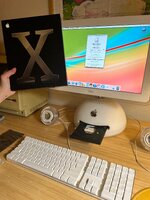
I bought this iMac from someone else. I opened the iMac to replace the battery on the mobo and clean it. I also added ram into the extra slot. I put it back together and it was working well (see pic). Since I bought it from someone else, I decided to reinstall the OS with 10.3 discs that I bought new, since that was the OS on it already, I thought it would be fine.
Some stuff went a little wonky during the clean:
Anyway, I fixed the heatsink bar and put it back together. It was working well, I even saw extra RAM reading on screen (see pic).
At this point, I started the new OS X install. New shiny discs. Disc 1 went well. When on Disc 2, there was a kernal error 00000001. I should have taken a pic and I regret not doing so. A bunch of text read on the left side of the screen, screen was still on but frozen. Keyboard input did not seem to work. So I did a hard reboot since it was locked up after I waited for a while.
Upon hard reboot is when the real trouble started:
I bought this iMac from someone else. I opened the iMac to replace the battery on the mobo and clean it. I also added ram into the extra slot. I put it back together and it was working well (see pic). Since I bought it from someone else, I decided to reinstall the OS with 10.3 discs that I bought new, since that was the OS on it already, I thought it would be fine.
Some stuff went a little wonky during the clean:
- The heatsink bar that goes over the processor was stuck to the heatsink on the top of the machine and wound up bending. Didn't realize it at first and I tried to put the bottom and top back together with it bent.
- This caused two things:
- One RAM clip broke off (it still seats fine and RAM seems undamaged). Before I started OS reinstall, both RAM were being read (see screen).
- Small scratch on one of these round whole on the mobo -- not sure they have a function? (Not my pic, I think it's the one under the metal heatsink bar).
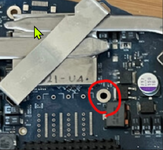
Anyway, I fixed the heatsink bar and put it back together. It was working well, I even saw extra RAM reading on screen (see pic).
At this point, I started the new OS X install. New shiny discs. Disc 1 went well. When on Disc 2, there was a kernal error 00000001. I should have taken a pic and I regret not doing so. A bunch of text read on the left side of the screen, screen was still on but frozen. Keyboard input did not seem to work. So I did a hard reboot since it was locked up after I waited for a while.
Upon hard reboot is when the real trouble started:
- Screen is now black, no LED backlight, no picture.
- Keyboard inputs do not seem to work.
- Fans are running, there is a start up noise.
- Disc seems to be spinning from what I can tell.
- PRAM reset
- PMU button
- Removing extra RAM with PRAM reset & PMU button
- Running only with extra RAM without mobo RAM with PRAM reset & PMU button
- I'd like to get the disc out but I can't open the tray since keyboard input does not work. Is there a manual way to do this?
- I ordered a mini-VGA to VGA cable to see if an external display will work.
- If I can get the disc out, I'm wondering if I should insert an earlier OS disc (which one?) Not sure if that would fix the screen issue but maybe would prevent it from bricking again. Any experience here appreciated.


