• Hello MLAers! We've re-enabled auto-approval for accounts. If you are still waiting on account approval, please check this thread for more information.

Did I do that??

I was installing os 6.0.8 onto the external SCSI drive on a Mac Plus when suddenly I heard a loud pop and smoke started pouring out of the top of the computer! AGH!  The screen flickered a bunch but the machine stayed on, of course as quickly as I could I powered pulled the power and opened her up.  

My question is, could I somehow have caused this?? 

Next question is where I do I start to repair it?!
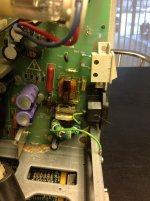
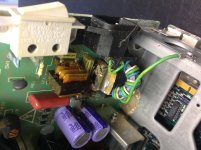
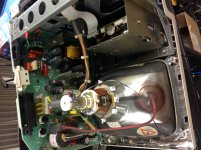
IMG_0021.JPGIMG_0022.JPG

 
That's not as bad as it may seem - if I recall correctly, the big yellow capacitor that blew up is a suppression filter. It's meant to protect the computer from power spikes; when it gets old it can blow up with a lot of black smoke as it happened to you, but it's nothing too serious. The Mac could even run without it!

What I would do, if you're practical with soldering, is just starting to replace it - there's a list floating somewhere with the exact replacement component to use, which now I don't remember. When you're at it, you might look around the other capacitors (possibly even remove them) to be sure there's no leakage going on - I can see some traces of corrosion in the second photo, so I'd definitely check their condition.

 
Nope. That's normal. They fail with age and it's unavoidable. Just swap it out and replace it with a matching value cap (there's serveral different type of caps you can sub in but they all work just as well) and you'll be fine.

 
Last edited by a moderator:
Oh man thanks guys!!! Loving this forum, and the old macs!   :D

I will look for the part and get to work.. 

on another note,  I am still trying to get this external drive to boot on the plus, it worked a few times, then no more.

The drive mounts when I start from a floppy, but it will not boot from the drive.  Is it possible that the CMS external drive isnt terminated? It has a set of 8 switches on the back 1-8 with on and off positions.  I am assuming this is the SCSI selector not the termination.  Any thoughts on how to get the plus to boot directly from the external HDD?? 

 
Most likely just from age, but it looks like you've got something else leaking inside?
Yeah there are a few spots like that in this Plus, but I believe it was from previous leaks, b/c I dont see any leaks.  Also the very first time I opened this Plus I forgot to take out the battery compartment screw, and the whole compartment came off with the back case, haha.

 
Oh my god, another CMS external drive? That's the second one I've heard about this week. O_o

Don't touch those dip switches. Even I don't remember how hey worked but if it worked before you touched them, they are the least of your problems, same with termination.

Are you able to get to the WECOME TO MACINTOSH screen, or is it getting to the happy mac and then going back to a blinking ? floppy disk? If the former you can try holding the shift key at boot to turn extensions off. Failing that, the Finder or another system file somehow got trashed and you need to reinstall.

 
I just downloaded the patched Apple HDSC setup so I can initialize this CMS external HDD so the mac plus can read it, I hope thats the problem on boot.  Strange that it works after booted, but not to boot from.

 
If HD SC setup fails, try a patched version of Drive Setup. HD SC setup will fail a drive if you breathe on it too hard whereas Drive Setup tends to be a bit more ignorant regarding surface defects. Really handy with the Powerbooks where the small hard drives are about impossible to find.

Also, popping my own CMS drive open I now remember that only the first three dip switches sets the drive ID and the last one I think turned termination on and off. The rest aren't connected to anything.

 
Last edited by a moderator:
Wow, thats really helpful, I'll check the last switch and see if it needs to be turned on... The drive formatted with the patched HDSC but then while verifying it, it hung.  Trying again.  Also ill look for Drive Setup as well.

 
Off topic: The first though that raced through my head when I saw the topic of this thread, was steve urkel. 

Am I getting old? lol. 

 
Off topic: The first though that raced through my head when I saw the topic of this thread, was steve urkel. 

Am I getting old? lol. 
I was hoping someone would say that!!!  That's actually what I was thinking when I named the thread haha.. I was going to put *URKEL VOICE* but decided against... hahaha glad you got it bro

 
If HD SC setup fails, try a patched version of Drive Setup. HD SC setup will fail a drive if you breathe on it too hard whereas Drive Setup tends to be a bit more ignorant regarding surface defects. Really handy with the Powerbooks where the small hard drives are about impossible to find.

Also, popping my own CMS drive open I now remember that only the first three dip switches sets the drive ID and the last one I think turned termination on and off. The rest aren't connected to anything.
Thanks for the tip about the dip switches.  I had switch 1-2 in the ON position but it still wouldn't boot from the HDD.  But as soon as I flipped the last switch on (termination) it booted instantly! Thank you for your help bro!

 
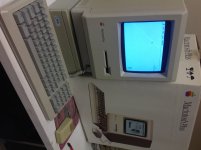
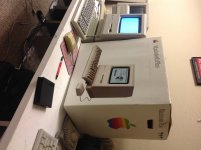
Here is a picture of the Plus w/box that I received not too long ago.  The box is in great condition, looks fantastic!  And the front case on the Plus is in really good condition, the back part is more yellow, but just a tiny bit.. The mouse looks very yellow but the keyboard seems to have done alright.   The inside of this plus also looks very clean with little to no dust at all in it, I am wondering if it was even used for very long.  Still had only 1mb ram in it so I updated it to 4mb.  Fun stuff!  

IMG_0024.JPGIMG_0025.JPGIMG_0023.JPG

not sure why, but this uploader keeps flipping my pictures one way or another.

 
Last edited by a moderator:
The leakage you see looks like normal never pulled battery drip into the case leakage and corrosion. Almost every plus I've seen has a little in the battery area if not more like that.

 
The leakage you see looks like normal never pulled battery drip into the case leakage and corrosion. Almost every plus I've seen has a little in the battery area if not more like that.
Yeah, you are right!  Another thing I noticed (before the capacitor blew up in the first Plus) was that the brightness knob made the screen flicker and pulse, I had to have the dial set just right for it to stay still... So not only that capacitor needs to be replaced, but I need to check everything else on the analog board too. ugh.   :) fun fun fun

 
spray the inside of the brightness potentiometer with a bit of TV tuner cleaner from radioshack (basically mineral oil and cleaning agents). or DeOxit, and rotate it a few times. 

itll clear that right up. 

 
Last edited by a moderator:
Back
Top