• Hello MLAers! We've re-enabled auto-approval for accounts. If you are still waiting on account approval, please check this thread for more information.

Connecting a Macintosh iisi to a VGA monitor

I am having trouble setting up my Mac iisi with a monitor. I do not own any compatible DB15 Apple monitors; however, I have a Dell CRT monitor with VGA.

I also have a few different DB15 to VGA dip-switch adapters that seem suited for this task, but I am unsure what settings to use. Do I need a specific kind of CRT to use an adapter, or are they plug and play? I have read that only specific LCD models work, but I am unsure whether this applies to CRTs.

I have never seen this computer work before, so I have no way of changing settings within the operating system. In theory, I have everything necessary to use the computer. I just need to configure it properly.


 
I have a switched Mac to VGA adapter and to use it with my Quadra 631CD and a Viewsonic LCD monitor switches 1, 3 and 5 are on and the others are off.

 
Last edited by a moderator:
Macintosh IIsi wants a display that supports Sync On Green, I have a Sony Trinitron Multiscan 210ES (now dead, unfortunately) that worked with my IIsi and IIci with the VGA adapter, now I'm using my father's Apple display purchased with the IIsi in 1991.

 
It's very complicated to find a LCD (or even a CRT) who accept Sync On Green. A home, i have many display, and the only way to have an image is my acquisition card.

 
I also have a few different DB15 to VGA dip-switch adapters that seem suited for this task, but I am unsure what settings to use. Do I need a specific kind of CRT to use an adapter, or are they plug and play? I have read that only specific LCD models work, but I am unsure whether this applies to CRTs
First things first, the IIsi has an inexcusibly HORRIBLE video subsystem. It outputs absolutely nothing remotely usable with a standard 60Hz VGA expecting display of any type and only a handful of Apple Displays to boot. Whether your Dell is multlisync or not is the overriding concern, sync on green falls where it may, usually in line with any capable multisync display's ballpark.

Avoid Google (now the enemy!) and practice DuckDuckGo-fu (your new non-tracking search engine best friend) to get your CRTs specs before trying anything else. [;)]

 
I did a ton of troubleshooting with my monitor adapters, and I was not able to get anything to display on the screen. My Belkin adapter looks the most promising, but it is missing a plastic knob which might be necessary for use. I am unsure whether or not this makes a difference, but I have a Radius Color Pivot IIsi Video Interface Card. Does this fix the video subsystem issues? I have no clue how to use it or if I can set it up without first using the computer normally. I looked up the model number of my CRT (Dell 781s) and found this:

https://web.archive.org/web/20011220004743/http://docs.us.dell.com:80/docs/monitors/688en/en/spec.htm#General

I appreciate the help, and I really hope I can get this to work!!

 
Resolution


Horizontal scan range


30 kHz to 85 kHz (automatic)


Vertical scan range


50 Hz to 160 Hz (automatic)


Optimal preset resolution


1024 x 768 at 85 Hz


Highest preset resolution


1600 x 1200 at 60Hz


Highest addressable resolution*


1600 x 1200 at 65 Hz


Last edited by a moderator:
Lost the rest of my post. It's a multisync at least for those preset resolutions. It remains to be seen if the flexibility is there for Mac resolution compatibility for syncing to oddball timings and resolutions. Have you got the Pivot Cable? If you do, install it, no drivers required, set VGA adapter to 16" and see what happens.

Gotta run, good luck!

 
If you're getting at least 640 x 480, an extron sync stabilizer can strip sync on green and output as C sync on H, or separate H/V sync. It's also a nice device for other reasons too (H shift knob and sync handling).

 
OOPSIE! Though it was your sig that listed a 6500. What other Macs have you got to do a baseline test of that CRT? The following applies to just about any other Mac you may have on hand.

the oopsie part:

Stop wasting time with IIsi testing, I see you've got a 6500. Use that to get the monitor up and running at 640x480 in MacHz(Don't recall offhand) and at 16" Mac Standard. If your 6500 can put those pixels on the CRT, the IIsi can as well.

If the 6500 can't do it, all the IIsi tinkering in the world is a lost cause.

 
I have a PowerMac G4 that can probably run the screen at 640x480. I am unsure whether or not the G4 will run the screen at the same frequencies necessary for a IIsi. I will test it out today.

 
I attached the CRT to my G4 Cube with VGA and was able to run the display at 640x480 60hz, but the G4 would not let me set anything lower. (I think I read something about 15hz?)

I took a closer look at the IIsi and realized that it does not have a boot chime. This probably means there are some capacitor issues with the computer. I would like to determine if I can even theoretically use the computer with my monitors before attempting a re-cap. (there is no noticeable damage after cleaning the board)

I re-read a post above where a Pivot Cable was mentioned: what is the purpose of such a cable? Can someone explain what the Pivot Card does and how to use it? -I am not sure I understand. I do not know where to continue from here.

Thanks for all of the help!

 
If you have no boot chime start easy. I'm not a iisi expert but I would literally start with cleaning ram and any other slotted card(s) with deoxit or even alcohol and q-tips. I've revived more PCs than I can count just starting there.

 
Thanks for the suggestion: I cleaned the entire computer and motherboard thoroughly with isopropyl alcohol, but unfortunately it had no effect. I need more information about the way the IIsi works with displays before continuing with recapping.

 
Thanks for the suggestion: I cleaned the entire computer and motherboard thoroughly with isopropyl alcohol, but unfortunately it had no effect. I need more information about the way the IIsi works with displays before continuing with recapping.

I know this is an old post, but perhaps this will be helpful for someone in the future. I went and found a Dell 17" 4:3 LCD display yesterday for use with my recapped IIsi. The DB-15 to VGA adapter worked fine with my 8500/120, but the IIsi had an issue at first. Doing a little Google search showed: "The IIsi is not capable of producing 640x480 at 60hz, only 66.7hz. You'll need a monitor that supports that refresh rate."

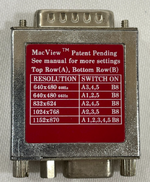
The adapter that I use has both 640x480 60hz and 640x480 66hz dipswitch settings. Once I moved it to the 66 Hz, the Dell monitor powered on. This is the adapter I use:
1752587586640.png
 
Last edited:
The IIsi is not capable of producing 640x480 at 60hz, only 66.7hz. You'll need a monitor that supports that refresh rate."

As well as a monitor that supports sync-on-green, as mentioned earlier, which is the trickier part. I have an Apple Multiscan 15AV that happily supports 640x480@66.7Hz, but refuses to work with the IIsi or IIci due to the sync issue.

You have been lucky with your Dell LCD, but it’s likely to be hit and miss. I don’t imagine the adapter shown is a sync converter.
 
I get confused between the sync methods that the different machines offered. I know the IIsi/IIci vampire video and Toby card are unique in that they don’t offer separate sync, and only sync on green. Then, later Macs came with more capable onboard video that supported separate sync.

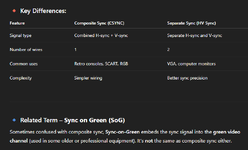
Let’s start from the basics. Is ‘composite sync’ the same as ‘separate sync’?
 
As well as a monitor that supports sync-on-green, as mentioned earlier, which is the trickier part. I have an Apple Multiscan 15AV that happily supports 640x480@66.7Hz, but refuses to work with the IIsi or IIci due to the sync issue.

You have been lucky with your Dell LCD, but it’s likely to be hit and miss. I don’t imagine the adapter shown is a sync converter.
That's very interesting, you'd think the Apple Multiscan 15AV would work. I guess I got lucky with both the
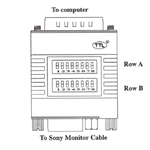
Dell 1703FPt 17" and that specific DB15 adapter, which I think it might be made by Sony. The adapter has two rows of 8 switches.

1752673610939.png

This GitHub link contains manuals for the MacView and Unimac adapters and has both troubleshooting steps as well as switch settings (although since it's a Sony adapter, the settings are geared toward Sony monitors). It might be helpful though.


ChatGPT is helpful when it comes to your question, and it gives a pretty good definition as to why they're different:
1752673306391.png
 
That's very interesting, you'd think the Apple Multiscan 15AV would work.

I know right?

ChatGPT is helpful when it comes to your question, and it gives a pretty good definition as to why they're different:
View attachment 88886

Ah, that’s helpful, thank you. So there are three sync methods in play across vintage hardware. I wonder if the IIsi and and IIci put out composite sync in addition to SoG.
 
Back
Top