According to the manual, you shut the computer and TechStep off (assuming the computer even pasts POST.) Depending on the machine, you typically plug in a SCSI cable, 1 or 2 ADB cables, 2 serial cables, and an audio cable. It has two slots in which you can plug in 2 different cartridges. [SIZE=1.4rem]For example, for my Mac IIci I'd [/SIZE][SIZE=1.4rem]have the SCSI Test Cartridge [/SIZE][SIZE=1.4rem]and Volume III cartridge for IIci. [/SIZE]
[SIZE=1.4rem]I then power on the TechStep, Select ROM A for my IIci Cartridge, select IIci for the computer type, then select Power On. The TechStep will then boot the computer into diagnostic mode. I don't think it has to power on completely, just that it has power, and then the TechStep can start probing the various functions of the computer. So if you have a computer that doesn't even Mac chime, you can still probe the hardware.[/SIZE]
I'll try to make a video, but it'll be difficult. I don't have a tripod or anything to hold my phone.
Also, there are additional components not listed on the cartridges that you can test. Many of the cartridges can test the BTO options for a particular model. For example, for the IIci I can also test 3 different video cards: 4•8, 8•24, and 8•24 GC, as well as test the IIci cache card. Likewise with the IIsi, which had a bunch of BTO options apparently.
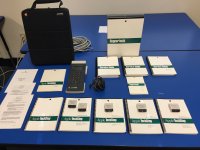
As far as I know, it's 100% complete. Even has the warranty card and an advertisement for AppleLink for Apple Technicians.

Also, there's nothing special about the cables, which is a relief. Whenever I saw pictures of a TechStep, it looked like a bundled set of wires, perhaps something proprietary. But they're not. The first few pages of the manual suggests you tie all the cables together, so a lot of people did. They're just regular SCSI cables, ADB cables, serial cables, and audio cable. So if you happen on a TechStep with no cables, don't worry about it.










 )
) 


 ]
] 
