• Hello MLAers! We've re-enabled auto-approval for accounts. If you are still waiting on account approval, please check this thread for more information.

Color Classic Screen / Dim Spot

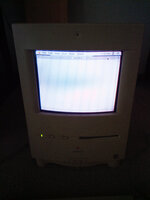
I am the fortunate owner of a Color Classic. However, it has a screen issue. Basically, there is a big chunk of the screen that appears a bit dimmer than the rest. I've tried playing with the brightness, tweaking the (exposed) CRT settings, and even started just recapping the analog board.

The only other tweaks I've done to this machine are to swap out the motherboard, and replace the hg with a scsi to sdcard adapter. I cant imagine either of those things being related to the issue.

Any pointers, or other things I should look at? My main concern is that the CRT or flyback is failing.
 
Could it simply be that this is from burn-in? If you turn off the machine and look at the screen in bright light, do you see any spots with darker colors?
 
Could it simply be that this is from burn-in? If you turn off the machine and look at the screen in bright light, do you see any spots with darker colors?
I dont think its burnt in. I've seen a few burnt in color CRTs and it doesn't really look like this. Also, the burnt in Mac CRTs Ive seen you can really see it around the menu bar.
 
I would check the degaussing coil and make sure it’s properly connected to the analog board, and that the 4 corner screws are securing it snug to the edges.
 
I would check the degaussing coil and make sure it’s properly connected to the analog board, and that the 4 corner screws are securing it snug to the edges.

Yup, this. I've had a couple CCs with darker spots like that, they cleared up when I let the degaussing coil do its thing.

You will hear a very slight "chirp" when you first hit the power switch, if you don't hear anything the coil might not be connected. Don't boot it up, just leave it like that with the coil on for a few hours.
 
Below is a picture. Simple text is open to show the issue better.

This unit hasn't been shipped in at least 25 or 30 years, so I don't think it was something loose from shipping. I do remember a time when the screen was perfect, maybe about 15 years ago. If I recall, it gave off a high pitched whine for a couple days back then. A little later, the screen suddenly appeared to tint blue for a while, but then that cleared up. This dark spot appeared after (I dont recall how soon after), and its been that way since.

I do hear a kind of chirp (except more high pitched if thats possible) when flipping the switch after its freshly plugged in. I plugged it on with the switch on for a couple hours this morning, and it appeared to clear a little (might be in my head). Ill leave it plugged in and with the power switch on (but not booted) overnight and see if it changes things more dramatically.

Looking at the CRT with the case off; I am assuming the build in degaussing coil is the Black and White wire that plugs in around the power switch. To me it looks fine. The four screws that hold the CRT in place appear to be firm.

I did consider buying a degausing coil a while ago. I see a lot of "220 Volt"(?) coils on ebay for like 10-20 USD. I'm not sure if those are legit or will work in the USA. IMG20230726124946.jpg
 
Here is some follow-up in case someone stumbles on to this issue later: Yes, the issue appears to be fixable with degaussing.

I bought a cheap degaussing wand on ebay (if you search for “degaussing coil”, you’ll probably see a ton of these cheap (10-20 USD) green wands: that’s what I bought). I tested it on a small black and white TV I had because I totally didn’t trust the thing.

I had an SCSI2SC in this thing, so I didn’t worry about the wand erasing my hard drive. But if you have a spinning rust disc, you might want to pull the hard drive out before degaussing.

There was indeed a trick to using the wand; you had to like make a square spiral radiating out of the center of the screen and making sure to go totally off of the screen, or you would end up with a rainbow effect on the screen itself.

But the dark spot totally went away after like the first pass. I only had to do the additional passes to get rid of the rainbow effect left by turning the wand off while it was still in front of the screen.

Not sure why the internal degausser doesn’t seem to be working, but Im at least happy with this as a short term fix. Thanks to the folks above who suggested degaussing.

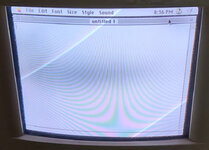
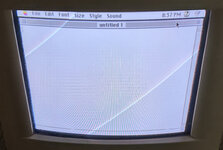
Attached are the before and after screenshots.
Before:
Before.jpg

After:
After.jpg
 
Back
Top