• Hello MLAers! We've re-enabled auto-approval for accounts. If you are still waiting on account approval, please check this thread for more information.

Classic shows 512 memory

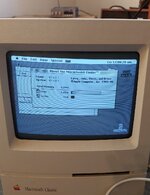
So theses two little cheap classics are turning out to be a pain lol.. classic logic is recapped. Analog next but works. When i boot up logic board it only shows 512 meg. When i turn on with memory expansion i get sad mac. Any idea what part of board controls memory. There was no cap leakage near the onboard memory etc

 
Are you saying memory when you mean disk capacity? What are you booting from? Which OS are you using? Photos of the board may be useful

The memory expansion board probably has bad RAM chips on it if it Sad Macs with it plugged in... or there could be a problem somewhere else.

512meg or 512k ?

Perhaps a photo of what you are seeing on the screen will help us clear up what you mean.
 
Are you saying memory when you mean disk capacity? What are you booting from? Which OS are you using? Photos of the board may be useful

The memory expansion board probably has bad RAM chips on it if it Sad Macs with it plugged in... or there could be a problem somewhere else.

512meg or 512k ?

Perhaps a photo of what you are seeing on the screen will help us clear up what you mean.
When it boots into system 6 it shows 512 memory instead of 1 meg. When i turn off and put memory expansion in and jumper settings are correct i dont even get a chime, just a sad mac. Will post pictures tomorrow.
 
I had this exact same issue and posted my fix in this thread.

 
Actually not the exact same issue as I didn’t get a sad Mac, just a classic that wouldn’t show more than 512k of ram.
Cool, well those ic chip legs look at little nasty, so going to remove clean, and replace. Will post any changes for the better:) thanks for the thread to check out.
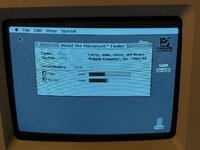
 
Cool, well those ic chip legs look at little nasty, so going to remove clean, and replace. Will post any changes for the better:) thanks for the thread to check out.
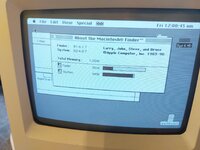
Well, pulled that ic and clean, reinstalled and still 512. So will order part. Is this the same? Or do you have exact part # you used?
 

Attachments

  • 65AFE21C-158C-422B-9898-48E786D24B37.png
    65AFE21C-158C-422B-9898-48E786D24B37.png
    430.2 KB · Views: 27
Well, pulled that ic and clean, reinstalled and still 512. So will order part. Is this the same? Or do you have exact part # you used?
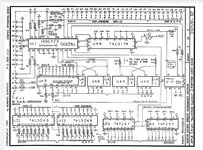
I will confirm the part number but before you replace did you check continuity from UH6 to everywhere it’s supposed to go? Schematics are available and I think a broken trace is probably most likely.
 
I will confirm the part number but before you replace did you check continuity from UH6 to everywhere it’s supposed to go? Schematics are available and I think a broken trace is probably most likely.
I checked traces and even pulled the chip off again. So i am guessing it is the ic, or actual memory chips themselves? I have another classic board i could try and pull up that chip off, but hate doing that just in case that working board is messed up after lol
 
I checked traces and even pulled the chip off again. So i am guessing it is the ic, or actual memory chips themselves? I have another classic board i could try and pull up that chip off, but hate doing that just in case that working board is messed up after lol
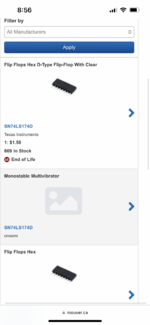
I'm not sure what the difference is to the chip you found (it might just be the package quantity that mouser can order from the TI Datasheet (i.e. difference between D and DR part number). But the part I ordered (still available) is below. Good luck!

1700454976759.png
 
I have new part on order. Should be here couple of days. Will let you know how it goes! The Texas Instruments part is listed above from mouser
My board is in pretty good condition, so I'm surprised. I'll probably grab the schematic and check for a bad trace. I suspect the chips are OK. It takes quite a lot to kill a chip.
 
My board is in pretty good condition, so I'm surprised. I'll probably grab the schematic and check for a bad trace. I suspect the chips are OK. It takes quite a lot to kill a chip.
Ok, yeah for sure. My board was clean too, so weird. I had worse boards with no issues
 
Seems like there will be a few of these up on eBay!

L@@K! Rare 512k Mac Classic Prototype! Steve Jobs! !!RARE!! I know what I have!
 
Fixed it :)
1000014381.jpg
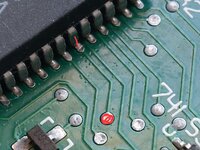
Address line 19 was broken at the BBU end. I visible fault, even after I found it with a continuity tester I couldn't see it. There wasn't continuity between the two marked locations.
1000014380.jpg
 
This might be helpful to others. I just checked every connection to UH6 until I found something that didn't connect pin to pin (test pin to pin, not pad to pad, and don't press down too hard or you will not spot dry joints).
1000014362.jpg
 
Ok, so the part i ordered arrived today and soldered into place. Have a whole 1meg memory now, and the memory expansion works flawlessly as well. So chips do go bad.. isnt always a broken trace, dry joint, or cap juice.
 
Back
Top