• Hello MLAers! We've re-enabled auto-approval for accounts. If you are still waiting on account approval, please check this thread for more information.

Christmas Conquest- Quicktake 200

Concorde, as a comfort rule you'd have to transfer anything stuffed from Snow Leopard (or any modern OS) to your vintage Mac prior to unstuff/mount/install.
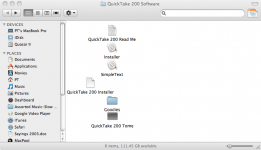
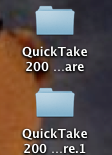
In regards to Protocal 7's QT software, and the eMate software sent by Beachycove, I did not unstuff any of the disk images (what for anyway? Classic environment is no longer supported on OS X, and I wouldn't be able to transfer pictures, or files from the QT, or the eMate anyway to my laptop). All I did was download the files from the link provided, which showed up as two separate file folders, then copied those folders onto a blank floppy disk. As a matter of fact, here is what I have thus far:

QT #1.png

QT #2.png

Let me know what you need, I'll try to do that over the week-end.
I need the entire QT 200 software package (Camera Access software to transfer pictures from the 200 to the 5215, and the Adobe software extras). Thanks for your help, btw.

 
never plug the quicktake 200 into an external power supply while it is turned on.
Thanks for the advice. Fortunately, I'm not having that problem with my 200, but that link you provided on "fuse replacement" was the one that I read a week ago.

 
the PCMCIA card SmartMedia

54e48f8edfc2448722ec51e17f18566c.gif.c6b3d71cea2442c28032dd6a24422d84.gif


no hassle with printercable and Camera Access software software on a mac

399956-2-200-0.gif


FD-A2 FLASHPATH FLOPPY DISK ADPT

available at http://us.ebid.net/for-sale/floppy-disk-adapter-for-smartmedia-fd-a2-fujifilm-34249411.htm

 
In regards to Protocal 7's QT software, and the eMate software sent by Beachycove, I did not unstuff any of the disk images (what for anyway? Classic environment is no longer supported on OS X, and I wouldn't be able to transfer pictures, or files from the QT, or the eMate anyway to my laptop). All I did was download the files from the link provided, which showed up as two separate file folders, then copied those folders onto a blank floppy disk. As a matter of fact, here is what I have thus far:

Is your browser set to automatically unstuff downloaded files? It's possible that it's automatically doing this AND mounting the disk image afterwards. Because my link is a stuffed disk image, so you shouldn't be getting loose files of any kind.

 
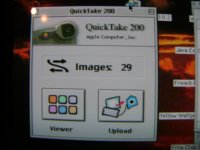
Update- the software sent about a month back from Protocol7 ended up working after all. The problem was the form of media I was using to transfer the QT software from the MBP to the 5215. Since the HFS structure is no longer supported in Snow Leopard when writing to floppies, the disk images in the QT folder (including the Install programme) kept showing up as generic files on the 5215. This was fixed by recording the disk images onto a compact disc. Now I get this on the 5215:

DSC03829.JPG

Now all I am missing is the PictureWorks NetCard, Adobe PhotoDeluxe 1.1, and Adobe PageMill 2.0 software that was originally bundled with the QT 200 camera package, in addition to the snap-on viewfinder (although I do not care much for this- software is more important).

Thanks to everyone for their help.

 
Back
Top