• Hello MLAers! We've re-enabled auto-approval for accounts. If you are still waiting on account approval, please check this thread for more information.

Chikorita157's Finds

Since I have more finds, I may as well create the own thread.

First is of course the Power Computing Macintosh Clone that I bought from here, which is my current project. I have shared the initial setup in a blog post, along with explaining what Macintosh Clones are. I managed to get it running after inserting the battery, but had some issues trying to get it started. This is when I found out my Interware Booster G3 accelerator does not work. I have a Buffalo G3 366 MHz, which is confirmed working in the listing. I also placed a bid on a 466 MHz, but I should know the results, but I'm sure I won it as I put a bid of 14,000 yen. However, it's not tested, so it can work (which can be a great deal) or be another dud, hoping its the former.


The tr:dr is that I put in 128 MB of RAM, which is expensive but 48 MB is not enough. I added an ATI Rage 128, but it may get replaced with a flashed Radeon 7000 or if I'm brave enough, a 9250. In addition, I added a Rabbit Hole Computing Hard Card PCI SATA, which I flashed with Dosdude1's patched Firmtek flasher. It was the easiest card to get working, but the performance is held back by the lower PCI Bus and the fact it's shared. On a Tsunami or 9600, I could put it on a different PCI Bus and probably will perform a bit better. Still, it's 4 times faster than what a SCSI2SD or even a BlueSCSI can provide. Also, I installed a Corsair PSU which has the same amperage for the 3.3v and 5.5v rails, but I had to tape it down because the screw holes don't align. I did this as a preventative measure given the original PSU is really old and all the Power Computing clones use regular ATX without any modifications. Also, no Spindler Plastics, the computer is relatively easy to work on, unlike the Power Macintosh 8100.

I also won a 9600 from Goodwill auction, which finally got shipped out. It came out to be $201 after shipping and tax. Seems loaded with a Jaz drive and PCI cards, but it has booting problems. Not sure it's a bad video card or PRAM. I bought it since it might be loaded with RAM (hoping there are 128 MB sticks I can spare to max out the PowerCenter), but it needs some TLC. Not going to do much with it for now, but I do plan to get the conversion kit to get rid of the old power supply and add a BlueSCSI and a SATA SSD.
 
I finally got the 9600. Yes, it needs a lot of TLC as it's in a similar shape as Action Retro's. The floppy panel was in the box, apparently fell off and the right side is loose. Also somewhat dirty and needs cleaning.

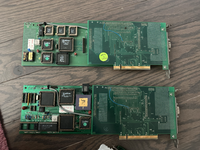
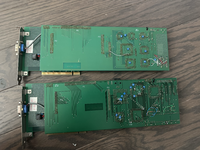
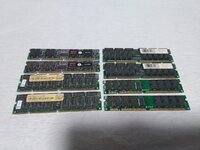
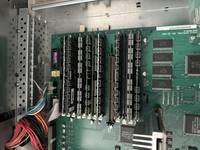
What I discovered is the two mystery PCI cars and a Twin Turbo "Ultimate", so I assume this is the Twin Turbo 128 that usually come standard. It has 4 64MB sticks, 4 32 MB sticks and 2 16 MB sticks. No 128 MB sticks sadly, but if I can find 4x 64 MB sticks, I can probably get at least 512 MB of RAM or maybe 640 MB if I remove the 16 MB sticks and keep the 32MB sticks.

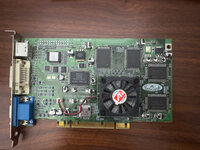
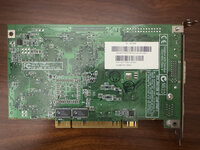
Not doing too much yet, I need to get the ATX 9600 kit from Kero Mac Mods and a BlueSCSI. I don't really want to power on the computer with that power supply. Also, I wonder, what are those mystery PCI cards, one has a broken serial port.

Also the battery haven't exploded, need to disarm it.
 

Attachments

  • tempImagevkLfCr.png
    tempImagevkLfCr.png
    12.2 MB · Views: 35
  • tempImageE1IXMr.png
    tempImageE1IXMr.png
    14 MB · Views: 26
  • tempImagel6afSG.png
    tempImagel6afSG.png
    14.3 MB · Views: 22
  • tempImageLjFWL1.png
    tempImageLjFWL1.png
    12.8 MB · Views: 31
Last edited:
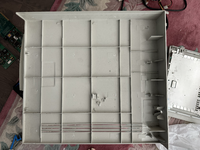
It seems that the right panel is in bad shape, had a lot of broken pieces.

Spindler Plastics got to it, sadly. Might need to tape it down, but maybe someone should make 3D print models of the missing pieces so I can make replacements and glue it on.
 

Attachments

  • tempImagepcMhdr.png
    tempImagepcMhdr.png
    11.4 MB · Views: 29
Great - what's your adversity for the 9600 PSU? As long as it's clean, no evidence of blown components, good change it'll be fine for years to come. I'm yet to question the PSU in my 9600/350.
 
Great - what's your adversity for the 9600 PSU? As long as it's clean, no evidence of blown components, good change it'll be fine for years to come. I'm yet to question the PSU in my 9600/350.
Just as a preventative measure. I already swapped out the PSU on the Power Computing one with an ATX as it has the same.

I just turned it on and the fan sounded funny. Best to replace it, but it did show an image. Goodwill listing said it bong, but it doesn’t on the second try, must be something with the PRAM or the video card being in the wrong slot.
 
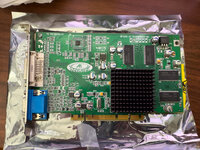
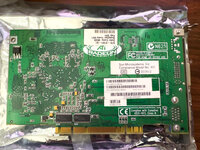
I bought a Sun XR-100, which is basically a Radeon 7000. The reduced ROM for a Radeon 7000 doesn't work on an old world Mac. I tried installing a flashed reduced rom 7000 on a Mac clone, but it never showed any display. Do they actually work with the ROM Xtender Extension?

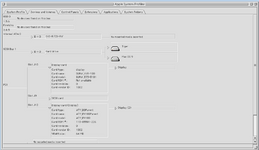
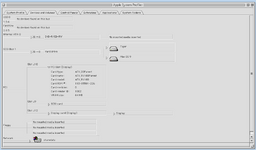
The interesting thing is the XR-100 basically gets detected in Mac OS as a Sun,XVR100, but no drivers since the model number doesn't match anything, although in Mac OS X, it matches the the same Device ID, 0x5159. Easy to convert using Graphicelerator inserting the Mac Radeon 7000 ROM.

Will probably put this one in the 9600.
IMG_3961.jpgIMG_3962.jpg
1718751212424.png1718751223517.png

Also, the overview of that 9600, hopefully the parts come in by the end of this week so I can work on start restoring it (right panel has to wait though).

 
It looks very close to the Radeon Mac Edition Radeon 7000, maybe check the ROM chip if reduced size, the smaller firmware works fine with Old World Macs. Not all Radeon 7000 cards can be flashed, and there are a lot of variants in what were usually low end GPUs of the era with cheap construction, what you've found will hopefully work well.

I'd get busy with the JB Weld and try to repair as many clips as you can that aren't visible.
 
It looks very close to the Radeon Mac Edition Radeon 7000, maybe check the ROM chip if reduced size, the smaller firmware works fine with Old World Macs. Not all Radeon 7000 cards can be flashed, and there are a lot of variants in what were usually low end GPUs of the era with cheap construction, what you've found will hopefully work well.

I'd get busy with the JB Weld and try to repair as many clips as you can that aren't visible.
The one on the Power Mac G3 B&W is a budget one since it's half height from Visiontek, but . I'm surprised a reduced ROM one work in that one. But I guess I should probably track down another one so I can use DVI instead a VGA to HDMI converter to hook into my LCD monitor.

Let's see what I can glue back, and what needs to be 3D printed. I think the large clips are salvageable, but not the multiple small ones, may need help on those printing a replacement.
 
It looks like the 9600 ATX PSU kit from Keros Mac Mods, and it looks like I need to do basic soldering, so I’m putting off working on the 9600 for a little bit.

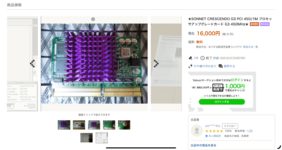
I won a Sonnet Crescendo G3 PCI that will work on the PowerCenter for… the starting price of the auction on Yahoo Auctions (had to use a different proxy to put the bid since Buyee blocked buying of all CPUs for some reason, when it’s not a prohibited item) This will come out to be close to $120, probably around $150-160 after shipping.

1719070349693.png
I sold the Interware card since it wasn’t compatible with the PowerCenter, since it uses an architecture other than Tsunami. It means that the selection of G3 accelerators are limited to PowerLogix, Newer Tech, and Sonnet. It should work this time since it’s on the compatability list. Once this is installed, the Clone project is mostly complete.

Also ordered another Sun XR-100, for $10 less and a another Rabbit Hole SATA card for the 9600.
 
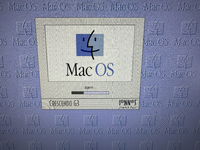
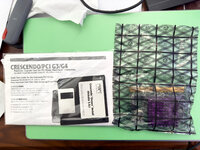
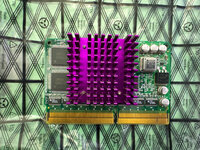
Finally got the Sonnet G3 that I won from Yahoo Japan Auctions for a grand total of $139.85, which is really cheap, and it worked this time in the Power Computing PowerCenter! Took some reseating, but it did finally chime. However, I had to remove some memory sticks to 320 MB. Anything above and it would become unstable or not boot at all. I wonder if Catalyst systems just don't like that much RAM or it's one stick of RAM that this clone doesn't like.

Maybe I should get another 128 MB stick from Memory Masters to find out, but don't know it's worth the trouble. Maybe I will get get another stick and put the two 128 MB in the 9600 instead.

Either way, I got some purple G3 power in the Clone, time to have some more fun with it trying to install Mac OS X Tiger. Like Action Retro says, my favorite chin is there.
 

Attachments

  • tempImage74b9JT.png
    tempImage74b9JT.png
    18.7 MB · Views: 10
  • IMG_3974.jpg
    IMG_3974.jpg
    2.8 MB · Views: 15
  • IMG_3975.jpg
    IMG_3975.jpg
    3.6 MB · Views: 8
G3s are much pickier with RAM, ensure interleaved, 60ns
Could be possible the PowerCenter is even pickier when it comes to RAM, it even had the issues of stability issues with the RAM I have. I only had the newer sticks of 128 MB installed, which is an OWC and MemoryMasters that had flatter DRAM chips and so far, no issues hopefully.

Probably the 9600 probably less pickier since it’s an official Apple system than a Mac clone. Still tinkering with it and wondering how Mac OS X will run.
 
Managed to win a lot of DIMM FPM RAM from Yahoo Japan Auctions for 5000 yen, or about $32.While it mentions that it’s a lot of 32 MB RAM, I saw there are 64 MB, 4 of them. I guess I can finally max out the 9600 to the official maximum of 768 MB, although 1.5 GB would be nicer, but finding 128 MB DIMMS are hard to find and expensive.

1719755601437.jpeg
 
I sold the Interware card since it wasn’t compatible with the PowerCenter, since it uses an architecture other than Tsunami. It means that the selection of G3 accelerators are limited to PowerLogix, Newer Tech, and Sonnet. It should work this time since it’s on the compatability list. Once this is installed, the Clone project is mostly complete.
Interex XLR8 upgrade cards are also compatible with clones:
 
For a while now, the Power Mac G3, which I got from a family member for free back in 2007 haven't got much upgrades. With my two recent additions, I don't know how it fits in my setup as I have a lot of machines that can run Mac OS 9 with a G3 in it. Actually, three of the beige Power Macs (including the clone) has a G3, two that are faster than the 2nd revision Power Mac G3 B&W at 400 Mhz.

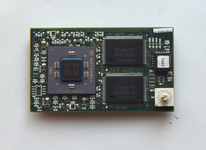
I found this Power Logix PowerForce G4 ZIF, not cheap but it's $195 from Yahoo Japan Auctions. I have been looking for a Yikes G4 Zif processor, but those are hard to find, but I guess this is it, which is even rarer. I wonder what the dial for or if I can run it faster than 400 MHz.

I guess next is finding a Radeon 9250 so I can max it out.
1720285965472.png
 
So, why exactly stuff all this newer-age stuff in there? Why OS X on a 9600?
Most of the tinkering with old systems is to put in newer stuff just to see how it will perform, even if it can't take full advantage of it. Things like PCI SATA cards with an SSD already gives a noticeable improvement over a SCSI emulator or a SCSI hard drive.

Also, the 9600 was a better machine than the Beige G3s since it has more expansion slots and hold more RAM. The Beige G3 has slightly faster bus speeds and RAM, but it doesn't truly feel like a Pro machine with only three PCI expansion slots and can only use up to 768 MB of RAM. At least with a G3 upgrade, the 9600 is a slightly more capable machine than the Beige G3s, until the Blue and White G3 came along, although that only has three PCI slots besides the dedicated slot for a GPU.
 
In my experience, bus speed seems to have a huge impact on overall responsiveness in Mac OS X. If the end goal is an OS X machine (or later Classic era games), I’d take the Beige G3. Also worth noting that the Beige G3 bus speed can be overclocked if I remember correctly. I believe I had mine running around 75mhz back in the mid 2000s when it was still my main machine. In 10.4 it made a notable improvement over the stock 66mhz.

Like you said though, 9600 definitely has the G3 beat in terms of PCI slots. Assuming you are utilizing them, there’s simply no alternative in any variant of the G3. And it is unfortunate that the Beige G3 didn’t get at least 4 RAM slots to accommodate a full gigabyte of RAM.
 
While I failed to win a Radeon 9200 PCI on Yahoo Japan Auctions, I tried finding an alternative. Yes, it's the original Radeon PCI Mac Edition (aka Radeon 7200), which is another rare GPU and is the 2nd fastest PCI Radeon video card (9250 and 9200 are basically the same thing). It's supposed to be 2x faster than the Radeon 7000 as that card is a cut down version. As expected, this card is rare, but I found one for 75 Pounds, or 95.27 pounds (around $120). That is not too bad given it's 2x faster. However, it can only use one display unlike the Radeon 7000 which has support for dual displays. This is going in the G3 B&W, not in the 9600.

I had to update the ROM, as it was out of date and couldn't use a 1920x1200 resolution. Once updated, it works properly with the 24 inch 1920x1200 display.
IMG_3984.jpgIMG_3985.jpg
Maybe I will gain the courage to flash my own 9250 with 256 MB someday.
 
Back
Top