• Hello MLAers! We've re-enabled auto-approval for accounts. If you are still waiting on account approval, please check this thread for more information.

CF AztecMonsters have landed

I've tried a few of them, but could get none of them to start. Maybe the files are busted / flattened. I'm also not sure what OS / version combination to use. 7.5.3 seems to work with Hard Disk Speedtools 3.3, whereas it won't run with 7.5.5. Anubis seems to run on either.

 
The Artmix board appears to be two sided from the highres pics I have on file. The size of the thing cut down to just a PDS bus slot multiplier would still be a consideration for two sided protoboards.
trag, got linkage to your explanation?
I can't seem to turn it up. I found this which mentions it back in 2008.

http://68kmla.org/forums/viewtopic.php?p=51475#p51475

It could be that I posted it before the board crash, or I may have posted it over at AppleFritter.

It boiled down to an analysis of what just the raw parts cost in small quantities and even though there isn't a lot going on on that board, it's still probably $20 worth of parts not counting the circuit board. The circuit board is big, so even if it is two layer, it may be another $20 by itself. And I'm pretty sure that Seed Studio wasn't around when he had those made. Then add it assembly cost for a small run, or cost of time to do it himself, plus storage. Handling sales and mailing them out, while always good news, is also a time consuming effort.

In the case of the SE/30 PDS adapter, apparently he had to have a large run made at once, so he also has time cost of money, and the risk that he won't sell enough to pay his costs. It's tough. When you don't know the size of your market, and you must buy 500 of something, in order to buy any of them, do you then sell them for (total cost/500) X (1 + % profit)? Or do you worry that you might not sell them all and so sell them for (total cost / 250) X (1 + % profit)? Realizing that the latter higher price will lower your rate of sales.

It sounds like the Monster is being run in smaller batches, so his risk cost may not factor into it. However, smaller runs usually means higher costs all around.

I think he has a very business-like pricing structure. I doubt that he's loosing money, but he's not profiteering either.


 
Also factor in the PDS board went through a rev change, so he may have scrap inventory. I think he said it had to do with changing the grounding design. If it is priced to keep him interested to keep going for a while, I'm all for it. Support the makers...

 
It goes through the installation until 'Reading Apple Guide: Shortcuts', where it says 'closing files', and looks like it's finishing the installation - but mighty quickly. Then the above error pops up.
There's nothing on the CF when I checked it. The activity light does flash occasionally (can't tell if it's reads or writes), and I can copy stuff to and fro to my hearts desire, using the hfs that the Anubis software installs. If I leave a System Folder on the CF when I install, the installer recognises it (with appropriate version / upgrade messages), and won't allow me to use the disk.
Sounds like instability in transfers, could be CF, PowerMonster, SE/30, bad installer, or formatting drivers. If you can try another machine. Those cards sound smallish and maybe are too slow, if that could be an issue? I am kind of stumped, basically you have to try to change each variable. Also try running Norton disk tools to check for errors, maybe it can fix them to at least get booting.

 
Kind of thought as much. I guess the next step is to buy a new CF card that is a little quicker - these cards are a bit old.

Thanks for all your help - much appreciated.

 
Looks like I've got to the bottom of this.

Now working, although I still can't clean install System 7.5.3, so maybe something's wrong with my copy.

Anyway, the key was to boot 7.5.3, install the Anubis driver, then low level format using Drive Setup 1.6. This took well over an hour for a 1GB CF card.

I've now dragged a 7.5.5 system folder over, and everything's pretty normal.

Hope this helps someone else.

 
Thanks for the update.... it has reminded me (I need to take some actual notes next time), I had a card that I first used Anubis for some reason to partition the disk, maybe other tools were not discovering the card. Then afterward it was not stable or there was some issue, so I formatted with Intech SpeedTools. The Intech process took quite a while (4GB) and it appeared to be hanging, so I restarted the machine and the two partions mounted anyway and seemed OK after that. I know it sounds a bit risky to use the CF card after that process, but it seems OK so far and used Norton to check them out and they were OK. I have also used microdrives and large capacity SanDisk cards with no issues setting up. I went through the trouble with the 4GB CF card since it uses SLC flash which is supposed to be more reliable and faster for embedded I/O applications.

 
I caved.

I am bidding on one of the 3.5" adapters on ebay right now. Maybe I'll win, I'm almost hoping I don't with the amount of money I've already sunk into my 7100's but looking at all the nonsense associated with getting more modern SCSI drives working is making my head spin.

At 10 bucks for an 8 gig card this thing is seeming really cost effective now.

 
Mine's now working pretty well - pleased with it. I'm going to try and replace the Anubis driver with a SpeedTools version as tt mentioned, as it looks like mine's a bit unstable in the writes department. Getting a lot of bus/address errors when installing / uncompressing stuff, although not on file copies, which is strange.

These errors also cause problems with installing the benchmarking software, so I'm not there just yet, but soon... :beige:

 
Just to revise my previous post, the reason I immediately went with Intech SpeedTools is it seems it has the best compromise from the benchmarks posted by others, where it can max-out to the theoretical read speed for the SE/30 and write speed is average across the driver spectrum for CF's, but stable. For some reason the read speeds are slower in an SE/30 and I know the CF cards and AztecMonster are much more capable, since I benchmarked it with an LC II or III and it performed much better. Maybe SCSI setups with other machines include a cache that the SE/30 does not have. Read performance with MicroDrives and SE/30 are decent probably due to a 2MB on-board cache like regular SCSI drives.

 
Well, that definitely didn't work! The Intech driver wouldn't allow this SE/30 to boot. Just the same chimes 'o' doom each time.

Now back running the Anubis driver, and everything's hunky dory. Perhaps a little more stable than before. Have now mounted the device internally, and closed the case. Am thinking the low level format is the answer to this. The strangeness I was getting before I did this was ridiculous - crash after crash. Now it seems relatively okay (bus / address errors every now and again).

So, back to the performance stuff, so I can post back, which of the disk performance testing tools would you recommend for putting this setup through it's paces?

 
Intech HD Speedtools is about the fastest driver out there for OS 9 and earlier machines, but only when it decides to work. I purchased the newest version of HD Speedtools from OWC to use on one if their Legacy SSDs earlier this year, but HD Speedtools refused to even format the drive:

viewtopic.php?f=21&t=18154&p=170398&hilit=Speedtools#p170398

As you can see from my comments in that thread, OWC never explained why HD Speedtools didn't work right when used to format an SSD. And even when I used HD Speedtools to successfully format another drive, it refused to boot, very much like what Billynomates reports. As a result, my copy of HD Speedtools sits on a shelf unused. (OWC refunded me for the SSD but not for the Intech software.)

 
Well, that definitely didn't work! The Intech driver wouldn't allow this SE/30 to boot. Just the same chimes 'o' doom each time.
Hmm, did you try a more current (faster) CF card? You should be able to get to a state where you're not getting bus errors during reads/writes.

So, back to the performance stuff, so I can post back, which of the disk performance testing tools would you recommend for putting this setup through it's paces?
It seems like Intech Quick Bench or HDT BenchTest is popular around here. Here is a page by bbraun on some benchmarks: http://synack.net/~bbraun/se30disks/. And LEM mentions using TimeDrive 1.3, which you can find as part of the "LaCie Silverlining 5.3.1" package.

 
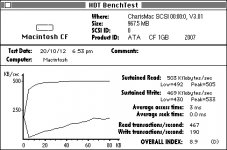
Okay, so here's the 'version' details (erm, can't see a version number), and performance graph for FWB's Hard Disk Performance Test...

This is an SE/30, 68MB RAM, System 7.5.5.

Notice the slight corruption in the HD icon. This appears to be pervasive, although is always sorted out by forcing a redraw of that area. Anyway, that's something for a different post.

Benchmark_precise.jpg

FWB PerfTest Banner.jpg

 
So after dicking around with wire transfer (stupid lousy paypal) I finally have an aztec on its way to me.

In order to ensure I have everything I need I thought I'd ask here if I was on the right track. I have two real desires for this adapter:

A) To use it in my powermac 7100 as a devoted boot disk and application storage. Files and documents will all be stored on my newly acquired MDD over localtalk.

B) To create a second partition on the card I could use to boot any of my macs either by way of this adapter, an IDE-CF adapter, or a PCMCIA cardbus adapter.

So my questions are as follows.

• Is THIS card an acceptable medium for storage?

• can I have separate partitions on the card; One for my standard 8.5.1 boot disc, one that can serve as a CD image, and one that can serve as a floppy image that I can restore and change as I need?

 
That card should work, although the 133x is a little slow in my experience. I use the SanDisk Ultra and Ultra II's, from Amazon they are in the same price range as the card you linked to.

For partitions, AFAIK, your 7100 should be fine, although earlier systems (I forget exactly how early, but most of the System6 capable machines) have difficulty booting from anything but the first partition. So you may want your "everything" partition first.

Be careful when using the CF card in different adapter systems. Different systems can use different addressing schemes, and may not work across adapters. The R-IDSC-E adapters can be used with regular USB card readers, etc. but I have a SCSI-PCMCIA device that seems to use a different addressing scheme and cards formatted there cannot be read in other devices. I have no specific knowledge of the Aztec in this regard.

 
Hey all, my card arrived today. I have a question:

Will I be able to format a CF card using system 8.5's standard dialogue when you insert an unreadable disk, or am I going to need one of these programs you guys have mentioned (anubis, etc)?

 
Give it a shot. I do not recall OS 7 automatically asking to format the drive. You will most likely need a 3rd party utility (or hacked Apple HD Setup) for setting up and formatting the drive. Which CF card did you end up buying?

 
Hey all,

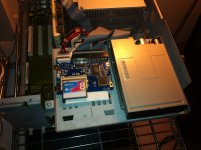
Got my flash card installed last night and boy does it work good. Just popped in an 8GB "Silicon Power" brand CF 400x and set it to ID 1 on the chain. From my 80 meg drive I booted and used Drive Initialize (the disc was initially recognized as a PC drive, and it would not offer me any options for erase.) to initialize the disk, then copied a system folder over and was on my way. Removed the spinning media, popped the jumper on the aztec card to T (for termination, I hope), and booted into a nice fast 8.5 Desktop.

Works GREAT, despite a little hiccup where (my fault) several pins on the card had become bridged and I thought I had killed my PSU.

In my opinion this is exactly what I was waiting for. No spinning drive whirring or ringing, everything loads fast and its going to be no problem to get a different card if I end up needing more storage. Awesome. To all those considering one, I say go for it. I will never deal with another annoying HD on this computer again.

Glad I have one, but I wish these were cheaper so I could get some more; for now I've blown the bank.

|)

7100aztec.JPG

 
Got my flash card installed last night and boy does it work good. / In my opinion this is exactly what I was waiting for.
That's awesome directive0! Looking forward to hooking up and tinkering at that hack shop.

 
Last edited by a moderator:
Back
Top