• Hello MLAers! We've re-enabled auto-approval for accounts. If you are still waiting on account approval, please check this thread for more information.

CF AztecMonsters have landed

Simple reason: The ATTO tools don't work on my SE/30 with System 7.1. According to their README file the require System 7.5.2 or later, and although they come as fat binaries, they crash on System 7
Oops!

7.5.2 , I see...(But that blurb about PCI machines in Read Me file is incorrect - it works on my Q605.)

I've just sent you an older ATTO test utility. Let's hope, that it works on your SE/30 and also bypasses system disk cache. Try it.

 
Let's hope, that it works on your SE/30 and also bypasses system disk cache.
QuickBench claims that it bypasses the system disk cache as well.

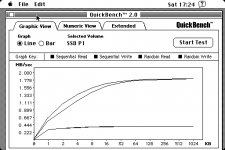
FWIW, here's the Kingston SSD I benchmarked last month. But this time, it has been initialized with HDST instead of HDT: Image10.png

And here, for reference, is the FWB benchmark for the same SSD, taken 4 weeks ago:

DSCN2019.JPG


Again, the same findings as above:

• HDST enhances the read performance to 1.8 MB/sec.

• Write performance is still limited to 407 KB/sec.

 
Since this thread is focused on flash drive solutions for our vintage Macs, I felt this would be appropriate.

Last night I commented on OWC's blog about their Black Friday 2011 specials. I noticed that they had specials on all their SATA SSDs but none on their "Legacy" IDE/ATA edition SSDs that are for vintage Macs. Having recently acquired some old PB G3 Wallstreets, I also commented about discounts on batteries too. Today, Grant at OWC kindly replied that he would take my words under consideration.

So as to not let this chance die (for truly, I am only one man asking about this), I wanted to post here to encourage those of you interested to reply in kind. Specifically, if you've ever pondered putting a true SSD, not just a CF card, in your vintage Mac, now is the time to seek out a discount and do it! I would therefore strongly encourage you to post a comment on OWC's blog if you would be encouraged to buy an OWC SSD if they offered a good enough discount on them.

Here's the Black Friday Blog:

http://blog.macsales.com/12693-holiday-deals-from-owc/comment-page-1#comment-49219

And here are the 3 product pages I mentioned in my comment on the OWC blog...

40GB Legacy 2.5" SSD:

http://eshop.macsales.com/item/OWC/SSDMLP040/

PB G3 Wallstreet PRAM Battery:

http://eshop.macsales.com/item/NewerTech/PRAMPBG3WS/

PB G3 Wallstreet Main Battery:

http://eshop.macsales.com/item/NewerTech/BAPLLIWSRS/

And while pondering whether or not to post a comment there, keep in mind, "Ask and ye shall receive!"

Thanks!

 
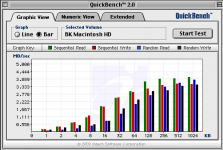
The CF AztecMonster is built around an Acard SCSI-IDE bridge, the same one that is used in the AEC-7720U. So I took an AEC-7720U, a Toshiba MK3021GAS 2.5" HDD and my G3 Powermac running MacOS 9.2 and got the following results: Picture 4.png

And here's the AztecMonster with a CF card, attached to the same Powermac as above: Picture 3.png

Finally, a real SCSI HDD (Quantum Fireball 1280S) not needing the Acard SCSI-IDE bridge chip: Picture 5.png

Powermac G3 Findings:

• In combination with an Acard SCSI-IDE bridge, a real HDD and a CF card show similar performance. Not the same, but similar.

• In both cases, the write performance reaches the same level as read performance. But it needs large transfer sizes to do so.

• Without the Acard SCSI-IDE bridge, a normal SCSI disk behaves more or less comparable to the CF card.

 
Just for fun, can you toss an IDE-CF adapter onto the AEC-7720U? (nothing with any fancy chips, just nice and passive)

It will likely not give better results, but just for the sake of curiosity and to deal with any questions about how the AztecMonster itself actually does stack against a normal SCSI-IDE adapter. With a passive CF-IDE dealy in the 7720U it *should* have the same results as the AztecMonster; since tests are going on atm if you have the stuff it might be neat.

 
< Bump > Neat stuff, I'd like to know if anything new has come up?

Are these adapters proving useful in real world applications? :?:

 
Just for fun, can you toss an IDE-CF adapter onto the AEC-7720U? (nothing with any fancy chips, just nice and passive)It will likely not give better results, but just for the sake of curiosity and to deal with any questions about how the AztecMonster itself actually does stack against a normal SCSI-IDE adapter. With a passive CF-IDE dealy in the 7720U it *should* have the same results as the AztecMonster; since tests are going on atm if you have the stuff it might be neat.
Did that. And since I was flashing the AEC-7720U to the Mac-specific firmware version 3.7m anyway, I took the AztecMonster, held it against the Acard firmware flashing tool and guess what? The firmware flashing tool identified the AztecMonster firmware as Acard version 3.7m. So from a firmware point of view, the AztecMonster is a 7720U running firmware version v3.7m.

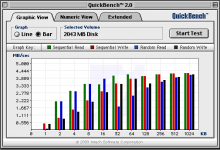
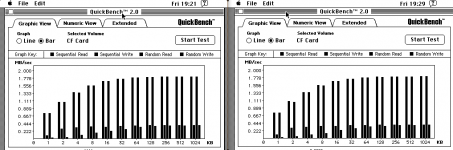
Here are the measurements, done with my SE/30. IMHO, they are indistinguishable.

Screen Shot 2011-12-18 at 6.39.08 PM.png

 
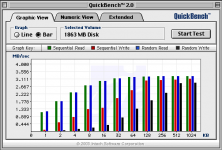
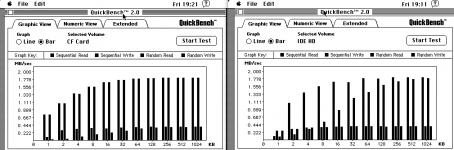
Here's another comparison: AEC-7720U with CF card versus spinning platter HD (Toshiba MK3021GAS). Both the CF card and the HD have been initialized with Intech HD SpeedTools v3.6.

Screen Shot 2011-12-18 at 6.40.19 PM.png

The HD, hooked behind the AEC-7720U, does not perform better than a CF card. For me, the performance bottleneck seems to be the SCSI-IDE bridge. What do you think?

 
For me, the performance bottleneck seems to be the SCSI-IDEbridge. What do you think?
Udo.Keller,

You tested AEC-7720U vs. regular HD in SE/30 and in your G3 so far. How about repeating the same test in one of your Quadras? Q605 will do. I'd love to see how 53C96 performs under same conditions.

 
I had several AztecMonsters on order with Artmix and he never sent them, so I got a refund.

Looking at the board design, it looks like a pretty simple layout (not that I'm an EE by any means)

Also, the chip used is a standard ACARD ARC-760B, which if it could be sourced relatively cheaply, we (i.e. the retro Mac community) could probably come up with a design for it and have it fabbed over here, though who knows if it would be at a reasonable price.

I'd be interested in looking into it if there were any enthusiasm! The scarcity of drives for these old machines will only get worse as time goes on.

 
IMHO, they are indistinguishable.
As are those bars in your benchmark chart.

Once again, folks, please use something other than the bar or line graph on the SE/30. PLEASE! I like the bar and line graphics, but I like understanding what each bar and line mean even more. At the very least, use Photoshop to mark which is which.

Thanks!

 
Was there a conclusion about whether the speed rating matters for the AztecMonster? I seem to remember someone showing it does not really matter, however I cannot find the discussion since there are multiple threads going on here about CF cards. 8-o

BTW, Manabu has more AztecMonsters in stock.

 
In my Acard ARS-2000SU with a CF to SATA adapter, I noticed that certain CF cards are much slower than others. Specifically, a 32 gig card will run at whatever speed the Quadra 605 it's in can run, but another card (a 64 gig SD card in an SD to CF adapter) works perfectly but much, much slower.

Some cards can only do very limited kinds of transfers, such as this 2 gig card in one of my Amigas:

wd0 at atabus0 drive 0:

wd0: drive supports 1-sector PIO transfers, LBA addressing

wd0: 1959 MB, 3982 cyl, 16 head, 63 sec, 512 bytes/sect x 4013856 sectors

I don't care about the speed since it's only in there to boot the machine, but if I were using it as my primary disk I'd not want to use a 1-sector-at-a-time card.

As a separate issue, the Acard chip is definitely not a bottleneck. On other m68k machines I get 3 MB/sec write, 5 MB/sec read via an Acard and a 500 gig hardware mirrored SATA setup, and on a PowerMac 9600 I get 22.5 MB/sec write and 46 MB/sec read on two hardware mirrored 2 TB SATA drives, also via an Acard. They're quite fast.


 
Some cards can only do very limited kinds of transfers, such as this 2 gig card in one of my Amigas:
wd0 at atabus0 drive 0:

wd0: drive supports 1-sector PIO transfers, LBA addressing

wd0: 1959 MB, 3982 cyl, 16 head, 63 sec, 512 bytes/sect x 4013856 sectors
Is there a way to get this info from OS 7 on a AztecMonster or OS 10.6 on a USB cardreader?

 
Only if you connect a CompactFlash adapter directly to an IDE bus. Adapting through a SCSI adapter or a USB adapter abstracts things so that this information isn't available.

 
How about Linux? What sort of command would reveal the transfer type? I am going to do an Ubuntu install and I have an IDE to CF adapter I could use.

 
Is it possible to use the CF AztecMonster inside a Apple HD-40 SC and be able to boot a Macintosh Plus like normal?

 
Yes, the Apple 40SC is my current test bed for the AztecMonster used with my SE/30. I have booted from it and it should work just fine with a Plus as well.

 
Back
Top