• Hello MLAers! We've re-enabled auto-approval for accounts. If you are still waiting on account approval, please check this thread for more information.

CF AztecMonsters have landed

The fact remains that even with the cache disabled, the spinning platter hard drive is still significantly faster than the Aztec Monster (combined with that particular Transcend CF card). Hence, I don't see the "cache" as having much to do with it at all. Ditto for BUS and OVERHEAD. Again, if the BUS or OVERHEAD or CACHE were issues here, how can one explain why the spinning platter drive is so much faster (in terms of the benchmarks given) than the CF card solution?

The reason I have been asking all these questions is because I want to discover if the Aztec Monster hardware interface itself is the bottleneck here. And by testing with significantly faster CF card than the 133x Transcend, based on the test results, one can start to have a better idea of what's going on.

 
My apologies, I missed that we were comparing slow as a relative term compared to the HDD. I thought we meant slow in general, meaning not reaching full CF speeds. [:I] ]'>

I just ordered a Kingston 266x card from newegg for my Wallstreet, so I'll have some benchmarks for a 266x card to compare to AztecMontster results with a 266x card.

 
I just ordered a Kingston 266x card from newegg for my Wallstreet...
You have a PCMCIA CF Card adapter for the PB Wallstreet? If so, what brand? And can you boot the machine off it?

I ask because I just recently acquired a PDQ Wallstreet (266MHz) and have been evaluating the possibility of putting an OWC 40GB Legacy SSD in it. Curious if it wouldn't be just as fast AND much cheaper to go the PCMCIA route instead.

 
Actually, I have a generic IDE -> CF .

I believe it only has a 16.7 MB/s bus to begin with. The stock HDD gets 5MB/s on normal reads and about 7MB/s on large block reads / peak.

The card will arrive within the week and I'll post its results then. :D

 
I was thinking about using the PCMCIA slot since it is a very speedy 32-bit, 33MHz Cardbus slot (with DMA), theoretically capable of booting the Wallstreet off a CF card (when inserted via a PCMCIA cardbus adapter). Theoretically, even in slower "byte mode" CardBus offers 33MB/s speeds. I just don't know if that is faster than internal IDE or not.

http://support.apple.com/kb/TA25359?viewlocale=en_US

 
If we go by the just specs for the AztecMonster, not considering what machine it would be used for, what would be the max speed that would make sense to buy? 200x?

 
I have run a Pismo from a SanDisk CF adapter with an 8GB Memory Technology branded CF card (Taiwan), dated 2003. I have it here in front of me now. It was a cheapish eBay find, and was bought new. I do not have the specs, but a CF card shouldn't be dead slow at that size & date of manufacture, methinks. The internal 30GB Toshiba was faster, so the PCMCIA CF drive did not yield the speed increases that people using SSDs are reporting these days. That, I think, is just not going to happen with a PCMCIA-based setup.

There is, however, a small (better by 10-15% or so) impact on battery life when running from PCMCIA/ CF, which was also something I had particularly wanted to test. In the 68k powerbooks, I have seen battery life nearly double when running from a RAM disk and with energy settings adjusted properly, and I had wanted to see if the same thing could be achieved in later hardware. No, it seems that it can't.

Likewise, I can report that a 2400c (cardbus enabled) machine was also slower when running from the same card than from an older 3GB internal hard drive.

The System installed on the CF card was 8.6. I have since wiped the card. At the time, I did not do any actual benchmarking,as it was obvious that both machines were marginally slower than when running from the internal hard drives. That, and the smaller than hoped energy savings, limited the possibilities of the setup in my mind. So I did what I wanted and then wiped the thing.

 
Thanks for the info about the PCMCIA slot, Beachy. It's clear Apple must being dummying-down Cardbus in the PB G3s, especially since the CardBus spec is 33MB/s and faster.

Anyway, here is the OWC Legacy IDE SSD I was speaking about earlier in the thread:

http://eshop.macsales.com/item/OWC/SSDMLP040/

If it were around $70, I'd probably already have purchased it by now. But at well over $150 when you factor in shipping, it's a decision that I am still mulling. That's also why I find this thread of interest. Indeed, I believe everyone in this thread are here seeking a drive solution that is faster, cheaper, cooler, quieter, and lower power (with a long lifespan) compared with a spinning platter drive.

 
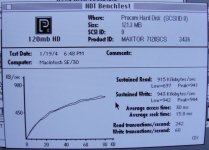
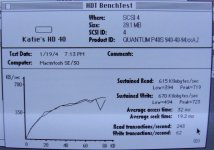
I did some benchmarks of two drives I have with an SE/30 and HDT BenchTest:

DSC02298.JPG

DSC02299.JPG

Just for reference...

 
Thank you for the comparison between the AZTEC Monster and a normal spinning-platter hard drive. The only thing left to test at this point would be another CF card, in order to determine if the specific features of the CF cards would impact performance further. For example, if you tested a significantly faster CF card, and if the benchmarks did not change much at all and if you could not "FEEL" any difference in speed among the cards, then such would prove that the AZTEC Monster hardware is incapable of taking advantage of the CF card features that otherwise would boost READ/WRITE performance when used in hardware specifically designed to use those features.
Friends have offered me their CF cards for testing, so we will get some other CF data for comparison soon. In addition, I plan to install the AztecMonster into my G3 next weekend, so we might estimate the SCSI bus performance influence.

 
JDW, are you thinking of taking that Legacy SSD and hooking it up via a IDE -> 50 pin SCSI adaptor?
I was thinking about putting one in my PB G3 PDQ, since it has IDE. And of course, I could test the SSD in other machines too, assuming I had the IDE to SCSI adapter you speak of. Which adapter would you recommend?

 
Thanks for posting theodic. Do you have a benchmark for the internal 8GB disk to compare? What are the speed ratings for the CF cards in xxxX?

 
Thank you for the comparison between the AZTEC Monster and a normal spinning-platter hard drive. The only thing left to test at this point would be another CF card, in order to determine if the specific features of the CF cards would impact performance further. For example, if you tested a significantly faster CF card, and if the benchmarks did not change much at all and if you could not "FEEL" any difference in speed among the cards, then such would prove that the AZTEC Monster hardware is incapable of taking advantage of the CF card features that otherwise would boost READ/WRITE performance when used in hardware specifically designed to use those features.
Since we have comrades contributing SE/30 related performance numbers now, I will use the same test environment now: SE/30, System 7.1.1 Pro, HDT v2.0.6.

CF card test candidates

DSCN1994.jpg


Here is that CF card I benchmarked last week: Transcend 4GB CF 133x

DSCN1978.jpg


This time it's a Transcend 8GB CF 400x

DSCN1964.jpg


An old, boring Samsung 512MB CF card

DSCN1983.jpg


An even older Toshiba 128MB CF card

DSCN1989.jpg


And here as a reference, a real hard disk: Quantum FireBall 1280S

DSCN1974.jpg


To summarize so far:

• The combination of AztecMonster, SE/30, and HDT 2 did work with all CF cards I have tested. No problems with device detection, initialization, and so on.

• Benchmark results with different CF cards are more or less the same.

• CF benchmark numbers are dramatically lower than real hard disk benchmark numbers.

But - it does not feel slow to me.

 
Last edited by a moderator:
JDW,

I couldn't have the slightest clue. I would love to use something IDE because then file swapping in an emergency/recovery process could consist of just throwing the SSD into a generic USB -> IDE enclosure or hotswap bay.

Those figures for ~750KB/sec read and ~400KB/sec write is not encouraging compared to 1200KB/sec read and write.

I would love to test a SSD with a scsi adaptor but money is extra extra now and my SE/30 is 1600km away.

 
Thanks for posting theodic. Do you have a benchmark for the internal 8GB disk to compare? What are the speed ratings for the CF cards in xxxX?
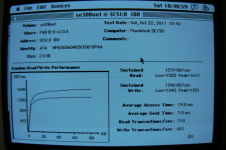
Valid point. I've updated my page of benchmarks and included an HDD test at bottom (1591K read, 1266K write). http://zombiegargle.com/cf/

The Transcend Ultra is 100x

The Transcend CFR150 is 150x

The takeMS HyperSpeed is 120x

The Delkin Devices eFilm is unspecified

MicroDrives tend to max out at around 7MB/sec. I've achieved this on both using my USB reader.

 
Interesting that the results from two different machines are different, but within the population of each machine, the results are similar.

Udo.Keller

780KB/s read | 390KB/s write

theodric

500KB/s read | 500KB/s write

Since the type of CF card seems to not impact the test results very much, what could be causing the difference?

 
I now question if any of my previous benchmarks hold any validity. The 4GB Microdrive that previously posted around 500K/sec read/write, still in its external enclosure, but now bootable with a full copy of the internal drive (and the internal drive dismounted) is now almost square with the internal SCSI HDD, and actually beats it on write speeds. GALOTS: Screen Shot 2011-10-22 at 22.53.16.png

My butt dyno* says it doesn't feel any slower, either.

*http://www.urbandictionary.com/define.php?term=butt-dyno

 
Back
Top