• Hello MLAers! We've re-enabled auto-approval for accounts. If you are still waiting on account approval, please check this thread for more information.

Can an Apple II External SCSI Drive Be Connected to a Mac?

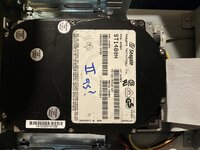
I have an external SCSI drive that came with one of my Apple IIGS units back in the day. It’s a Seagate 400MB drive (Apple formatted). Hardly ever used it.

Anyway, it’s been sitting on my shelf for sometime. I fired it up not connected to a computer and the HD and power supply seem to function properly.

My question is - can I connect this external SCSI drive to my IIfx to see what contents are on the drive (if any)? Saves me from having to pull out one of the IIGS units from storage. I know certain Apple II floppy drives could not be connected to the Mac, as the drive controller could be damaged.
 
If that drive is indeed SCSI, you can do that since SCSI is standardized. Maybe you need to have ProDOS filesystem support on your Mac (no all System Software version do IIRC) if there are ProDOS partitions on this drive.
 
Agree a 100%, the drive itself will work fine with the Macintosh, but reading old data from it won’t be straightforward.
 
Connected the external drive to the IIfx’s SCSI port. Got the blinking question mark on startup. Tried different SCSI IDs on the external drive - same issue.

The IIfx’s internal drive works perfectly, so I’m not sure what is causing the conflict. I might have to dig out the IIGS after all. 🧐
 
I figured out the root cause of the conflict. According to my MTP Emergency Boot Disk, the external drive is reading as SCSI 0, which is the ID number for the IIfx’s internal drive.

So for some reason the ID switch on the external drive is not working. I checked the connections - everything seems fine.
IMG_1445.jpeg
 
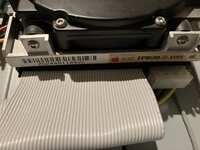
Google the model number of the HD and you should quickly find instructions on how to manually set SCSI IDs on the drive shifting a jumper
 
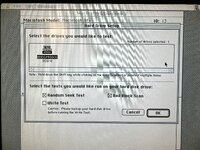
So shifting the jumper worked (it now shows as ID #2 on the IIfx) and the drive itself is in good shape according to Norton Disk Doctor (no bad blocks).

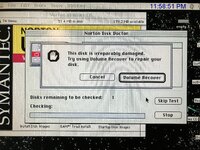
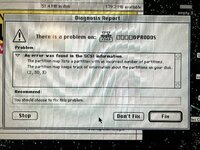
However, Norton detected corruption with the IIGS software that is installed on this drive and could not fix the issue with whatever is ailing it as seen here:
IMG_1451.jpeg
Oddly, this drive has no less than seven partitions on it (I can assure you I wasn’t responsible for that). And of course Norton discovered that:
IMG_1450.jpeg
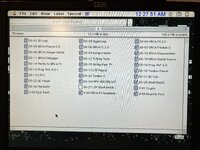
I was able to retrieve some documents that the IIfx could recognize (Word docs that contained software information and manuals):
IMG_1452.jpeg
I tried to use Apple File Exchange but it would not open and said the drive had to be initialized.

I don’t recall if I have an SCSI card for my IIGS units. Hopefully there’s still a workaround with using the IIfx to retrieve and repair these “damaged” software programs (at least according to Norton).

Also, is there a special tool that’s available to remove jumper switches? I ended up using a jeweller’s screwdriver to take out the jumper switch.
 
I wouldn't trust Norton to fix ProDOS partitions, and note it came up "catastrophic" errors pretty much every time you run it! :) The multiple partitions would be < 32MB each which was the max partition size the Apple II/IIGS would work with.
The documents you have recovered look mostly like applications to me (disk images?) over documents. You might need the IIGS running to identify what the files are that can be read on other computers, or force opening them in Word (or a modern computer) to see if there are any leads to identify.
 
Or force opening them in Word (or a modern computer) to see if there are any leads to identify.
These docs do open in Word 5.1 and they are manuals. I could post some pics. I made the icons smaller as to show what was recoverable on the IIfx. But yeah, sounds like I'm going to have the boot this drive on the IIGS (if one of them has a SCSI card).
 
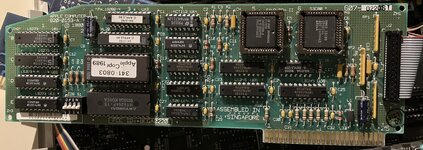
Opened up both IIGS units. One of them had the Sandwich II Apple SCSI card, so I shouldn’t have any issues running the external drive:
IMG_1454.jpeg
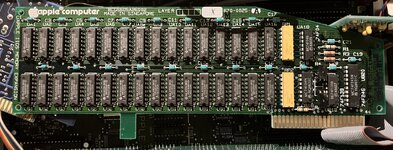
I also had two Apple memory expansion cards. One of them is fully populated (I think that gives me 1MB - could be wrong):
IMG_1455.jpeg
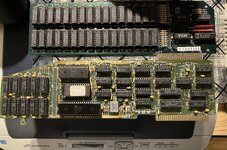
Had a third party memory expansion card from some company. It says 4MB on the card but who knows? Need to run that someday:
IMG_1460.jpeg
Below the memory card is a Franklin Computer printer card.

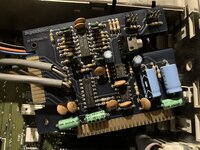
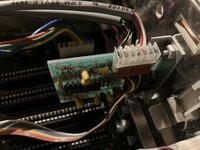
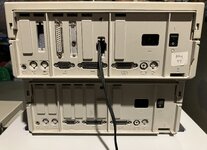
There was also some weird “SuperSonic”sound card and another card piggybacked onto it (I have a stereo wire running out the back of the IIGS):
IMG_1456.jpeg
IMG_1457.jpeg
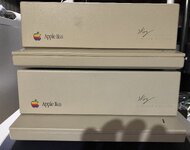
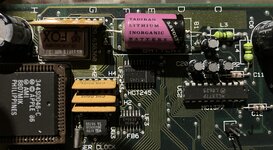
Both of these units are ROM 1 Woz Limited Edition machines with the battery soldered in (amazingly no leakage):
IMG_1461.jpeg
IMG_1462.jpeg
IMG_1458.jpeg
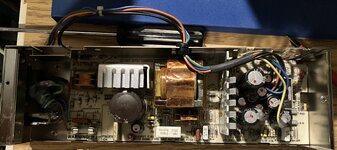
Original power supply (RIFA cap I’m looking at you):
IMG_1459.jpeg
Haven’t fired up the IIGS yet. I’ll be using my Commodore 1701 monitor as I don’t have the original CRT for this computer (and I doubt my 20” IBM ThinkVision will work with the IIGS). Neither have been used in a few years. Let’s see what blows up first lol 😆
 
The Woz Limited Editions were all ROM 0 to my knowledge
Yes, my mistake. No upgrades have been done to either machine. Would like to get a ROM 3 installed someday.

I forgot to mention the lack of fan in both units. How well do they dissipate heat with expansion cards installed? Should I hunt down a Kensington System Saver? I have one for my Plus.
 
IIRC there is a fan inside the PSU (but can be wrong) anyway most Apple IIs and early Macintosh don’t have a fan.
 
The IIGS didn’t ship with a fan during its lifetime, but there is a header for one on the motherboard. I always add one to mine. They can get quite toasty inside with a load of cards and a CPU upgrade.
 
Last edited:
Back
Top