• Hello MLAers! We've re-enabled auto-approval for accounts. If you are still waiting on account approval, please check this thread for more information.

Beige Macintosh Plus Screen/Flyback Transformer Issue

Compare the datasheets. The damper diode needs to be of a fast recovery, high voltage device. 

You cant substitute parts without comparing datasheets. 

 
I compared the data sheets for the CR1 replacements, and they seem similar enough so that it wouldn't make much of a difference. However, I have trouble finding data sheets for the original parts used on the computer. How can I be sure that my replacements for C1 and Q3 are correct?

 
They *should* be fine. Q3 seems to be actually the same component (BU406), while the replacement you found for CR1 is an upgrade of the original component, with response time of 150 ns instead of the original 200 ns and similar current/voltage specs. 
If you want to go with a component which is as close as possible to the original one, digikey is still selling the GI824 (which is the original CR1), or you could buy this one which is even faster. 
As others have already told you, try replacing Q3, CR1 and the flyback first and go from there: be prepared to what could be a rather long trial & error process, though!

 
Last edited by a moderator:
Well, after a week of waiting the parts finally arrived. With some help, I desoldered the old Flyback Transformer, C1, Q3, and CR1. I installed the new parts from Digikey, and this is the final result after some screen and voltage adjustments:

IMG_3371_zpsrkbbbkbo.jpg.4fbeee650536c12e62592aa55b778e5f.jpg


The Old Parts:

IMG_3372_zpsvaywfj9z.jpg.89f5c1357cb96e9fed2cecc6cc55966b.jpg


There also used to be a faint clicking sound when the ? Floppy Disk screen would appear, but there isn't anymore. The new flyback transformer appears to be working perfectly, and I have had no screen problems since. The speaker works perfectly.

 
Keep an eye on J1. The browning of the connector is the result of a poor connection. The socket delivers signals to the deflection yoke and when the connection gets really poor or intermittant the horizontal/vertical can start to jitter or completely collapse.

 
The J1 connector has brown plastic, but the metal part seems fine. If I needed to replace J1, where would I get such a replacement? Also, I was wrong about the faint clicking sound. It's still there, and I remembered that it was coming from the speaker, since I could still here the sound when I plugged in headphones.

 
did you change all the caps?  if not you should. they can fry inside and lose connection, and can still look nice on the out side.  at least all of the 1000uf's 2200uf's  220uf.s 470uf's at a bare minim, also the AC filter caps… those are known explode at random times and give smoke off like a smoke bomb, can be really nasty. So changing those X2 Caps is a good idea.

 
I have now replaced all of the parts on the list below, except for CR20, since there appears to be a part number mixup, as the part I received could not possibly fit into the correct position. It has two pins on it, with no polarity, but resembles transistor Q3. I tested CR20 with a multimeter, though, and it appears to be fully functional. All of the other parts on this list, including the capacitors, have been replaced with their respective Digikey part numbers, except for the parts highlighted in green:

https://docs.google.com/spreadsheets/d/132RwzC8HM5ask-BdY_31txErOCwJDSkz099GY2XLpE0/edit?hl=en&pref=2&pli=1#gid=0

Another list:

http://macfaq.org/plusanalogue.html

Pictures: 

IMG_3387_zpsmialwur6.jpg.92c030027b4cfaee0c3641360367f2a7.jpg
IMG_3386_zpsmiopryei.jpg.8d94156b38661cbc17bb8560ebfdc355.jpg
IMG_3392_zpsvlu4cwzh.jpg.be935ee12cc5d0fbaac9dc0bfb83315d.jpg


Part that I couldn't replace (CR20):

IMG_0020_zpsxr6b7lwy.jpg.134fc87438acee66a411f50244289bfa.jpg
IMG_3394_zpsf5wixu06.jpg.abd9e646f8dedc9ac4639a50c5292120.jpg


Now, if only I could get that modem working...

https://68kmla.org/forums/index.php?/topic/26622-apple-personal-modem-issue/

 
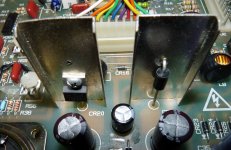
The new analog boards use that style diode.  When I reworked my two boards one had it and the other had the old more traditional looking diode.  The new style is more robust and better designed to dissipate heat.  In order to use the part you must remove the left lead. 

Here's a picture of how it looks installed:

P1020757.JPG

 
I replaced CR20 as described and pictured, and the computer is still working fine. Anyway, what makes CR20 a high-failure part? What is its purpose?

 
CR20 is the main rectifier for the +5V feed to the logic board. Anything happens to the logic board, plugging in wrong floppy drives, etc.. will kill the +5v Rail. 

CR21 is responsible for the main Sweep supply, and regular logic 12v. 

 
Last edited by a moderator:
Back
Top