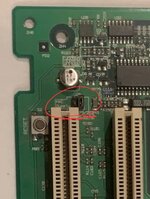
Beige G3 RAM and PSU questions:

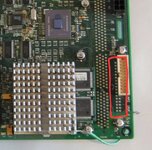
This on the other hand is actually a PC floppy drive connector. There was a prototype Perch card that had a load of PC hardware on it, AI forget what exactly, but things like a PC sound chip, PS2 and perhaps a parallel port.

1000034947.jpg
 
I think it was planned to be called "Web" (to go with Whisper, Wings etc) and was for CHRP machines, including ones to run Windows NT for PPC.
 
Has anyone ever tried to get a PC floppy drive to work with a retail board?
Haven't heard. I don't think so.

Can't remember if it is wired into the Mac chip (which does support PC drives) or only into the Perch slot. Can probably find out.

Edit : I believe it was planned to work in a normal Beige G3. Not sure if any motherboard straps require setting.
 
Maybe desolder the FDD connector and hotwire it from the solder side? In doing so, the PC connector could be installed and tested without loss of Mac Floppy connection. Using both would be cool.
 
Maybe desolder the FDD connector and hotwire it from the solder side? In doing so, the PC connector could be installed and tested without loss of Mac Floppy connection. Using both would be cool.
I wouldn't recommend it. I'd take the overlaid footprints as a hint that they're not intended to be used at the same time.

It would have been less effort to not overlay them, therefore it was intentional.

Edit - yeah, they use common signals so it would cause issues
 
Last edited:
Has anyone ever tried to get a PC floppy drive to work with a retail board?
Haven't heard. I don't think so.

Can't remember if it is wired into the Mac chip (which does support PC drives) or only into the Perch slot. Can probably find out.

Edit : I believe it was planned to work in a normal Beige G3. Not sure if any motherboard straps require setting.

I briefly looked into this and its wired directly into the Heathrow/Mac-io chip. There is MFM support in ROM so it would probably work without any further hacks.
 
Interesting, will they go straight from a 24Pin source to a 20Pin adapter cable w/o modification to the adapter?
The pinout is compatible with 20 pin ATX. The tower PSU is basically an ATX PSU. The desktop one has the soft power the Mac way instead of the ATX way, so if you want to use a board out of a desktop with ATX you have to swap Jumper J28 over to the other position (it's in the corner near the back of the end PCI slot.

If you move a tower board into a desktop or vice versa, and are wondering why it powers on as soon as you plug it in? Swap J28 over. It just inverts the soft power logic.

1000034954.jpg
 
Back
Top