• Hello MLAers! We've re-enabled auto-approval for accounts. If you are still waiting on account approval, please check this thread for more information.

Beefed-up G3 MT - will it overheat one day?

I recently pretty beefed up my beige G3 MT

- 768mb/ram
- Radeon 7000 - 32mb
- USB Card
- Sonnet Encore G4/1000
- Adaptec SATA Card with Kingston SATA SSD

Looking at the internals, the Sonnet Encore is huge and cable routing is a bit of a mess. I am running the unit oben on my bench at the moment cause there is not much clearance above the CPU and it's two fans and I first want to make sure, the system runs stable. Using my IR temp meter, the CPU heat sink has a hot spot of 40°C or 104 Fahrenheit. I have a Fairchild VRM and that also stays quite chill at 31°C or 90 Fahrenheit. The Radeon 7000 also doesn't exceed 40°C / 104 Fahrenheit.

So no worries here, but give the fact that the G3 MT only uses the PSU Fan to blow air out of the case, I will have an eye on it. Fortunately, the CPU fan sits right below the internal case fan, that sucks hot air out of the mainboard area.
 

Attachments

I recently pretty beefed up my beige G3 MT

- 768mb/ram
- Radeon 7000 - 32mb
- USB Card
- Sonnet Encore G4/1000
- Adaptec SATA Card with Kingston SATA SSD

Looking at the internals, the Sonnet Encore is huge and cable routing is a bit of a mess. I am running the unit oben on my bench at the moment cause there is not much clearance above the CPU and it's two fans and I first want to make sure, the system runs stable. Using my IR temp meter, the CPU heat sink has a hot spot of 40°C or 104 Fahrenheit. I have a Fairchild VRM and that also stays quite chill at 31°C or 90 Fahrenheit. The Radeon 7000 also doesn't exceed 40°C / 104 Fahrenheit.

So no worries here, but give the fact that the G3 MT only uses the PSU Fan to blow air out of the case, I will have an eye on it. Fortunately, the CPU fan sits right below the internal case fan, that sucks hot air out of the mainboard area.

It might be useful to remove the upgrades and get some baseline temperature numbers for comparison.

Also, a PCI slot cooler fan might be a cheap and easy way to improve cooling. Not to mention checking the thermal paste on the CPU - given their age, a refresh with new higher-performance paste may buy you a few degrees of cooling.

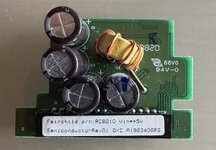
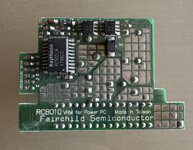
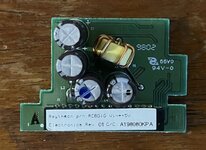
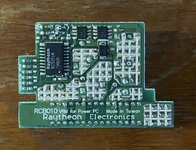
What does the Fairchild VRM look like?

Presumably it is labeled as such? Seems that Sonnet found an issue with one of the other manufacturers of the G3's VRM...
 
Last edited:
If it's not crashing under load it's adequate and max 40 degrees is well under this. If you can on any vintage Mac a modern fan here and there can help things along markedly.
 
There are pictures online of Raytheon, Switch Power and the infamous Royal VRMs, but I’ve honestly never seen a Fairchild. Just curious.
Here we go - using a Raytheon RC5051M Power Management IC.
 

Attachments

  • IMG_3220.jpeg
    IMG_3220.jpeg
    930.4 KB · Views: 11
  • IMG_3221.jpeg
    IMG_3221.jpeg
    1,015.6 KB · Views: 12
If it's not crashing under load it's adequate and max 40 degrees is well under this. If you can on any vintage Mac a modern fan here and there can help things along markedly.
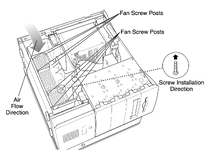
I am thinking of adding a 60mm fan in the baffle handle as Apple has designed two fan spaces there. In the Service Source for the G3 Server/MT, installation is optional for some PCI cards. It will not help in the cramped around the CPU and ram, but it can suck air just thru the vents on the side panel - leaving it to the main fan to push air from the logic board area to the PSU and the PSU fan to push it out of the enclosure.
 

Attachments

  • Bildschirmfoto 2025-08-19 um 12.14.39.png
    Bildschirmfoto 2025-08-19 um 12.14.39.png
    610.5 KB · Views: 11
Back
Top