• Hello Guest! We're hosting a challenge to welcome vintage Intel macs to the MLA during the month of July! See this thread for more information.
  • We've made some quality of life improvements to the Trading Post. More info here.

basic hdv (mpeg2/720p) editing on late powerbook g4, yaa or nee?

I'll probably had tried working in either imovie hd 5 or final cut pro 5

powerbook likely would have some kind of solid drive instead of the venerable factory hdd beside also stuffing the maximum ram it can support altogether

and as for the videos themselves? I guess like maybe 5-40 minute lengths, and I'll simply save it in some native format .. especially considering that i could transcode it on something else hardware-wise if I had to for any reason

(just as a footnote: I'm not actually looking to do this but I simply had to wonder if given the close hardware vs software release timelines it did indeed sound like a plausible match)
 
Why not, I say yes? Anything on your desk will do it faster, but not nearly as much fun or elegance of the PowerBook.
 
When I was a student and the G4s were current, I did edit and put together a DVD on a PB G4 using Final Cut Pro (4? I think) and DVD Studio Pro 2. The render times were brutal, and often required me leaving it doing its thing overnight, but I at least remember it being a usable workflow if one was prepared to apply some patience to the problem.
 
<snip> either imovie hd 5 or final cut pro 5 <snip> I guess like maybe 5-40 minute lengths, and I'll simply save it in some native format .. especially considering that i could transcode it on something else hardware-wise if I had to for any reason <snip>
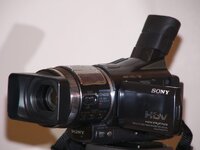
If it's possible, I would use the technique they used to use: offline, non-linear editing. I had FCE HD with my iMac G3/1.8 (and 1GB of RAM) and Mac OS X 10.3 (I didn't upgrade to 10.4 on the G5). I used it with an early Sony HDV camera, The HDR-HC1:

SonyHdvHc1.jpg
The iMac (and later my 12" PBG4/1.5) couldn't download HDV video at 1x, FCE would transcode it to an intermediate format and download at about 0.67x. But it could edit the video adequately.

Early on in the era of non-linear, digital video editing (and I saw some of this in the late 1990s), they would download their DV video to a lower resolution (maybe quarter-NTSC-DV, or in our case, quarter-PAL-DV, whatever the term is); edit that, then when rendering, reattach the original source tapes and the video editor would shuttle to the right timecodes; copy the clip; re-render the clips and any transitions; then write to the output.

So, because most of the time in video editing is the editing itself (about 1min per second of video), the computers of the day (400MHz G3s or Pentium IIs/IIIs) would be fast enough to edit with and the minority of the time would be spent rendering for the final production. You'll use about 1/4 of the CPU and 1/4 of the disk space with that system. You'd need tape without timecode gaps to make this work.

Having said this, it was a much faster workflow than using linear Beta-SP based video editing, because obviously, any corrections earlier than your current target edit point would require the reconstruction of the entire prior edit list back to that edit point.

OTOH, I don't know how to make off-line video editing work with FCP. OTOH, FCP and FCE can do low-quality editing from actual quality footage.
 
Back
Top