



Hello Everyone,
I hope this is useful for others and I’m not 100% duplicating something that already exists…
I was looking for a way to export a tileset into a C array for use in a new game I’m writing in C using CodeWarrior PRO 4 on System 7.
I want the tileset to be defined inside the C code, not stored as PICT entries in the resource fork since I plan to use it to procedurally generate a play area (shh, I've already said too much!).
I couldn’t find an existing script that did exactly what I was looking for, so I came up with this little LUA script I thought I'd share.
My initial version of the script just exported the tiles as hex values into the array. It worked, but the colour palette was bonkers due to the difference between the palette I was using in Aseprite (on my M1 Macbook Air) vs the system palette in System 7.5.5.
So, after a lot of head banging, I decided the best option (for my case) was to include the palette colour definitions inside the exported .h file as well as the C array tileset values.
Then, I could tell my program use to that palette and restore the System palette when the game quits.
I've included a .SIT file that contains a CodeWarrior PRO 4 C project that will:
- Load the exported tileset.h file
- Read the palette info stored in that file and setup the correct colours for you
- Load each of the 16x16 squares into 16x16 tiles and apply the correct palette and display them in a grid for your verification.
- Restore the system palette on program close
IMPORTANT
You must have the following setup in Aseprite for this to work:
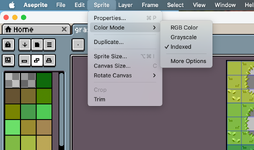
- Your tileset MUST be indexed (8bit) in Aseprite (SPRITE -> Colour Mode -. INDEXED)
- You must have a TILEMAP layer created (right click on layer -> CONVERT To... -> Tilemap)
- You must have my C Array Exporter LUA script installed (duh)
This script ONLY supports 16x16 tiles.
If you want 32x32, 48x48, 64x64, etc.. you will need to adjust the code in the .lua file as well as main.c
Below is an example of the wonky tile colours caused by the palette mismatch
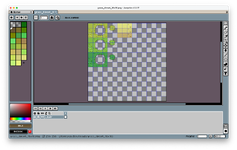
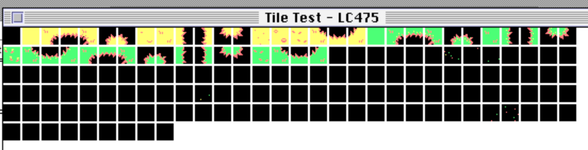
Original correct Aseprite tileset colours vs the wonky imported tileset on my LC475
How to use this script...
- Load your beautiful tile art into Aseprite
-Convert it to be Indexed (8 bit / 256 colours)
- Right click on your drawing's LAYER and Click Convert To... -> Tilemap.
- Place my C Array Exporter.lua file in your scripts folder (refresh scripts if needed)
- Run the C Array Exporter script
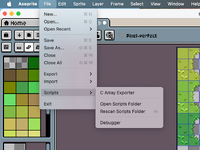
- It will ask you where you want to save the exported file. It's your choice...
- The file will be named tileset.h
-That's it, we're done with Aseprite.
- Get your fancy new tileset.h file onto your System 7 machine (or emulated environment).
- I'm going to assume you're using CodeWarrior PRO 4 so place it in the Tileset Testing folder
- Add the tileset.h file to your project.
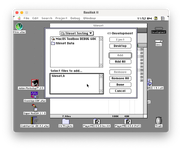
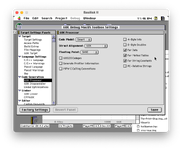
- Make sure you've enabled these 3
Far Data
Far Method Tables
Far String Constants
options in the CodeWarrior 68K Processor settings (see image below).

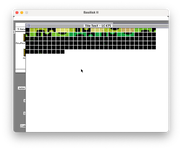
That's it, the program should load the included palette from the tileset.h file, and draw each of your tiles in the glorious, correctly displayed 256 colours!
I hope that helps someone!
As always, feel free to contact me with suggestions, comments, anything!
Aaron/DW
Dark Systems BBS
Credits
The tileset used in the exampleis called: Grass Tileset 16x16
and was created by Bonsaiheldin.
https://opengameart.org/content/grass-tileset-16x16
C Array Exporter.lua below:
main.c (written in CodeWArrior PRO 4)
I hope this is useful for others and I’m not 100% duplicating something that already exists…
I was looking for a way to export a tileset into a C array for use in a new game I’m writing in C using CodeWarrior PRO 4 on System 7.
I want the tileset to be defined inside the C code, not stored as PICT entries in the resource fork since I plan to use it to procedurally generate a play area (shh,
I've already said too much!). I couldn’t find an existing script that did exactly what I was looking for, so I came up with this little LUA script I thought I'd share.
My initial version of the script just exported the tiles as hex values into the array. It worked, but the colour palette was bonkers
due to the difference between the palette I was using in Aseprite (on my M1 Macbook Air) vs the system palette in System 7.5.5.So, after a lot of head banging, I decided the best option (for my case) was to include the palette colour definitions inside the exported .h file as well as the C array tileset values.
Then, I could tell my program use to that palette and restore the System palette when the game quits.
I've included a .SIT file that contains a CodeWarrior PRO 4 C project that will:
- Load the exported tileset.h file
- Read the palette info stored in that file and setup the correct colours for you
- Load each of the 16x16 squares into 16x16 tiles and apply the correct palette and display them in a grid for your verification.
- Restore the system palette on program close
IMPORTANT
You must have the following setup in Aseprite for this to work:
- Your tileset MUST be indexed (8bit) in Aseprite (SPRITE -> Colour Mode -. INDEXED)
- You must have a TILEMAP layer created (right click on layer -> CONVERT To... -> Tilemap)
- You must have my C Array Exporter LUA script installed (duh)
This script ONLY supports 16x16 tiles.
If you want 32x32, 48x48, 64x64, etc.. you will need to adjust the code in the .lua file as well as main.c
Below is an example of the wonky tile colours caused by the palette mismatch
Original correct Aseprite tileset colours vs the wonky imported tileset on my LC475
How to use this script...
- Load your beautiful tile art into Aseprite
-Convert it to be Indexed (8 bit / 256 colours)
- Right click on your drawing's LAYER and Click Convert To... -> Tilemap.
- Place my C Array Exporter.lua file in your scripts folder (refresh scripts if needed)
- Run the C Array Exporter script
- It will ask you where you want to save the exported file. It's your choice...
- The file will be named tileset.h
-That's it, we're done with Aseprite.
- Get your fancy new tileset.h file onto your System 7 machine (or emulated environment).
- I'm going to assume you're using CodeWarrior PRO 4 so place it in the Tileset Testing folder
- Add the tileset.h file to your project.
- Make sure you've enabled these 3
Far Data
Far Method Tables
Far String Constants
options in the CodeWarrior 68K Processor settings (see image below).
That's it, the program should load the included palette from the tileset.h file, and draw each of your tiles in the glorious, correctly displayed 256 colours!
I hope that helps someone!
As always, feel free to contact me with suggestions, comments, anything!
Aaron/DW
Dark Systems BBS
Credits
The tileset used in the exampleis called: Grass Tileset 16x16
and was created by Bonsaiheldin.
https://opengameart.org/content/grass-tileset-16x16
C Array Exporter.lua below:
Code:
local spr = app.activeSprite
if not spr then return app.alert("No active sprite!") end

if spr.colorMode ~= ColorMode.INDEXED then
  return app.alert("Sprite must be in INDEXED color mode!")
end

local layer = app.activeLayer
if not layer.isTilemap then
  return app.alert("Please select the Tilemap layer.")
end

local tileset = layer.tileset
local totalTiles = #tileset
local palette = spr.palettes[1]

local dlg = Dialog("68k Tileset + Palette Export")
dlg:file{ id="path", label="Save As:", save=true, filename="tileset.h", filetypes={"h"} }
dlg:button{ id="ok", text="Export" }
dlg:show()

if not dlg.data.ok then return end

local f = io.open(dlg.data.path, "w")
if not f then return app.alert("File Error!") end
f:write("/* Auto-generated from Aseprite */\n")
f:write("#include <QuickDraw.h>\n\n")

-- --------------------------------------------------
-- Export Palette (safe for <256 colors)
-- --------------------------------------------------
f:write("static const RGBColor game_palette[256] = {\n")
local paletteSize = #palette
for i = 0, 255 do
  local r, g, b = 0, 0, 0
  if i < paletteSize then
    local c = palette:getColor(i)
    r = c.red * 257
    g = c.green * 257
    b = c.blue * 257
  end
  f:write(string.format("  { %d, %d, %d }, // %d\n", r, g, b, i))
end
f:write("};\n\n")

-- --------------------------------------------------
-- Scan tilemap layer to find used tiles
-- --------------------------------------------------
local usedTileIDs = {}

for _, cel in ipairs(layer.cels) do
  local tilemap = cel.image
  if tilemap then
    local w, h = tilemap.width, tilemap.height
    for y = 0, h-1 do
      for x = 0, w-1 do
        local tileId = tilemap:getPixel(x, y)
        if tileId ~= nil then
          usedTileIDs[tileId] = true
        end
      end
    end
  end
end

-- --------------------------------------------------
-- Helper function: export a single tile
-- --------------------------------------------------
local function exportTile(tile, isUsed)
  local pixels = {}
  for y = 0, 15 do
    for x = 0, 15 do
      local val = 0
      if tile and isUsed then
        local p = tile:getPixel(x, y)
        if p ~= nil and p < paletteSize then
          val = p & 0xFF
        end
      end
      table.insert(pixels, val)
    end
  end
  return pixels
end

-- --------------------------------------------------
-- Export Tiles
-- --------------------------------------------------
f:write("static const unsigned char game_tileset[" .. totalTiles .. "][256] = {\n")
for i = 0, totalTiles - 1 do
  local tile = tileset:getTile(i)
  local isUsed = usedTileIDs[i] or false
  local tilePixels = exportTile(tile, isUsed)

  -- Write tile to file
  f:write("  {\n    ")
  for j = 1, 256 do
    f:write(string.format("0x%02X, ", tilePixels[j]))
    if j % 16 == 0 and j < 256 then f:write("\n    ") end
  end
  f:write("\n  },\n")
end
f:write("};\n")

f:close()
app.alert("Export complete!")
main.c (written in CodeWArrior PRO 4)
C:
#include <QuickDraw.h>
#include <Windows.h>
#include <Menus.h>
#include <Events.h>
#include <Fonts.h>
#include <Dialogs.h>
#include <Palettes.h>
#include "tileset.h"

/* GLOBALS */
PaletteHandle gGamePalette;


/* FUNCTION PROTOTYPES */
void ToolBoxInit(void);
void InstallGamePalette(WindowPtr window);
void DrawTileset(void);


/* MAIN */
void main(void)
{
    WindowPtr myWindow;
    Rect windowRect;
    EventRecord event;
    Boolean quit = false;

    ToolBoxInit();

    SetRect(&windowRect, 50, 50, 650, 500);

    myWindow = NewCWindow(nil,
                          &windowRect,
                          "\pTile Test - LC475",
                          true,
                          documentProc,
                          (WindowPtr)-1,
                          true,
                          0);

    if (myWindow == nil)
        return;

    SetPort(myWindow);


    /* Install our exported palette */
    InstallGamePalette(myWindow);

    DrawTileset();

    while (!quit)
    {
        if (WaitNextEvent(everyEvent, &event, 60, nil))
        {
            switch (event.what)
            {
                case mouseDown:
                case keyDown:
                    quit = true;
                    break;

                case updateEvt:
                    BeginUpdate(myWindow);
                    DrawTileset();
                    EndUpdate(myWindow);
                    break;

                case activateEvt:
                    if (event.modifiers & activeFlag)
                        ActivatePalette(myWindow);
                    break;
            }
        }
    }

    DisposePalette(gGamePalette);
    DisposeWindow(myWindow);
}


/* TOOLBOX INIT */
void ToolBoxInit(void)
{
    InitGraf(&qd.thePort);
    InitFonts();
    InitWindows();
    InitMenus();
    TEInit();
    InitDialogs(nil);
    MaxApplZone();
}


/* INSTALL PALETTE */
void InstallGamePalette(WindowPtr window)
{
    short i;

    /* Create new 256-entry palette */
    gGamePalette = NewPalette(256, nil, pmExplicit, 0);

    if (gGamePalette == nil)
        return;

    /* Fill entries from exported palette */
    for (i = 0; i < 256; i++)
    {
        SetEntryColor(gGamePalette, i, &game_palette[i]);
    }

    /* Attach to window */
    SetPalette(window, gGamePalette, false);
    ActivatePalette(window);
}

/* DRAW TILESET */
void DrawTileset(void)
{
    int t, x, y, px, py;
    unsigned char colorIndex;
    int tilesPerRow = 30;
    RGBColor theColor;

    for (t = 0; t < 159; t++)
    {
        x = (t % tilesPerRow) * 18;
        y = (t / tilesPerRow) * 18;

        for (py = 0; py < 16; py++)
        {
            for (px = 0; px < 16; px++)
            {
                colorIndex = game_tileset[t][(py * 16) + px];

                /* Direct lookup from our palette */
                theColor = game_palette[colorIndex];
                RGBForeColor(&theColor);

                MoveTo(x + px, y + py);
                Line(0, 0);
            }
        }
    }
}


