• Hello MLAers! We've re-enabled auto-approval for accounts. If you are still waiting on account approval, please check this thread for more information.

Appletalk wiring

Hello,

I have a Mac Plus and a Powerbook 100 and hope to connect them via Apple network.

I got a lot of cables from my uncle and see two possibilities :

- try to use a Phonenet system with two small boxes and a phone cable but I miss the terminators so between what pins of the rj11 should I connect the 120 ohms resistor ?

- I have also found a 3 pins minidin 4 meters cable and I am wondering if I can simply put this cable into the minidin printer connectors of both computers and get the network working ?

Thanks for help on that topics.
Philippe
 
Last edited:
If you use PhoneNet, make sure you have an RJ-11 cable with all four wires, not just two. The terminators are really not needed; you will be fine without them.
 
Yeah, over short distances I wouldn't worry about the terminators at all. It's not like SCSI where it's vital.

You can't just wedge the 3-pin din between two machines in the serial port - it won't fit. But you can use a standard Apple printer cable, the 8-pin one, between two computers and that'll work too (so long as it's actually a mac printer cable and not an identical-looking cable which isn't, thankyou strange Internet vendors of cables...)
 
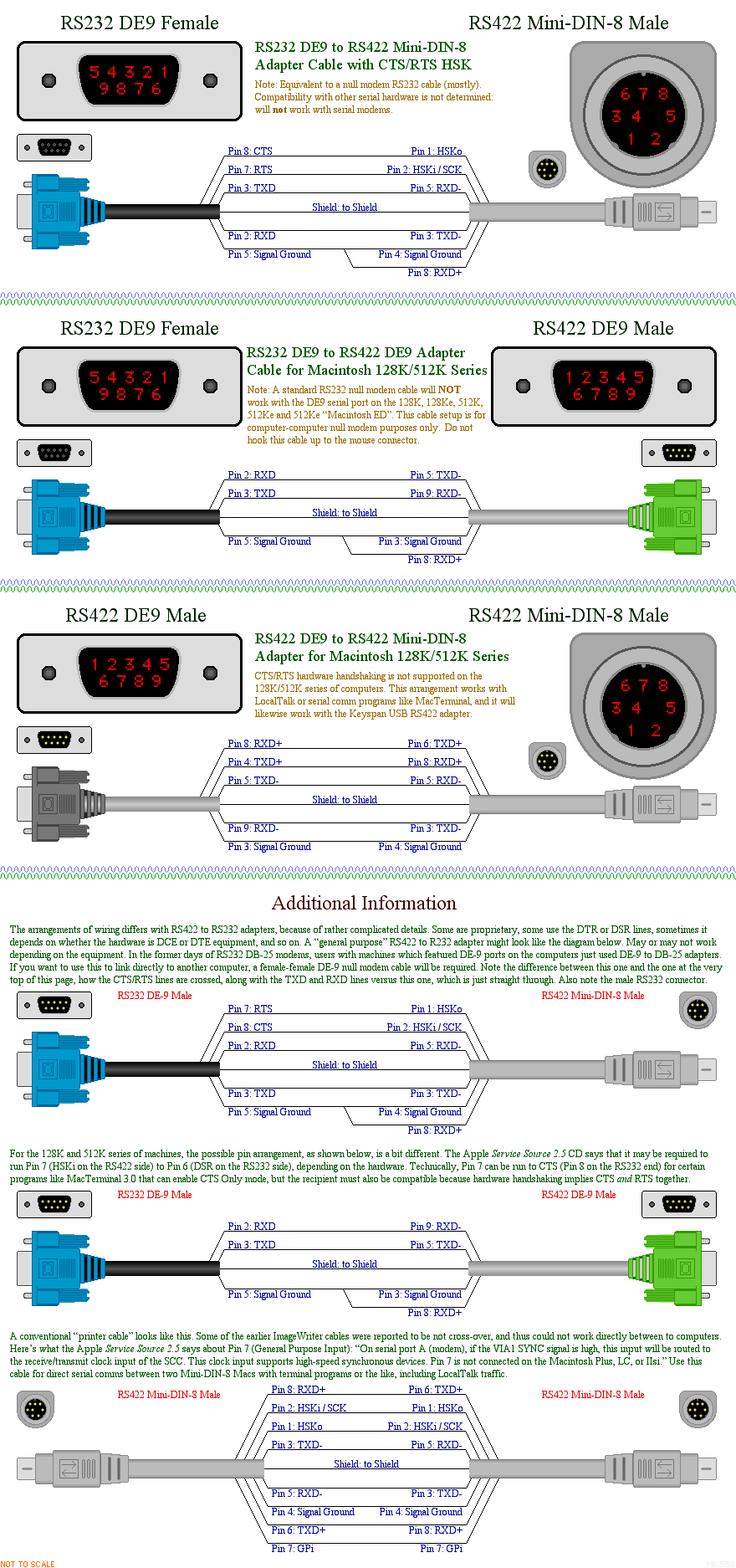
Just what exactly IS an Apple printer cable, and how does the wiring differ from most random eight pin mini DIN cables sold today?

I bought one of those from CablesToGo to connect two old Macs together locally, and it did not work.
 
Apple printer cable has a mini-DIN 8-pin on both ends. Pins 1-2, 3-5, and 6-8 are flipped.


Your random cable has all pins wired straight through. So pin 1 one end is wired to pin 1 on the other end

Thanks!

I have a Mac SE and the MacTest SE application. It is asking me to connect a serial loopback cable.

How does the wiring of a serial loop back cable different from a printer cable?
 
A loopback "cable" really isn't a cable. Its a pigtail connector that "loops back" the above pairs in the connector for testing. The Apple printer cable is technically a crossover cable.
 
An Apple "printer cable" is shown at the bottom of this image.

1yq5cpr6.png
 
Back
Top