• Hello MLAers! We've re-enabled auto-approval for accounts. If you are still waiting on account approval, please check this thread for more information.

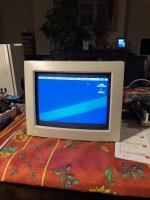
Apple M1296 12" RGB: Loud bang

Powered on my M1296 CRT this morning and bang, a visible bright spark from underneath the case and a tripped breaker in the house. 

Does anyone know what this is likely to be? I'm willing enough to go ahead and start cleaning and recapping, but don't want to bother if it's something more serious (flyback etc). 

Can't see many (any) reports of this happening. 

 
I, myself dont believe a capacitor would suddenly blow like that. You for sure wouldnt be seeing sparks. Id take off the case first and see whats going on.

Thats the Macintosh Color Display model, right? I had one. Tricky to remove the case. Youve got to remove the two screws on the bottom, and then press down a few inches from either side on the top case while sliding back. It should be quite obvious what went wrong. Im betting its the flyback. Ive had two CRTs (Out of 3) that made popping sounds and got dim, both due to flybacks reaching their expiration point. This is why Im only a compact crt only person, they dont seem to have as many issues as the bigger monitors, and also new flybacks are sold.

Was it as soon as you turned it on, or was it on for a little while? 

 
Last edited by a moderator:
Yes this is the Macintosh Color Display, 12". Pretty sure its M1296? The bang happened as soon as I pushed in the power switch.

Got the case off easy enough. There are clear scorch marks and bad solder joints on the power switch. The scorch marks are only on the solder side of the board, not on the component side. Capacitors look okay. 

I'm not sure what happened first, the 'bang' or the bad solder. Could the switch itself have failed? Or is there something else happening downstream?

25amcmt.jpg.e7166819b27e2891f7d0f67fdc62ae78.jpg


Whats above it? The solder wont just do that. Whatever its holding onto is the culprit (probably). Looks like the switch maybe?

You probably should recap it at this point as well.


Last edited by a moderator:
Above it is the main power switch. Will be checking it carefully. 

Also will recap for sure, but might have to wait until after Christmas :)  

 
Welp this is common if something hard shorts ahead in the circuit path, and you have shit solder joints. Its going to go at its weakest point, and in this case, there were bad solder joints on the switch which blew out. 

Need to do some resistance checks across the AC circuit on the monitor, as well as testing the safety capacitors, as well as the bridge rectifier. 

Now from a quick glance of the picture, the fuses are ahead of the switch, not behind it. So if the fuses didnt blow, (which they probably didnt) its likely due to just your solder joints. they are HORRID on that switch so its of no surprise. It could not handle the surge current and it went. violently. 

 
Last edited by a moderator:
Now from a quick glance of the picture, the fuses are ahead of the switch, not behind it. So if the fuses didnt blow, (which they probably didnt) its likely due to just your solder joints. they are HORRID on that switch so its of no surprise. It could not handle the surge current and it went. violently. 
The fuses are good, and I came to the same conclusion that you did, it seems unlikely that something went bad downstream, but didn't blow a fuse at the same time. The problem seems to be before the fuses, and the switch is the only component before the fuses. 

Not to say that the rest of the monitor isn't 'bad', I'm sure there's a lot of restoration to be done! 

 
Well before you get too much further, you need to clean up all that carbonization, and then resolder those joints. Chances are as long as the switch contacts didnt weld themselves shut, Thats all it needs. 

 
I've added about eight times as much solder to the four points of the switch and cleaned up with isopropyl, and so far everything is working great. Will have to recap another time. 

My running theory is that the solder joints were already weak from pushing the switch in and out, and eventually were weak enough to cause the failure. Some oily type goop has built up around the switch, which may have also contributed. More unlikely is that an insect happened to make residence in there, and got vaporized, or some other conductor happened to fall into the right spot... 

 
First, this is NOT the Macintosh Color Display. This is the shadow mask 12" RGB, commonly referred to as an LC Topper.

Second, this problem seems to be more prevalent in the Revision B boards based on personal knowledge, but odds are also good the monitor suffered a lot of abuse before it was yours. These computers were used heavily in schools, where the switches were pressed potentially thousands of times during their years of operation.

Third, don't try to mix and match the Revision A and B boards on these monitors. I had my first and so far only short-out of one of these by using a B board on an A tube. 

Fourth, you'll want to re-solder AND re-cap any of these boards at this stage of the game. I have a few waiting for it right now, in fact, and also have one that just came back to me with new caps that I have to try out...

Finally, if you need any advice on taking these monitors apart, I've done it about 20 times; in fact, I just swapped out some boards in one of these a month ago. It takes more effort than your run of the mill compact Mac, lots of parts to remove and adjustment can be a pain, but it's worth it in the end for that authentic LC experience.

 
Last edited by a moderator:
It takes more effort than your run of the mill compact Mac, lots of parts to remove and adjustment can be a pain, but it's worth it in the end for that authentic LC experience.
I agree with that, but once done the image is pretty crisp and sharp.

121.jpg

122.jpg

 
Oh yea, I love these monitors. they are cute, small, and look good with the machines. 

I snapped up a few extra parts including a Flyback for the ones I have. 

 
Last edited by a moderator:
Back
Top