• Hello MLAers! We've re-enabled auto-approval for accounts. If you are still waiting on account approval, please check this thread for more information.

Apple III "Diagnostic RAM" but only on power cycle

ravuya

6502
Just got my heavily contaminated Apple III logic board cleaned up, plugged into my (mostly) recapped power supply and fired it up. The floppy drive and keyboard are not connected, because the keyboard needs a little more TLC and I didn't want to get involved with floppy drive madness at this point in the quest.

On the first startup I get the message "RETRY" and a blinking cursor, which I believe means it's waiting for me to insert a disk and strike a key. That makes sense, and I'm happy that it's working as well as it was (it was very filthy.)

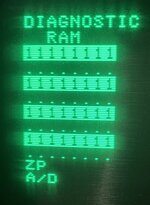
I did a power cycle by flipping the switch off, waiting a second, and then flipping it back on. This time I get a "DIAGNOSTIC RAM" screen, where exactly half of the RAM on the zero page(?) is fingered as bad.
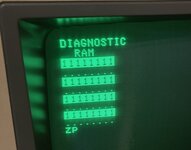
apple-iii-diagnostic-ram-failed.jpg

I remember reading that if your keyboard isn't attached (or the little neon bulb is blown out) that you will get stuck in the diagnostic, but I'm not sure if the diagnostic will manifest like this – I haven't been able to find that info again on google searches at the moment. And presumably it's getting "past" this diagnostic on the cold start, because I get to the "RETRY" screen.

I'll start working the schematic to figure out if it's something simple that interacts with exactly half the RAM.
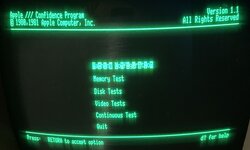
 
Update after a little while! I've managed to boot the system off of a Floppy Emu by using this adapter by ThorstenBr (only the internal floppy connector works to boot; I was mistakenly chasing a decode or disk controller problem for quite some time before realizing this.)

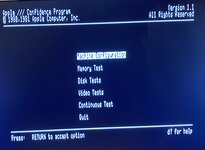
apple-iii-confidence-test-booted.jpg

I can now boot into the Confidence Program disk, although there is obvious graphical corruption and the program seems to lock up when I go into any of the sub-menus (although it seeks the disk first.) On warm starts, I get a "Diagnostic RAM" screen similar to before, but it's now also complaining about "A/D." "ZP" I can safely assume is the Zero Page, but does anyone have an idea what "A/D" could possibly be?

apple-iii-zp-ad-complaints.jpg

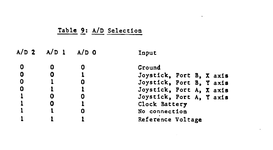
My best guess is that it's analogue/digital; the service manual lists a handful of A/D registers and their corresponding devices.

1754238940037.png
Since there's no battery (or calendar) that's probably the cause although this wasn't popping up before; regardless it doesn't seem to be as immediate a problem as the memory not working properly.
 
Last edited:
Small update: I manually pulled and tested some of the 4116s from the RAM board, using an eBay DRAM tester. This produced one "definitely bad" and two "kinda spotty" chips, so I replaced them with TMS4116 chips which tested out green.

Additionally, the 74LS51 at B11 was fingered by the Apple III service manual, and testing it failed using minipro on my TL866 II, so I got replacement 74LS51s on AliExpress. When tested, however, those also failed in an identical way, so I suspect the minipro test case for the 74LS51 is flawed (even though it makes sense to me.)

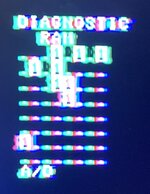
When running the replacement 4116s, I no longer get the "ZP" error during diagnostics, but instead a whole different diagnostic error. Please forgive the gross colour on this one, my test LCD has been hit by lightning in the past and hates Apple II style colour video even if it hadn't been.

apple-iii-after-4116-swap-ram-errors.jpg

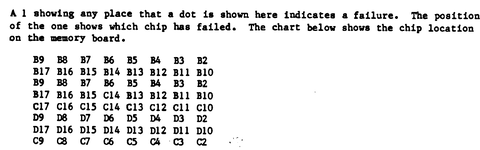
I suspect without a working zero page, whatever RAM test algorithm they were using simply did not work well enough to give an accurate picture of the bad chips. I will be using this map to track them down further; at first glance I don't think any of the parts I tested are fingered here.

1755743320512.png

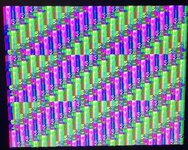
The computer will cycle between this RAM diagnostic failure and a screen full of rainbow garbage on startup unless you start up while holding control and open apple (you may only need to hold control, I haven't tested) which will convince it to go to the disk.

apple-iii-after-4116-swap-video-junk.jpg

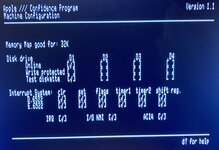
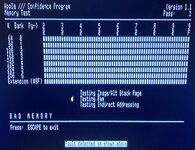
Additionally, no doubt thanks to the zero page actually working properly, I can now go into the menus of the Confidence Program, and the inverse-video characters are no longer corrupt. Unfortunately, Confidence Program seems to think I only have 32K and the RAM test aborts instantly.

apple-iii-after-4116-swap-confidence-test-loads-now.jpg

apple-iii-after-4116-swap-32k-memory-map.jpg

apple-iii-after-4116-swap-ram-tester-failed.jpg

This computer is tough as hell and is trying to claw its way out of the grave.
 
Can you try to swap chips from the locations found "bad" to other locations to see if the test is relevant or not ?
 
Unfortunately, there's not all one type of RAM on this card - the "B" row are the gold-plated MK4332 "stacked" RAM. I need to look up the pinout and figure out if I can easily cobble something else together.

That said, I should be able to move them around and see if the error follows the IC.

D17 was another bad 4116 and was replaced, which made that error go away. Now Confidence Program thinks I'm a 64K Apple III (but still gives up almost instantly on the RAM test.)
 
Last edited:
Probably giving up because the lower bank of memory is required to keep on going. So more chips should be bad.
 
Back
Top