• Hello MLAers! We've re-enabled auto-approval for accounts. If you are still waiting on account approval, please check this thread for more information.

Apple IIgs Text mode doubled

Pitou

6502
Hello,

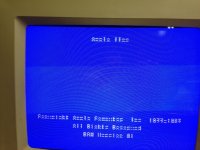
I have an issue with an Apple IIgs. The text is kind of doubled in Text mode. When I boot a system disk, in graphic mode, everything is fine. I have some experience in electronics and can also solder. I would like to repair it actually.

Just to make sure, I tried the monitor on another Apple IIgs and it's fine.

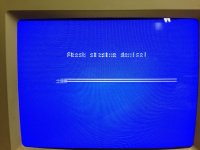
You can take a look at the pictures.
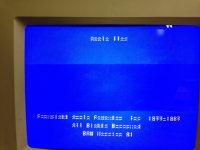
IMG_1363.JPG

IMG_1364.JPG

IMG_1365.JPG

Any idea?

Thank you

Pitou!

 
Last edited by a moderator:
I thought about this. Can you tell me which one is it?

Just so you know, I also replaced the VGC chip and it made no difference.

Thanks!!

Pitou

 
What kind of monitor is this? Have you tried it on a Composite Monitor? If not, check your VGA Settings. 

 
Looks like the AppleColor RGB monitor the IIgs is paired with normally. There is no character ROM on a IIgs, it is stored in the main ROM. Have you performed a self-test? Hold down Open-Apple and Option on power on, or press Open-Apple, Option, Reset. If there is a fault in the ROM, it should fail the checksum test.

 
I tried reseating the chips and no luck. I'm not sure how to clean the sockets honestly.

The problem is also present on the composite output.

The monitor is an Apple RGB monitor model A2M6014

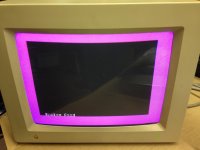
I tried the Self test and it seems to stop on that screen. Please note that all characters text in the self test are also doubled or shifted

IMG_1366.JPG

 
I can make out "System Good" on that image, but you say it freezes at that point? Interesting.

What cards are you running on the IIgs? Have you run it without cards?

If it were a Mac SE/30, I'd say part of your video circuit has lost a couple traces.

 
If it were a Mac SE/30, I'd say part of your video circuit has lost a couple traces.
Something like this would be my guess as well. I don't know what the IIGS video circuitry looks like, but that looks an awful lot like the most significant of the character ROM row-select address lines has come disconnected and it's just cycling through the top half of the character a second time instead of continuing on to the bottom half.

 
It actually looks like what my vision does to me, from time to time. lol.

But I digress....

double data = missing upper address bit/select signal on character ROM. 

 
Last edited by a moderator:
Its weird that only text is having a problem. That and the ROM checksum is passing. The only other chip I can suspect having a problem is the MEGA II which contains the character generator ROMs and creates onscreen text. That chip is soldered onto the board and is custom logic, so a board swap may be in order.

 
Last edited by a moderator:
Well it's hard to tell if it's the ROM chip or the Mega II. I also played around with the scope and followed the schematics, but I'm not able to pinpoint the root cause.

Here they are if you are curious :)

Schematic Diagram of the Apple IIgs.pdf

I can desolder the Mega II if I find another one.

I'll try look further...

Thanks for your help and suggestions!

Pitou!


Attachments

I wonder if this is for all the characters in the ROM or just a segment of them?

Boot it up without the disk drives attached so it goes into AppleSoft Basic.

Then type the following:

for x = 0 to 255 : print chr$ ( x ) ; : next x 

Then press 'ENTER' and watch the entire character set print out. From this there you can determine if the whole ROM is affected or  part of it.

Another test in case some control characters goof this up is to poke each character on the screen. I'm assuming that the IIgs Screen memory map is in the same place as the older Apples, so this should work:

for x = 0 to 255 : poke 1024 + x , x : next x 

This will print out the ROM's characters across the screen, if 1024 is start of the text screen location.

Either way, this will show if addressing problem is in part of the ROM or all of it? If it is in all of it, I believe it would be an easier fix as it would be easier to locate as set amount of address lines affected.

 
@Elfen, very good suggestion, I would try that for sure.

However, with no drive connected , it stays on "Check status device" and a kind of bar run from left to right and right to left, like in the 3rd picture on 1st post.

Actually I don't know how to drop into AppleSoft BASIC.

Any clue?

Thx!

Pitou!

 
@Gorgonops, ok thanks, will try that.

I have another question about the ROM chip. it's a 128kx8, so it needs 17 lines of addresses in order to access the entire memory of the rom. The 65SC816 processor seems to be a 24-bit address bus. So not a problem. However, by looking at schematic, only A0-A15 seems to be defined/implemented.

Also, if you look at page 9 of the PDF, the ROM chip, pin 22 (A16) connects to a resistor and goes to ROM output Enable?

Can someone confirm or explain the behavior here?

Thank you.

Pitou!

 
According to the Apple IIgs Technical Reference, the character ROM is stored in the Mega II chip, not the main ROM. The Mega II is also responsible for generating text screens on the IIgs.

 
@Gorgonops, ok thanks, will try that.

I have another question about the ROM chip. it's a 128kx8, so it needs 17 lines of addresses in order to access the entire memory of the rom. The 65SC816 processor seems to be a 24-bit address bus. So not a problem. However, by looking at schematic, only A0-A15 seems to be defined/implemented.

Also, if you look at page 9 of the PDF, the ROM chip, pin 22 (A16) connects to a resistor and goes to ROM output Enable?

Can someone confirm or explain the behavior here?

Thank you.

Pitou!
I believe that it is only using 64K of ROM instead of 128K. It can use it as bank switching use 64K for the Apple II+/e/c emulation, and the other 64K for IIgs.

Check if that line goes elsewhere, I bet it will.

 
According to the Apple IIgs Technical Reference, the character ROM is stored in the Mega II chip, not the main ROM. The Mega II is also responsible for generating text screens on the IIgs.
That what I read on some webpages searching for this info.

I'm hoping that my test will say if some address lines going to it might be rotted and need to be rerouted. From the looks of it, the low 4 bit addresses are OK, the high 4 bits might be bad. Time to pull out the multimeter!

 
Back
Top