• Hello MLAers! We've re-enabled auto-approval for accounts. If you are still waiting on account approval, please check this thread for more information.

Apple IIe 1982 PAL graphics problem

td75

6502
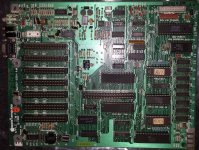
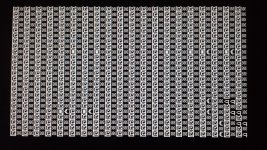
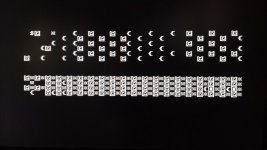
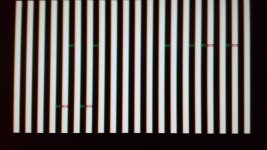
My Apple IIe was working just fine when it froze. I did a reset and ended up with corrupt graphics. Every time I power up or reset I get get different corruption. I have tried reseating every socket IC but still the same. Could this be caused from faulty RAM?

Apple IIe 1982 logic board.jpg

corrupt 1.jpg

corrupt 2.jpg

corrupt 3.jpg

 
If what you're seeing on the screen is just a static random pattern (IE, you turn on the machine and the same pattern sticks there until you reset again) I'd say RAM or ROM are probably your best bets. The CPU is probably crashing shortly after reset, before it can clear and set up the screen area, and the most likely reason for that to happen is it's either:

A: fetching garbage in place of a valid instruction, or:

B: fetching/calculating a bad address from RAM that's causing it to jump to someplace where A: happens instead of where it's supposed to.

(This is based on my experience with repairing a Commodore PET that was "completely dead", IE, static garbage on the screen at power-on.)

If you have an oscilloscope handy the first thing you can check is if you're getting a 1mhz square wave on the PH1 and PH2 pins; the waves should be exactly out of phase with each other.. If you see that then the problem is probably *not* the 6502 itself. (According to the old hands that helped me with the PET the 6502 is a pretty durable part and rarely the cause of a dead machine, but it's still the first thing you check since it's a low-hanging fruit.) After that, well... do you have a parts machine to swap bits with?

 
Thanks for your reply. I don't have an oscilloscope or spare parts unfortunately. I have found quite a bit of corrosion in 40 pin socket for IOU IC so going to swap the socket out as looks quite poor quality really. Do you know if I can replace standard sockets with gold plated turned pin sockets? The RAM isn't socketed so would probably fit sockets for replacement RAM as well. Found some RAM on eBay which isn't too expensive http://www.ebay.co.uk/itm/4-x-NOS-Samsung-KM4164B-15-16-PIN-DIL-RAM-memory-chip-/200931781697?pt=LH_DefaultDomain_186&hash=item2ec877ac41

 
Got one of those cans of air? Turn it upside down and shoot the RAM chips one by one. Sometimes freezing the chips changes their behavior and can make finding a bad chip easier (marginal chips sometimes decide to work properly when they are ice cold). Apple IIes are pretty trouble free, and when they do give trouble, its usually easy to fix.

 
Thanks for replies. I don't have an air can to try this but may be worth buying one to try. I was going to just remove all the RAM as I would like to put sockets in. The graphics corruption image is different every time I turn on/off, could this still be a RAM fault?

 
Did you try powering the computer up with nothing in the slots? Reason I ask, I once had a very similar issue with my original //e. Computer had a Saturn Systems RAM card installed, which had two chips on it blow right after a thunderstorm (powered the computer up, saw lightning outdoors, shut it off immediately). Later that night, after the storm passed, I powered up the computer, only to see the garbled characters you have on your //e's screen. Popped the lid and pulled one card at a time. Removing the Epson APL interface didn't change anything. So, tried the Saturn card. Still no difference. Pulled the disk ][ controller. Still had issues. Finally pulled all three, leaving the 80 column card in place. Hit the power switch and was greeted with the beep and "Apple ][" at the top, then the cursor just below. Shut it down, then started reinserting the cards one by one. Both the Saturn card and the disk ][ card caused video issues and no startup beep. The 74LS05 on the controller card had blown, and, on the Saturn card, the 74LS266N and another chip just above it blew.

If the computer does this without any cards in place, then it'd be RAM, ROM, or maybe an iffy 6502.

-J

 
Yes I get the same fault with nothing in the slots. I guess this fault would be much easier to resolve if I had a working logic board which I could swap parts. I'm going to replace the RAM first I think and if still a problem then will move onto CPU & ROMS. Any idea where I can source replacement ROMS for this?

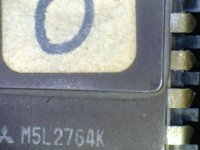
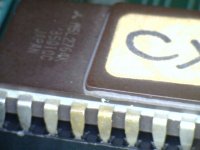
Have also just noticed 3 darkened legs on CD ROM M5l2764k, not sure if there has been some overheating here? Could this possibly be the cause?

cdrom.jpg

cdromlegs.jpg

 
Should work fine. Was the chip used on the 1983-84 //e machines. The Revision B //e's. Your board's 6502A has the same logo and font on it.

-J

 
Does anyone know where I could buy ROMs for Apple IIe please? I definitely want to try a different video ROM but no idea where I could fine one. Have been looking out for logic boards but not much available.

 
Back
Top