• Hello MLAers! We've re-enabled auto-approval for accounts. If you are still waiting on account approval, please check this thread for more information.

Apple IIc strange characters on screen

Roberto

6502
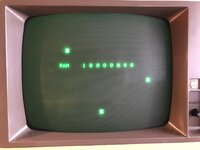
Hi everyone, I got my hands on an Apple IIc. I tried to turn it on and I get a screen with strange characters on the screen when I turn it on (see photo).
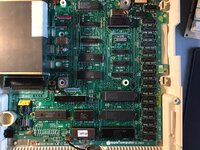
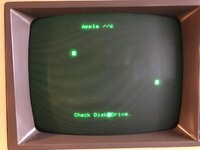
I read various things to do online when this happens (it seems like a problem with some RAM chip). So I burned an EPROM with the ROM 3 binary (from what I understand in this version it is possible to do an accurate diagnosis of the RAM), I adjusted the jumpers to allow the use of this Eprom on the computer and then I turned it on. By pressing empty apple + full apple + control + reset I get the screen (see photo). Can you tell me which RAM chip it refers to (ard0/7, mrd0/7)? Or is it another problem? Thanks to whoever answers me.
 

Attachments

  • C3BA9163-2599-4181-9EF2-568440E00A93.jpeg
    C3BA9163-2599-4181-9EF2-568440E00A93.jpeg
    166.6 KB · Views: 35
  • 38E90A40-CFB2-4ABA-B687-947CD7269930.jpeg
    38E90A40-CFB2-4ABA-B687-947CD7269930.jpeg
    160.6 KB · Views: 33
  • 2889DB8A-5BA1-42F2-83B7-C0E795124C9C.jpeg
    2889DB8A-5BA1-42F2-83B7-C0E795124C9C.jpeg
    346.2 KB · Views: 33
MRD 7

If you want to be sure, try the piggybacking method. Put a good ram chip on top of the bad one (try your best to get each and every leg touching the below ones) and do the test again.

The test should work without giving an error code.
 
MRD 7

If you want to be sure, try the piggybacking method. Put a good ram chip on top of the bad one (try your best to get each and every leg touching the below ones) and do the test again.

The test should work without giving an error code.
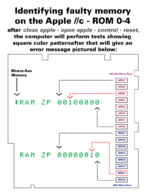
I found this diagram on the internet, and it corresponds exactly to MRD7 that you mentioned. Thanks
I remember some time ago that I had an Atari STacy that didn't work and I suspected that it was the faulty CPU. So I ordered a new CPU and, since it wasn't socketed, someone told me to place it on top of the one soldered on the motherboard, so that all the pins made contact with each other. It started working again; I had forgotten about this technique!
I have already purchased a dozen MT 4264-15 because I read that that memory test stops at the first problem found, so it could be other faulty RAM chips. I hope I did well.
Thanks for your help
 

Attachments

  • IIcmemerror-784x1024.png
    IIcmemerror-784x1024.png
    100.9 KB · Views: 24
I found this diagram on the internet, and it corresponds exactly to MRD7 that you mentioned. Thanks
I remember some time ago that I had an Atari STacy that didn't work and I suspected that it was the faulty CPU. So I ordered a new CPU and, since it wasn't socketed, someone told me to place it on top of the one soldered on the motherboard, so that all the pins made contact with each other. It started working again; I had forgotten about this technique!
I have already purchased a dozen MT 4264-15 because I read that that memory test stops at the first problem found, so it could be other faulty RAM chips. I hope I did well.
Thanks for your help
Hopefully piggybacking the RAM chips will identify the wrong one for sure. Then what are you planning to do?
I had the same problem, and I personally went a bit further: with some help, I desoldered all original RAM chips, soldered sockets and installed new RAM on sockets... so it is fixed forever ;)
 
Hopefully piggybacking the RAM chips will identify the wrong one for sure. Then what are you planning to do?
I had the same problem, and I personally went a bit further: with some help, I desoldered all original RAM chips, soldered sockets and installed new RAM on sockets... so it is fixed forever ;)
How did you desold the ram chips? Did you use hot air? Or a soldering iron tip suitable for 16-pin chips?
 
If you want to be sure, try the piggybacking method. Put a good ram chip on top of the bad one (try your best to get each and every leg touching the below ones) and do the test again.
I love your straightforward tips - this is gold, something new learnt today. Have a couple of 128K boards to resurrect soon and this tip will really help me out.
 
How did you desold the ram chips? Did you use hot air? Or a soldering iron tip suitable for 16-pin chips?
I think using a basic solder sucker will work fine, no need to subject the old brittle board to so much heat (except maybe as a last resort to loosen up some stubborn old solder). A desoldering gun is best if you have access to one. This is a decent video showing the process using a standard soldering iron and a cheap solder sucker:

You may also want to consider getting some low-profile sockets for the new chips.
 
I think using a basic solder sucker will work fine, no need to subject the old brittle board to so much heat (except maybe as a last resort to loosen up some stubborn old solder). A desoldering gun is best if you have access to one. This is a decent video showing the process using a standard soldering iron and a cheap solder sucker:

You may also want to consider getting some low-profile sockets for the new chips.
@Roberto I confirm desoldering gun (this was most of the help I got) did the trick. And low profile sockets for sure in a IIc!
 
I love your straightforward tips - this is gold, something new learnt today. Have a couple of 128K boards to resurrect soon and this tip will really help me out.
Thanks, been there before (too often indeed)

The 128k is using a sad Mac code pretty easy to follow (been there also) but yes the piggybacking can help also.

Concerning the chip removal, if you have no special tools, you can cut each leg of the faulty chip with a sharp and small plier, the removal is then longer but safer.
 
MRD 7

If you want to be sure, try the piggybacking method. Put a good ram chip on top of the bad one (try your best to get each and every leg touching the below ones) and do the test again.

The test should work without giving an error code.
This really works? I will have to try it!
 
Update: I got the slim profile sockets (that way when you put the RAM chip in it won't touch the floppy drive that goes on top of it). I'm just waiting for a set of RAM I ordered. I'll update when I hear back, thanks for the advice.
 
Just to complete this problem I had. I got the RAM and also the low profile sockets. So I put the socket and then inserted the RAM. I discovered to my dismay that the MRD7 position is right under the floppy drive profile and (despite the low profile of the socket), when I inserted a floppy, pressing down on the lever, it probably interfered with the RAM and crashed my computer. I ended up having to solder the RAM directly into the motherboard. Now it works.
 
Back
Top