



To save someone else the trouble of trying to get video to work on a Power Macintosh 6100/60 or 6100/66 with the Apple DOS Compatibility card installed, I'm posting my solution here:
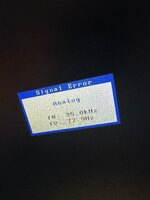
I tried 4 cards, 3 computers, different versions of the PC Setup software, different original "y" cables, with and without RAM SIMMs, etc. Nothing seemed to work. As a last resort, I swapped out my third party monitor (which is using an Apple RGB to VGA adapter) with an Apple 14" trinitron display from the era, 640x480 @ 67hz.
My DOS Compatibility card switched over and instead of seeing "no signal", I instantly saw the RAM test and it booting into MS-DOS.
If you're also experiencing blank screen from switching into the DOS card, it may be an incompatible monitor that is causing it!
I tried 4 cards, 3 computers, different versions of the PC Setup software, different original "y" cables, with and without RAM SIMMs, etc. Nothing seemed to work. As a last resort, I swapped out my third party monitor (which is using an Apple RGB to VGA adapter) with an Apple 14" trinitron display from the era, 640x480 @ 67hz.
My DOS Compatibility card switched over and instead of seeing "no signal", I instantly saw the RAM test and it booting into MS-DOS.
If you're also experiencing blank screen from switching into the DOS card, it may be an incompatible monitor that is causing it!


 )
)


