• Hello MLAers! We've re-enabled auto-approval for accounts. If you are still waiting on account approval, please check this thread for more information.

Apple 8•24 GC 1bit graphics behaviour

Is there an extension for the 8•24 GC? I only have a control panel…
This may come across as a ridiculous question (as I’ve owned an 8.24 GC card for over 10 years now), but what exactly is the difference between the 8.24 GC control panel and the Monitors control panel that came with System 7.1? I never installed any extensions or software for my 8.24 GC in the IIfx.
IMG_1340.jpeg
 
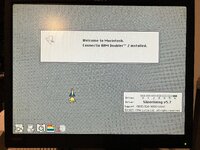
Here is the software in BinHex format. Use BinHex, StuffIt, or Tiny Transfer to extract it. One control panel is for System 6. The other is for System 7. You'll get a cool rocket ship taking off when you reboot.

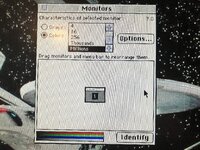
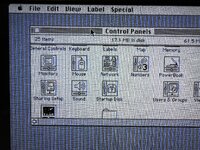
You still use the Monitors control panel to choose the number of colors. The 8-24 GC control panel enables/disables acceleration and lets you know how much memory is on the card.
 

Attachments

Okay, I’m starting a clean installation of the System and Control Panel. I’ve also rolled back to the previous ROM version.
they need a minute or two to 'warm up'

David, you might have the key to solving this mystery. Since your board is heat-sensitive, do you have a can of freeze spray? If so, could you cool the various parts of the board one by one until the problem shows up again? That way we can pinpoint the area or component that’s generating the artifacts.
 
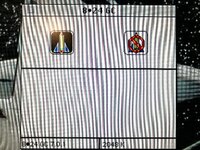
I did a clean install of System 7.1 Update 3.0 and absolutely nothing changed. So at this point I have a Macintosh IIci running System 7.1 Update 3.0 and an 8•24 GC with ROM 341-0812. Of course I also installed the card’s software. It may be that whatever component degrades over time is further gone on my board than on David’s. If we can figure out what it is, perhaps we can fix it. What’s certain is that these cards are prone to this sort of problem, now we know that. From the symptoms it looks like a timing- or bit-stream interpretation issue: the card runs into serious trouble with “checkered flag” patterns—i.e., a repeated 10101010.
 
When I switched to @bigmessowires Mac Sync-inator, the display is perfect. No blue. So, whatever he is doing to extract the sync signal fixes the unintentional coloring.

It's great that so many people are reporting better image quality when using the Mac Sync-inator. To be totally honest, I do not understand it. There's nothing that the device does to enhance image quality, it was only intended to change the sync signals to a different format that would be compatible with a wider range of monitors. The only thing I can think of is that there are some secondary analog-level electronic effects happening that are basically like a happy accident, due to shifting the timing of the generated sync signals so their edges don't coincide with the edges of the video data signals, and maybe due to the inclusion of capacitors on the Sync-inator PCB that help smooth the edges of the sync signals and reduce over/undershoot.
 
Let me just chime in and I have the exact same artifact behavior in monochrome mode with my Rev A 8.24 GC. As I run mosty 256 colors, I have just learned to live with it.
 
I have just learned to live with it.
Yeah, you’re probably right. I think I’ve resigned myself a bit as well. But I’m very curious to understand why some Rev. A units work while others don’t.
So, it looks like a sync problem and, unless I’m saying something silly, the synchronization is handled by the RAMDAC. Are we sure every Rev. A board uses the same RAMDAC? That component, and perhaps only that one, definitely differs from the Rev. B.
 
Are we sure every Rev. A board uses the same RAMDAC?

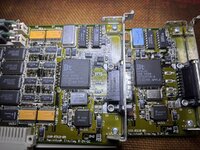
You might be onto something here. I checked my cards again today, and the two "good" cards are using a different RAMDAC than the "bad" card. The bad one is marked “9026”, while both the good cards are using “9047”. Maybe others can check their revisions to confirm if this could indeed be the culprit?

Picture - good card on the left, bad card on the right.
IMG_5383.jpg


I did try the cards again, and in my case, the symptoms are definitely very consistent. The bad card has the lines regardless of the CP being installed or any other factors. Meanwhile, the “good” cards exhibit zero issues, even during initial startup.
 
Last edited:
Mine is 268 9026, very close to your “bad” card. But I noticed something: do you have GWorld RAM installed on your good board? Is there any difference if you install the RAM on the bad board?
 
I tried to repro this on my two 8*24 GCs. One is a revision A card and then other is a revision B card. I am running System 7.1 and I do have the GC driver installed (v7.0.1). I am using a DELL LCD. This is in a IIfx.

I cannot reproduce on the revision B card, and just as a note, the RAMDAC has a 9052 date code on it. Cold boot in B&W and everything looks perfect and stays perfect.

My revision A card is a different story. On cold boot in B&W (same system, not changes), I don't see artifacts but my LCD seems to be having trouble sync'ing properly. The screen is readable but there's a lot of waves and shimmering, what you see when you get a bad sync. This went on for about a minute or so and then slowly cleared up and then went away. The screen was perfect after that. On subsequent boots, it's perfect and seems to stay perfect. But on a cold boot, same thing happens. This revision A card has a RAMDAC with date code 9024 so it's earlier than some of the ones posted in this thread.

The presence of the driver doesn't change the issue. Only time / warm up seems to help.
 
The screen is readable but there's a lot of waves and shimmering, what you see when you get a bad sync. This went on for about a minute or so and then slowly cleared up and then went away. The screen was perfect after that. On subsequent boots, it's perfect and seems to stay perfect.
I have the same problem with my current LCD screen - a 20" IBM ThinkVision L201p. Tons of wavy lines on a cold boot, but then it goes away (the lines are more aggressive on startup when the 8.24 GC card is left in accelerated mode).

Interestingly, the lines are not as bad when using my Portrait Display or 13" Apple Color Display monitor. I hardly notice any lines when running DOS or Win 3.1 with my OrangePC card (although I do get the occasional small random line here and there - fun tidbit, I can't load the IBM DOS Shell when the card is in millions of color mode and accelerated - I have to bring it down to 256 colors). I attribute some of these defects to age - after all, these 8.24 GC cards are over 35 years old, so some wear in the quality of the graphics is expected at this point.
 
Just for fun I tried an LCD monitor, but of course nothing changed. One thing is certain: REV A has this problem, we’re sure of it by now. Some of us have to live with it (myself included); others may have hardware that has held up better over time or received a batch of components less prone to this issue (it could be the RAMDAM, but that still needs to be verified).

IMG_4266.jpeg
 
I think the issue that @Concorde1993 and I are describing is probably different from what you're experiencing so unless shown otherwise, this will be my last post on this within this thread, as I don't want to distract from the issue you are describing with your 8*24 GC.

To conclude on the issue I was reporting earlier (and what @Concorde1993 mentioned as well on his):

Problem Statement: on a cold boot with the 8*24 GC (regardless of B&W or color modes), the image is unstable and wavy, with waving lines on an LCD. The issue looks similar to what you would see on an LCD when it's not syncing properly with the signal. After about 2-3 minutes, the problem goes away and the screen becomes perfect. On subsequent warm boots, the picture looks good. This issue only happens on the first cold boot. And it occurs regardless of driver presence, acceleration on/off, and for me is occurring under System 7.1 on a IIfx.

This problem seems to differ from the original poster's issue which seems to be the presence of miscolored vertical lines.

I have two 8 * 24 GC cards which I had been under the impression was one revision A card and one revision B card - but this was wrong.
I was examining both boards and could not find a difference between them aside from the ROM version (both have stock Apple produced ROMs with Apple labels). That seemed odd as I was aware that the difference between a revision A board and a revision B board is both the ROM version AND the RAMDAC. After further review, ** SADLY **, it looks like I actually have two revision A boards but one has the original ROM and the second has been upgraded with the revision B ROM either by taking installing a newer ROM from another revision B card or from Apple's ROM upgrade kit. The net however is that I have two revision A cards (hardware-wise) which is sad but oh well. The revision B hardware uses an AMD RAMDAC, not BrookTree.

The above wavy line issue only occurs on my 8*24GC running with the revision A ROM and does NOT occur on my 8*24GC running the revision B ROM. This doesn't look really like a ROM issue but I had to test so I swapped ROMs and the issue follows the hardware, not the ROM. So the ROM version does NOT matter with regards to this cold boot wavy line issue.

As for the RAMDAC, both of my cards use the BrookTree (BT) RAMDAC which is Apple branded. The silkscreen on the chip doesn't say what type of BT RAMDAC it is but on subsequent searches, it looks like it's a BT9016. This is not a common RAMDAC, it was most likely made specifically for Apple. There are other cards that use it like the 8*24 (non-GC) and the 4*8. The card that had the revision A ROM has an earlier date code RAMDAC (9024) .. the card with the revision B ROM has a later date code (9052).

I do have a revision B 8*24 (non-GC) card that has the same Apple part BT RAMDAC (357S0010-A) with a newer date code (9041). But I'm not willing to desolder it off my working 8*24 to attempt to test out a theory that it's the RAMDAC causing the issue. At least not right now.

I'm not convinced yet it's the RAMDAC that is the issue since the problem goes away after 2-3 minutes. Yes, it's possible the chip warms up that resolves something internally but I personally (in my limited time working on a dozen nubus video cards) haven't seen this failure scenario with a RAMDAC. It usually either works or it doesn't. I could be wrong of course. Then again, since @Concorde1993 and I have the same issue, could be due to some components from a bad batch. Feels more like a cap related issue but again, not sure.

Some useful links from this forum:

Information regarding the various differences between a rev A and a rev B 8*24GC (and 8*24):


Information regarding the RAMDAC used in the 8*24 GC, 8*24, 4*8 (ie. BrookTree vs AMD):


With that, I'm going to stop here and let this thread get back to the original poster's issue with the vertical artifacts.


 
No problem! Any help for users is a good thing. But yes, it seems to be a different issue from the one I have. The REV B RAMDAC is 343S1075, whereas the REV A RAMDAC is 357S0010. The REV B 343S1075 (AC843) RAMDAC should be the same found in the Quadra 950 and on some RasterOps cards (for example, 24MxQ).
 
Back
Top